Processes
Proposal Confirmed → Create Project | Create Project → Archive Project | Preliminary Costing in Proposal → ProjectProposal Confirmed → Create Project
With Lead
If the contract is not yet secured, it is advisable to work with leads (English for 'trail' and means recording a qualified prospect). This not only makes acquisition more efficient and reliable, but the likely upcoming order volume can be calculated accordingly. This provides better insight than just the total proposal amounts. » More info on leads
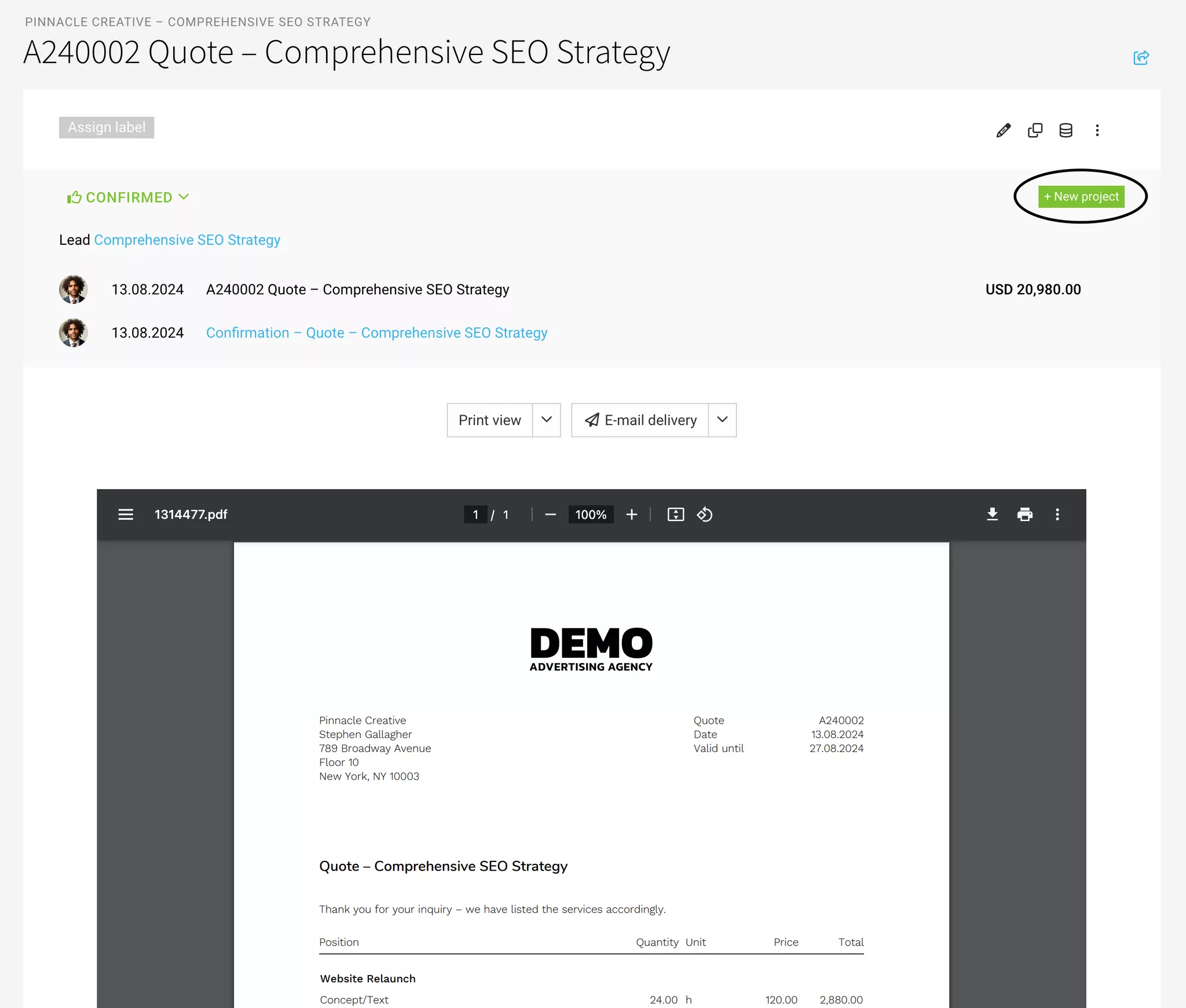
Once confirmed, a project (or multiple) can be created from a lead. Details and proposal(s) are carried over.
How to create a project from a lead
Once confirmed, a project (or multiple) can be created from a lead. Details and proposal(s) are carried over.
How to create a project from a lead
Without Lead
Create proposals under "Acquisition" > "Proposals". After being commissioned by the client, you create the project directly from the proposal. The details are transferred to the project, and the proposal is assigned.
Project Already Exists
Assign Lead Retrospectively
In the project under "Proposals", you can also link a lead retrospectively.
Assign Individual Proposal Retrospectively
You can also assign the proposal to the project retrospectively.
» Move/Assign Proposals
In the project under "Proposals", you can also link a lead retrospectively.
Assign Individual Proposal Retrospectively
You can also assign the proposal to the project retrospectively.
» Move/Assign Proposals
Adopt Proposal Amount as Budget
In the project, the total of assigned confirmed proposals can be adopted as the project budget (blue link in the budget line). Positions marked as additional services are adopted as a proportional additional service budget.
Adopt Services from the Proposal
a) For Time Tracking
When creating the project from the proposal, you can directly choose at the end of the form whether you want to adopt the services.
Under "Services", the services from the proposal can be adopted for time tracking at any time retrospectively (blue link).
The service is automatically budgeted with the set amount. Positions marked as additional services are not considered.
If you use services with daily rates in the proposal, they will be automatically converted for the project upon adoption. MOCO recognizes common unit designations such as day, days, d.
Under "Services", the services from the proposal can be adopted for time tracking at any time retrospectively (blue link).
The service is automatically budgeted with the set amount. Positions marked as additional services are not considered.
If you use services with daily rates in the proposal, they will be automatically converted for the project upon adoption. MOCO recognizes common unit designations such as day, days, d.
b) Additional Services
Additional services marked in the proposal can be adopted into the project. To do this, select the corresponding proposal under "Additional Services" in the project.
Create Project → Archive Project
Create Project
A project is independently created under "Projects" – or from a lead or proposal (see above). Depending on the situation and working method.
Ongoing Project
Services are booked to the project: hours and/or additional services.
Work Completed
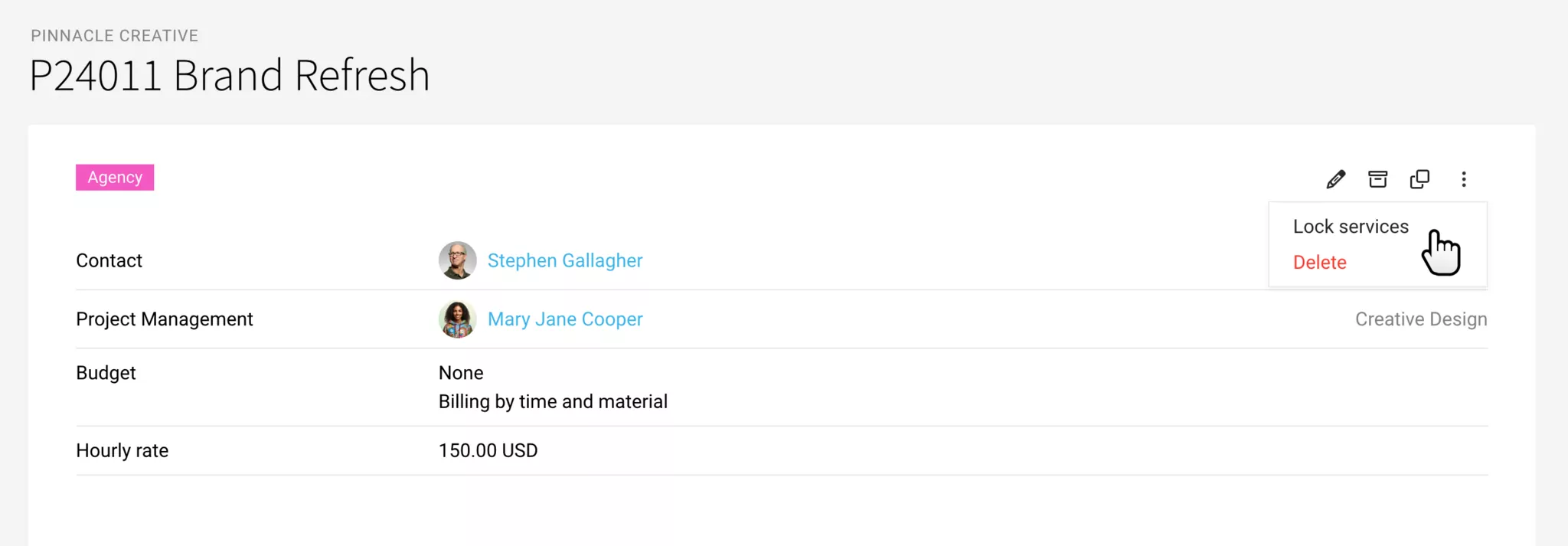
If you want to prevent further bookings to the project, you can lock the services:
If needed, the project can be marked as completed with a previously created label. For example, if the invoice is created by another person in the company.
Create Invoice(s)
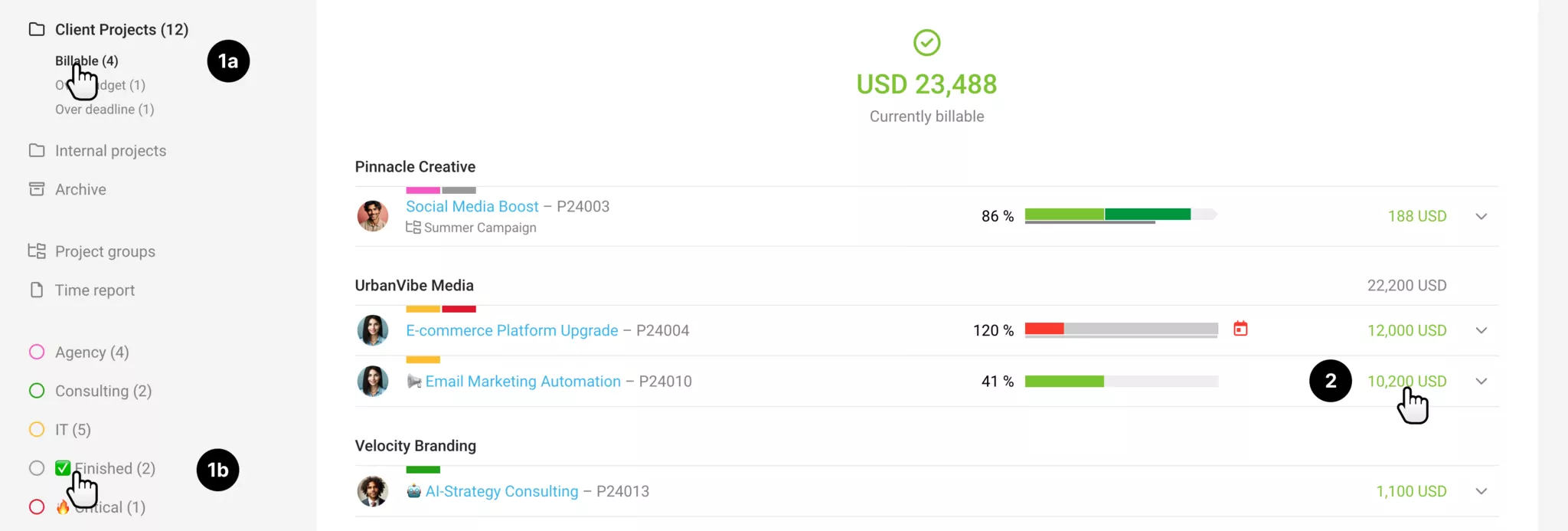
The invoicer can filter the projects to be invoiced using the Smart Filter (1a) or the aforementioned label (1b). Clicking on the billable amount in the project list (2) leads directly to the invoicing option.
Tip: Holding the cmd (or Apple) key opens the invoicing option in a new tab. Create invoice, close tab. Return to the project list to invoice the next project.
Invoices can also be created across clients – or through mass invoicing.
Archive
After the final invoice, archive the project. This keeps the project list clear. Invoices are managed independently under "Invoicing".
A project is independently created under "Projects" – or from a lead or proposal (see above). Depending on the situation and working method.
Ongoing Project
Services are booked to the project: hours and/or additional services.
Work Completed
If you want to prevent further bookings to the project, you can lock the services:
If needed, the project can be marked as completed with a previously created label. For example, if the invoice is created by another person in the company.
Create Invoice(s)
The invoicer can filter the projects to be invoiced using the Smart Filter (1a) or the aforementioned label (1b). Clicking on the billable amount in the project list (2) leads directly to the invoicing option.
Tip: Holding the cmd (or Apple) key opens the invoicing option in a new tab. Create invoice, close tab. Return to the project list to invoice the next project.
Invoices can also be created across clients – or through mass invoicing.
Archive
After the final invoice, archive the project. This keeps the project list clear. Invoices are managed independently under "Invoicing".
Preliminary Costing in Proposal → Project
For many external cost items, conducting a preliminary costing during the proposal creation makes sense, as it allows for a better estimation of the expected profitability. This is especially true when, for example, mark-ups are intended to provide a project management buffer. The costs recorded there can be directly transferred to the project and are updated when an incoming invoice is assigned.
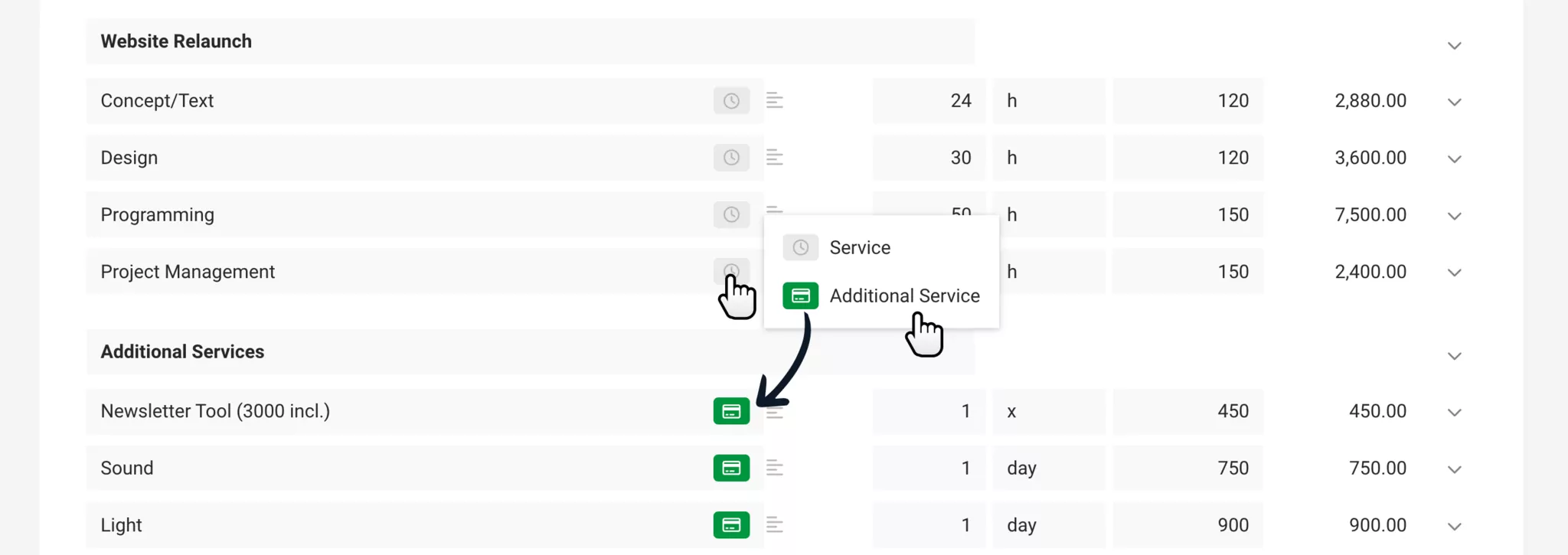
1. In the proposal, mark the Additional services (usually external costs) as such.
2. Through the Cost calculation in the proposal, known costs can already be entered (preliminary costing).
3. In the project under "Additional services", adopt the additional services from the proposal. You reserve the planned or proposed external costs in the project. Any forecasted costs are also included. The services for time tracking can also be adopted and are automatically budgeted.
4. Record the received invoices for the external costs under "Expenditures" and assign them to the additional services. MOCO updates the cost amount and links the document.
5. When invoicing the item, the document can be sent along. To do this, select the document as an attachment in the invoice (at the end of the form).
The final profitability of the project, which can include multiple proposals, can be found in the project report or under "Reports" > "Projects" (here with the distinction of profitability by external costs or overall).
1. In the proposal, mark the Additional services (usually external costs) as such.
2. Through the Cost calculation in the proposal, known costs can already be entered (preliminary costing).
3. In the project under "Additional services", adopt the additional services from the proposal. You reserve the planned or proposed external costs in the project. Any forecasted costs are also included. The services for time tracking can also be adopted and are automatically budgeted.
4. Record the received invoices for the external costs under "Expenditures" and assign them to the additional services. MOCO updates the cost amount and links the document.
5. When invoicing the item, the document can be sent along. To do this, select the document as an attachment in the invoice (at the end of the form).
The final profitability of the project, which can include multiple proposals, can be found in the project report or under "Reports" > "Projects" (here with the distinction of profitability by external costs or overall).








