Article from
New Standard Field: External Project Number – Also for E-Invoices
In line with the purchase order number, the external project number is now also available as a standard field. Add it to the project when needed and transfer it to the invoice automatically.
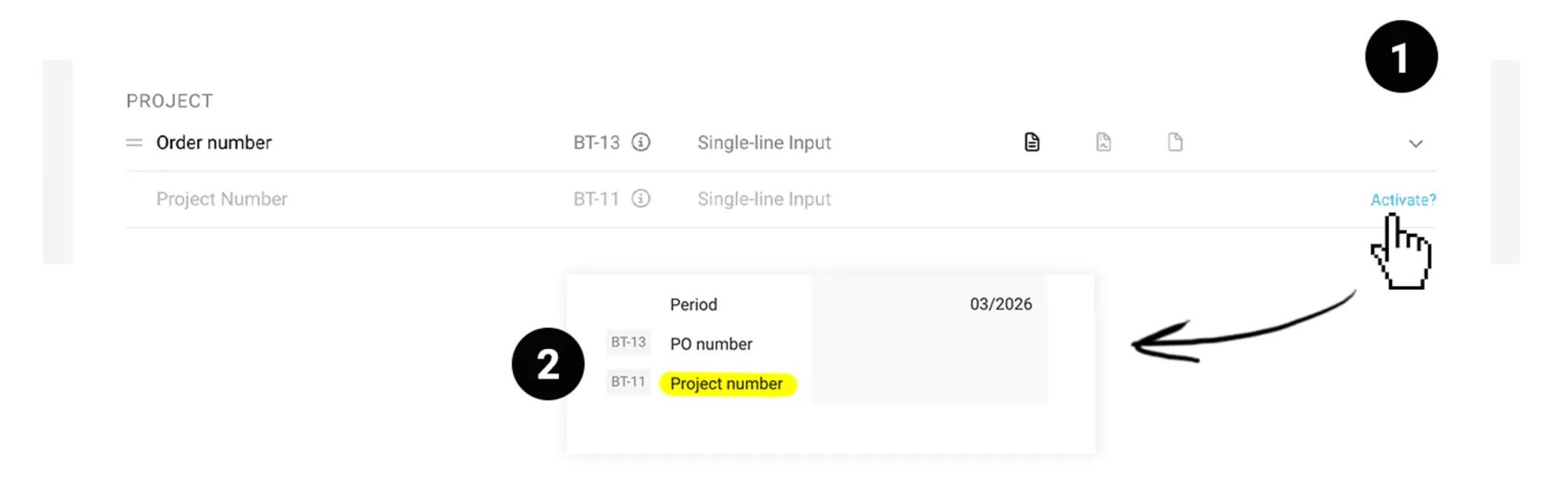
As a service provider, you include an external project number on the invoice when a client wants it as a reference for their internal allocation. MOCO now provides a dedicated standard field for this.
The value entered is automatically included in e-invoices as BT-11 in the XML file – a reference field that many recipients in the public sector and large organisations require.
The value entered is automatically included in e-invoices as BT-11 in the XML file – a reference field that many recipients in the public sector and large organisations require.
Activation
Enable the field in Settings under Account > Custom Fields (1). Once enabled, the field “External Project No. (BT-11)” appears in both the project and the invoice form – and, if needed, also on quotes and timesheets (2).
Replace an existing field
Replace an existing field
If you already use a custom field for the external project number, you can select it during activation and adopt it with a click. All existing values are retained; the previous field is deleted.
Using the External Project Number
Enter the external project number in the project (3). When you create an invoice, the value is transferred automatically. On the invoice, you can overwrite the number if needed – for example, if a client uses a different reference for the same billing.
BT-11 in the e-invoice
As soon as a value is entered, the external project number is correctly output in the BT-11 field of the XML file when exporting as ZUGFeRD or XRechnung. If no value is available, the field remains empty – no empty tag is created.
As soon as a value is entered, the external project number is correctly output in the BT-11 field of the XML file when exporting as ZUGFeRD or XRechnung. If no value is available, the field remains empty – no empty tag is created.








