Article from
Archiving Companies – the New Feature and Possible Use Cases
Clients, suppliers, and other companies can now be archived. Here we explain what archiving does and when it can be useful.
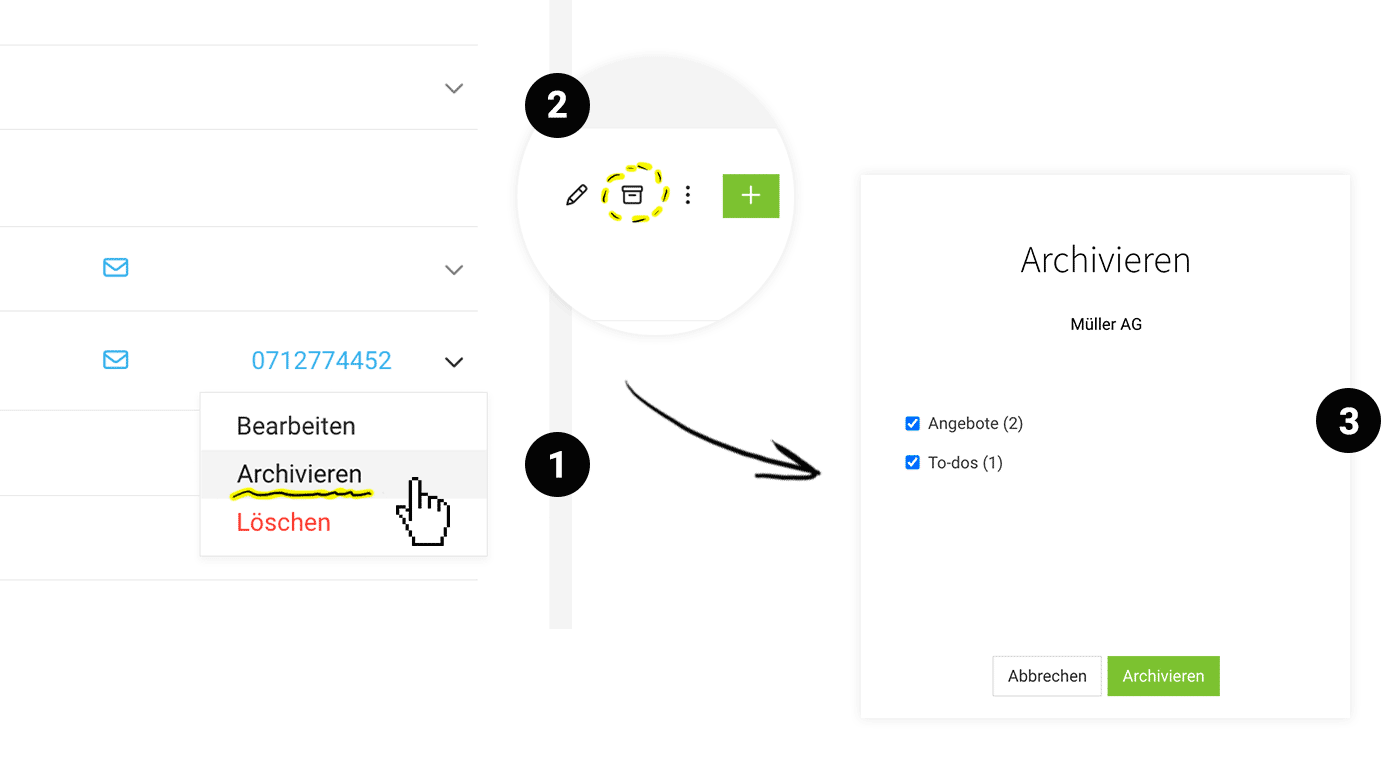
If you archive clients, suppliers, or other companies via the dropdown (1) or on the detail page via the action (2), the company can no longer be selected for new projects, quotes, or leads.
When archiving, you can also mark open quotes, outstanding to-dos, and planned purchases as completed (3). Clients with active projects or leads, and suppliers with draft purchases, cannot be archived.
Re-enable
Archived companies can be re-enabled at any time with a single click.
Reports & Export
Archived companies can be exported at any time. All company data is retained and remains accessible, including in reports, for example.
 (English image not yet available)
When is archiving useful?
Hide inactive companies
Archive companies that are no longer relevant (e.g. business closure, insolvency, long periods of inactivity) so they no longer appear in selection lists for new items.
Archive companies that are no longer relevant (e.g. business closure, insolvency, long periods of inactivity) so they no longer appear in selection lists for new items.
Reflect structural changes
In the case of mergers, renaming, or group structures, archive old companies once all items have been completed, so you only work with the current structure.
In the case of mergers, renaming, or group structures, archive old companies once all items have been completed, so you only work with the current structure.
Clean up after acquisition or review phases
Archive companies after leads, projects, or reviews have been completed, when it is clear that nothing else is pending – keeping your operational list lean.
Keep your data lean and error-free
Archiving reduces the number of selectable companies and lowers the risk of accidentally assigning new projects, quotes, or leads to the wrong company.
Archive companies after leads, projects, or reviews have been completed, when it is clear that nothing else is pending – keeping your operational list lean.
Keep your data lean and error-free
Archiving reduces the number of selectable companies and lowers the risk of accidentally assigning new projects, quotes, or leads to the wrong company.
Special Case: "Personal expenses"
Some MOCO accounts have also set up users as suppliers so that personal expenses billing could be assigned to them. For a few months now, you can store the creditor number directly on the user under “Personnel”. If you use the creditor number on the user, you can now archive the corresponding supplier.









