Article from
Time Tracking for Agencies: The MOCO Workflow.
Is time tracking a hassle? It doesn't have to be. With the right workflow, this dreaded task can become a routine that actually eases your team's workload, saving you time, stress, and money. In this article, we'll show you how MOCO makes time tracking so simple, quick, and flexible that everyone gets on board. It's a breeze.
 (English image not yet available)
No more chasing: How to get your team to track time
It's Friday evening, and there's little time left before the weekend – yet not everyone has logged their project hours.
Another scenario: The monthly invoicing cycle is approaching, but some only log their hours half-heartedly or with delays. Project managers are frustrated, team leads send reminder emails. This is the daily reality in many agencies and other project service providers.
Why? Because employees often find time tracking tedious. It's seen as a form of control. Yet, it not only ensures that your employer can invoice correctly – it also offers direct benefits: Less frustration with poorly planned, underestimated projects, as future project efforts become clearer. It aids in self-assessment and provides an overview of one's own billable hours and overtime.
Example: Time tracking can highlight if too much time is spent in meetings. It's in the entrepreneur's interest to reduce this unproductive time, which ideally saves employees unnecessary overtime and boosts their motivation.
So, if the "why" is part of the company culture, only the "how" needs to be right.
And this is where MOCO comes into play: Time tracking is quick and easy, and can even be done on the go.
By the end of this article, you'll know which tools to provide your employees – potentially saving you a lot of time and stress.
 (English image not yet available)
(English image not yet available)Time tracking: Simple, quick, and flexible
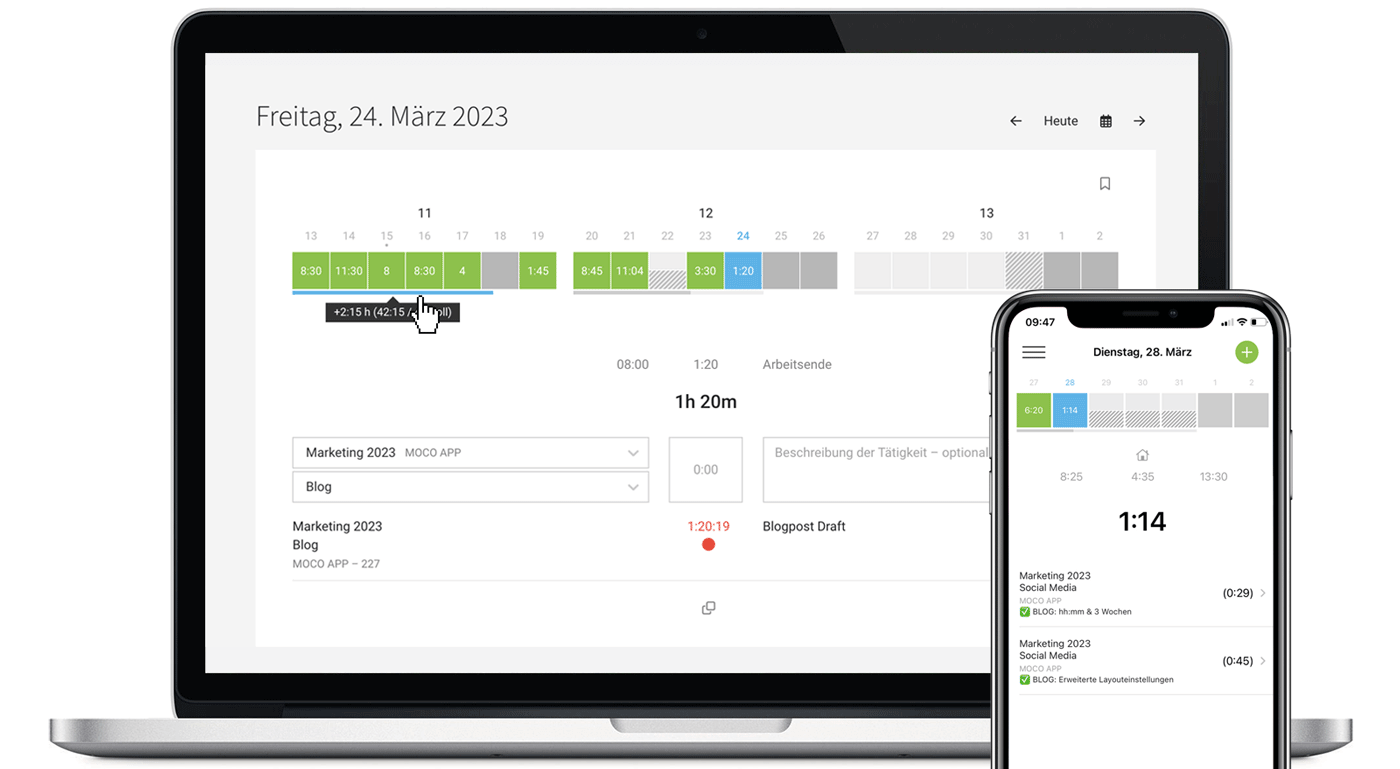
The core of MOCO's time tracking is the intuitive input. It's flexible and focused on the essentials. Employees can log their hours:
- Manually – easy and quick entry of hours in various formats.
- Using a stopwatch – for those who want to track their working time live.
- By booking suggestions – on planned projects, favourite entries, or directly from calendar appointments. No searching, no memory lapses – the right entries are always ready.
- On the go via Mobile App – use the MOCO iOS and Android app for time tracking on the move. Flexibility for employees working from home or on the go.
- Especially handy: Sharing – entries can be easily shared with colleagues. So, in meetings, only one person creates an entry, and voilà – it's there for everyone, including the same description.
Each person can choose their preferred method – whether starting the stopwatch in the morning or logging hours collectively in the afternoon, MOCO supports both optimally.
Clear orientation: Planning, favourites, and appointments in view
For personal orientation, MOCO offers the "Suggestions" area – these suggestions can be accessed via time tracking.
Project planning
Projects with their services can be planned in advance. Employees see these in their time tracking and can book directly against them. This ensures higher accuracy, as no service is forgotten and bookings are made accurately.
Favourites
Recurring activities can be saved as favourites. One click – and the entry is set. Favourites save time and minimise input errors. The favourite is offered daily for booking until deselected.
Calendar integration
Through the integration of an external calendar (e.g., Google Calendar or Outlook), all appointments with times are displayed daily and complement project planning. Appointments can be converted into time entries with a click.
Control through transparency – not pressure
MOCO offers self-control instead of micromanagement:
- The progress bar in time tracking shows weekly whether the target is met. This allows employees to see if they are on track.
- The subscribable weekly email automatically reminds of missing times, reducing the manual reminder effort for team leads.
- The Target-Actual comparison provides an overview on a monthly and yearly basis.
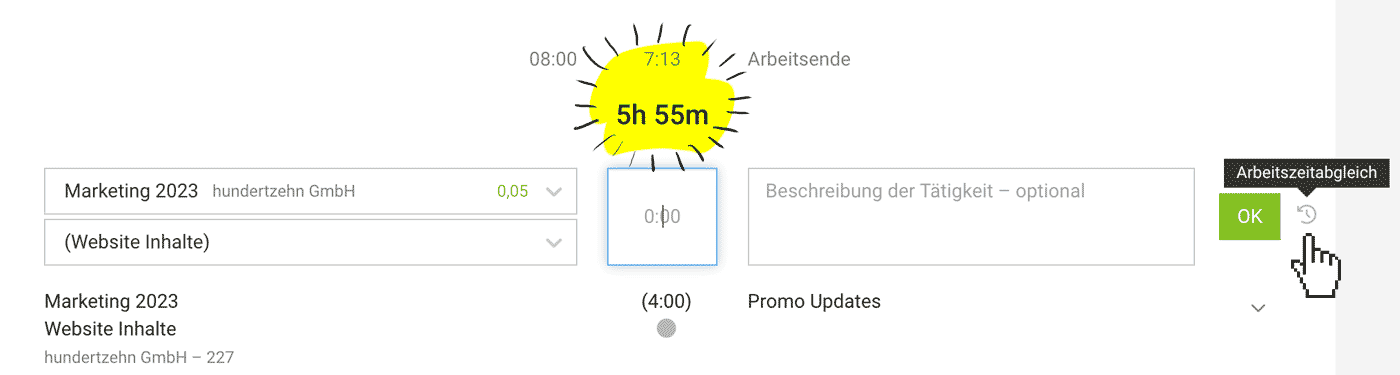
- Work time reconciliation: In time tracking, it's immediately visible if project times are missing within working hours. With one click, the gap can be filled with an existing or new entry.
 (English image not yet available)
Easily fulfil the obligation to track working hours
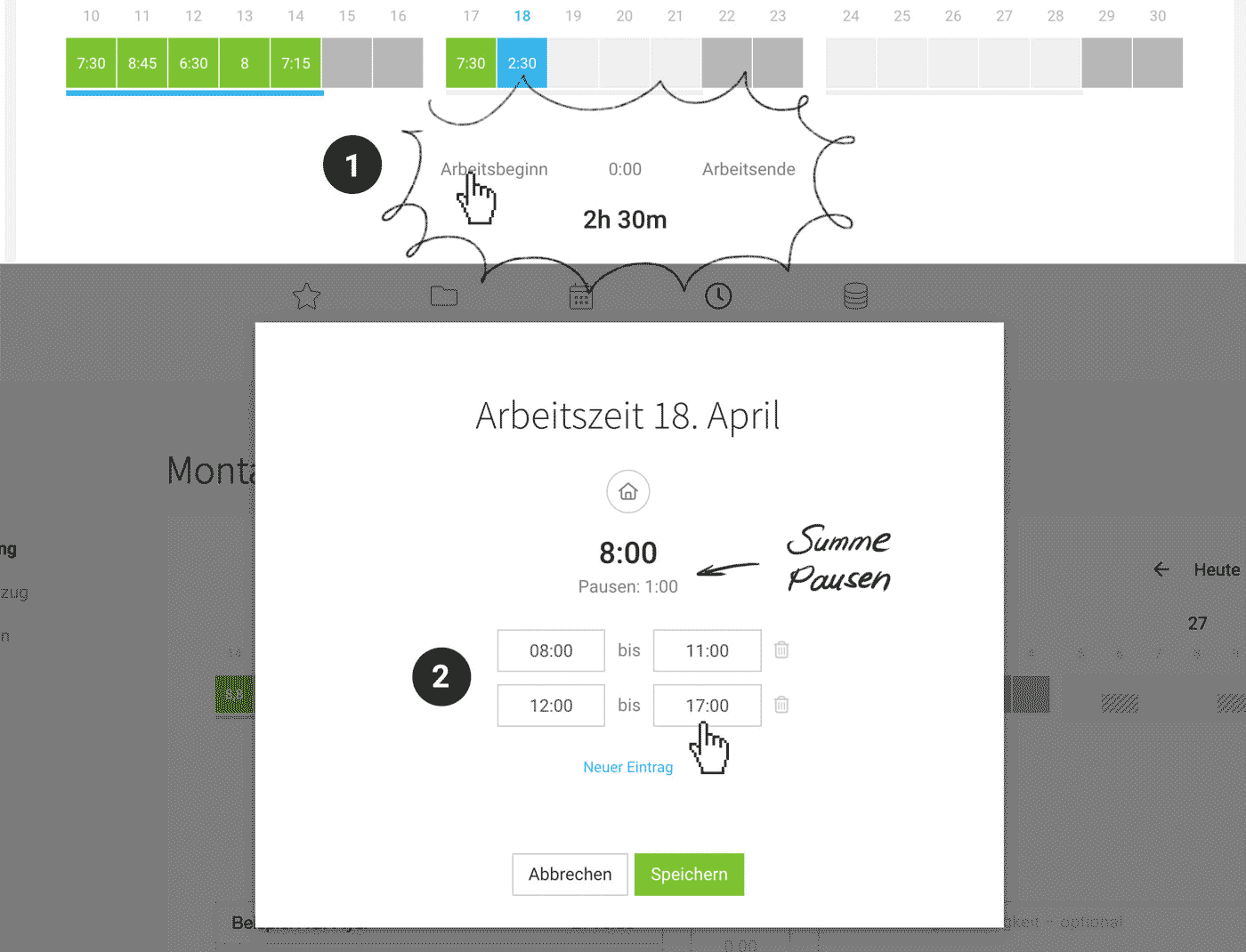
In addition to project time tracking, MOCO offers working time tracking (1). It provides the time frame, documenting start, end, and breaks (2) – but is independent of projects.
 (English image not yet available)
(English image not yet available)Benefits at a glance
- Activation of working time tracking for individual persons or the entire team – flexibly applicable, depending on legal requirements or internal regulations.
- Start/Stop button for daily tracking – simple, quick operation.
- Automatic calculation of breaks – for documentation purposes.
- Manual entries possible – no incomplete working time tracking due to missed entries.
- Preset fixed working hours – minimises daily effort.
- Automations via NFC, Wi-Fi, or location – tracking runs automatically without manual entry.
Additional benefit: Working time tracking can also document home office days – useful for internal evaluations or legal proof.
Custom additions: MOCO integrations for time tracking
MOCO deliberately focuses on project business and remains streamlined. For special requirements, there are integrations.
Useful integrations for time tracking
- Calendar (Time Tracking) by MOCO: Calendar appointments directly in MOCO time tracking – useful if appointments are to be used as the basis for time tracking.
- Quick access via browser extension: Browser extension for direct access via widget – without having to search for the MOCO tab.
- Memtime: Tracks activities for time tracking in the background – and can be a solid reminder to fully log project times.
- Wi-Fi, NFC, RFID: Automated tracking via environmental triggers – unbeatable for recurring routines.
- Practical tip with NFC: Terminal for your office for physical time tracking – ideal for on-site teams.
This is how a time tracking workflow in MOCO might look
Start of the day
Employees check in via desktop or smartphone.
Benefit: From now on, working time runs automatically.
Benefit: From now on, working time runs automatically.
During the day
The team logs hours via stopwatch, manually, or creates them from suggestions (planned projects, favourites, or calendar appointments).
Benefit: There's something for every working style.
Benefit: There's something for every working style.
End of the day
Employees add missing times via work time reconciliation or manually, or along the suggestions.
Benefit: Complete logging made easy.
Benefit: Complete logging made easy.
End of the week
Final check on the progress bar to see if it's blue, indicating the target was met – usually ensuring complete time tracking.
Benefit: Quickly review days and avoid end-of-month rework.
Benefit: Quickly review days and avoid end-of-month rework.
Reporting
Team or project leaders use the time tracking report and timesheets for controlling and invoicing.
Benefit: No action required from employees, quick overview for supervisors, and transparent invoicing.
Benefit: No action required from employees, quick overview for supervisors, and transparent invoicing.
Good to know: To enforce timely complete logging and "lock" the tracking for invoicing, time tracking can be locked. Employees can then request temporary access if needed.
Controlling & Reporting without extra effort
MOCO offers extensive options here:
- Timesheet per person, project, client, or globally – precise overview of which services cost how much time, basis for optimisations.
- Comprehensive reports on time tracking for project and working hours – identify irregularities and gaps across the board and quickly access detailed information.
- Export as PDF, Excel, CSV – flexible further processing for internal evaluations or client transparency.
- Live display of budget consumption – intervene in time if project budgets threaten to get out of control.
- APIs – build additional individual dashboards.
This provides full oversight at all company levels – in real-time, anytime, anywhere.
Conclusion: Ease instead of frustration
MOCO is quickly and well-received by your team due to its simplicity and flexibility. It doesn't feel burdensome but supportive, offering real-time insights for everyone in the company. Thus, a dreaded task becomes a functioning routine. Instead of "chasing," it's "running smoothly."








