Mobile Apps
iOS and Android | Target-Actual | Absences / Leave | Time Tracking | Receipts | Messages & To-dosiOS and Android
The complementary personal app
Often, by the end of the working day, you don’t manage to log all your hours in the online software on your laptop or desktop computer (web app). In that case, you can easily catch up on your way home on the tram or train: using the iOS or Android app.
The mobile app includes the following features:
Often, by the end of the working day, you don’t manage to log all your hours in the online software on your laptop or desktop computer (web app). In that case, you can easily catch up on your way home on the tram or train: using the iOS or Android app.
The mobile app includes the following features:
- Target-Actual: Current and monthly
- Leave: Leave balance with absence requests (see example image)
- Other absences: Request sickness and other absences
- Time tracking: Track working time and project time
- Receipts: Scan and record personal expenses and purchases
- Inbox: Notifications, including push option
- To-dos: Check and record tasks and reminders
iOS and Android are developed in parallel, so the features may differ slightly.
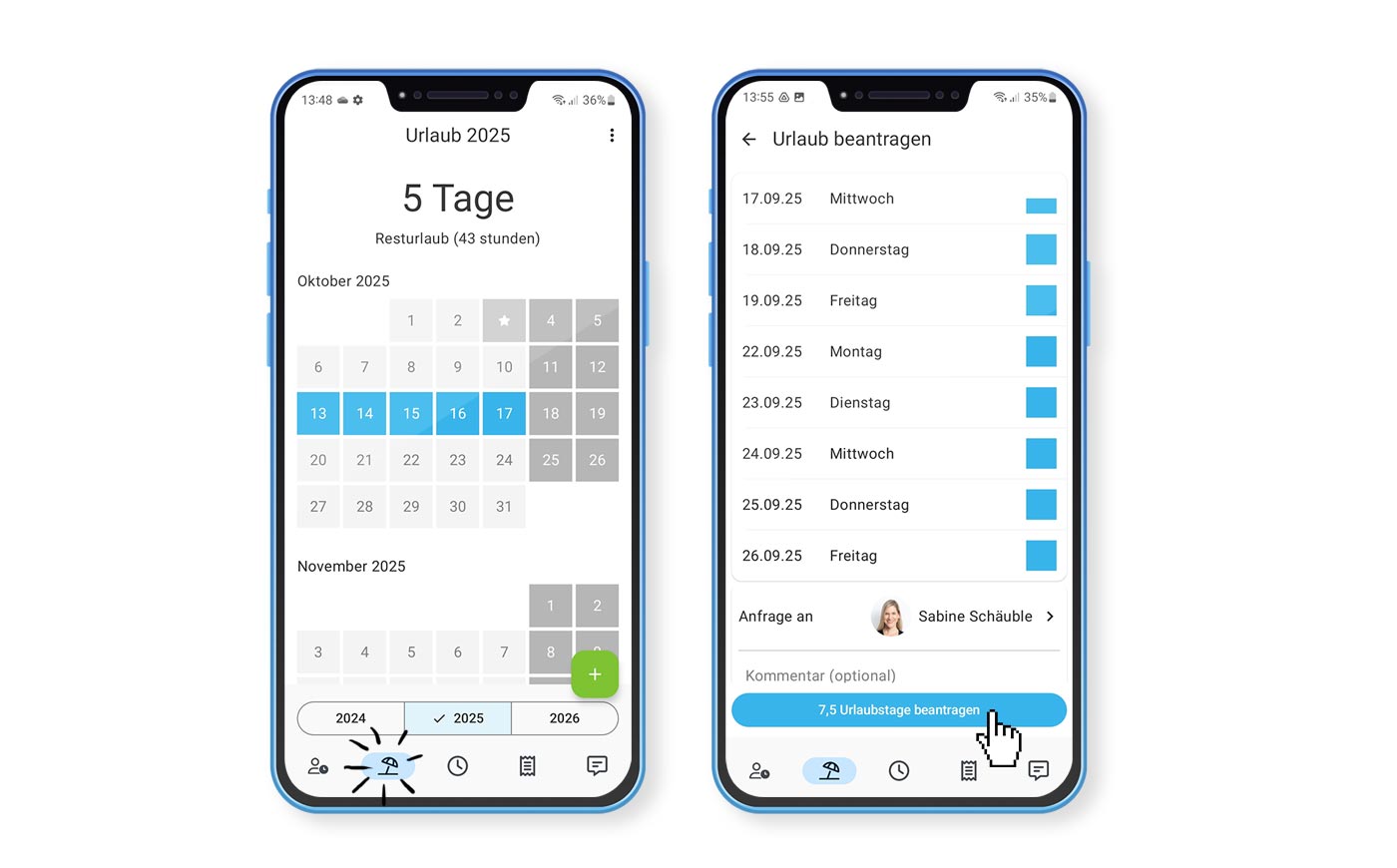 (English image not yet available)
The iOS app is available in the Apple App Store:
Get the free MOCO iPhone app for mobile time tracking in the App Store
The Android app is available in the Google Play Store:
Get the free MOCO Android app for mobile time tracking in the Play Store
Log in on iOS and Android via QR code
Target-Actual
For your quick Target-Actual check – just as you find it in the WebApp via Profile.
- Annual balance up to the current day
- Balance per month
Absences / Leave
Check Your Leave Days and Submit Absence Requests
- Leave and remaining days available
- Approved and pending requests
- Create absence requests
Time Tracking
Project Time Tracking & Working Time Tracking
- View your personal absences (with comments)
- You can tag entries with "#description"
- Share, copy, move time entries, and set them to billable/non-billable
- Stopwatch
- Show suggestions (calendar appointments, planned projects) for time tracking and record time against them
- Voice input and AI processing
- Working time tracking manually or automated (location, Wi-Fi, NFC, etc.) – including working from home
- Top up working time with project time (long-press on an entry)
- Target-Actual weekly view with a progress bar directly in time tracking
- Mark a time entry as a favourite (long-press on an entry) and use it as a suggestion for time tracking
With an internet connection, the app syncs automatically. Pull down to refresh, or use the menu in the top left.
Receipts
Personal Expenses & Purchases
Scan your receipts here for amounts you wish to have reimbursed.
If you have access to Purchases, you can also scan company expenses (expenses paid directly by the company) and save them as a draft.
Share Document
Images can be uploaded directly from photos into MOCO and recorded there as new personal expenses or new purchases.
Share Document
Images can be uploaded directly from photos into MOCO and recorded there as new personal expenses or new purchases.
Messages & To-dos
In the Messages section, you'll find notifications from MOCO and your colleagues – in the To-dos section, your checklist of personal and assigned tasks.
Messages
- Inbox for notifications similar to the WebApp
- Push notifications can be enabled
To-dos
- Checklist for ticking off
- Create new to-dos (from iOS 26)
 (English image not yet available)







