Alter News-Artikel!
» Hier geht's zur aktuellen Online-Hilfe
Article from
Quick Wins: Updates on Reports, Keyboard Shortcuts, Exports & More.
General
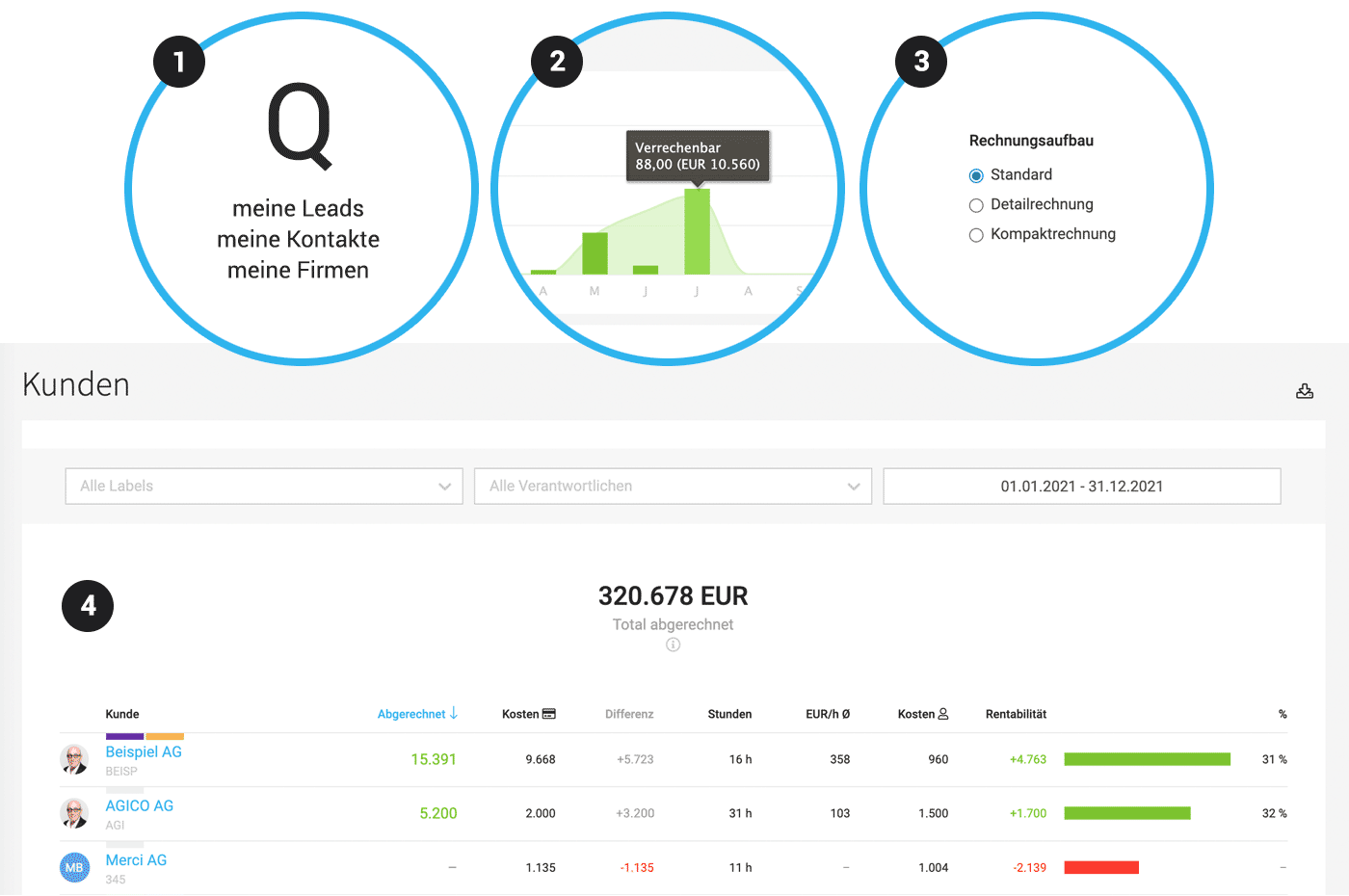
Filter with Q for my Leads, Contacts, Companies, etc. (1)
Using the keyboard shortcut "Q", you can filter your projects with a single click in the project list. This feature is now also available for Leads, Companies, Contacts, and Expenditures.
Format Optional Items in Proposals
If needed, we can adjust the colour of optional items for you – it is also now possible to choose whether or not to display the brackets.
 (English image not yet available)
Using the keyboard shortcut "Q", you can filter your projects with a single click in the project list. This feature is now also available for Leads, Companies, Contacts, and Expenditures.
Format Optional Items in Proposals
If needed, we can adjust the colour of optional items for you – it is also now possible to choose whether or not to display the brackets.
(English image not yet available)Reports
Display of Amount with Hours (2)
In the monthly hours chart (Project, Client, Person, Company), the corresponding amount is now displayed in brackets alongside the hours. Exception: Your personal report in the profile.
Client Report revised and expanded (4)
In the monthly hours chart (Project, Client, Person, Company), the corresponding amount is now displayed in brackets alongside the hours. Exception: Your personal report in the profile.
Client Report revised and expanded (4)
- Each column is sortable.
- The time period can be narrowed down to the day.
- Filter options by label and responsible person.
- New figures: Effective hourly rate, number of hours, percentage profitability.
- Additional overarching figures are available under the "i" if needed, similar to the project report.
- Export with all figures.
Enhanced Project Profitability Export
The Excel export for the global project report (Reports > Projects) has been expanded with the following information:
The Excel export for the global project report (Reports > Projects) has been expanded with the following information:
- Custom fields
- Total number of hours
Invoicing
Standard Invoice Structure
In the settings under "Layout" > "Proposals & Invoices", you can now define whether you prefer the invoice structure to be detailed or compact by default (3). Detailed information on invoice structure for invoicing based on effort
Email Display
The selected email recipient and any cc addresses are now displayed above the email button for visual confirmation.
In the settings under "Layout" > "Proposals & Invoices", you can now define whether you prefer the invoice structure to be detailed or compact by default (3). Detailed information on invoice structure for invoicing based on effort
Email Display
The selected email recipient and any cc addresses are now displayed above the email button for visual confirmation.
API/Webhooks
- All services in the project can be deleted at once (if without hours)
- Webhooks are now also triggered for labels (Update)
Cleanups
- If no budget is set for a project based on effort, all budget options for additional services are hidden.
- If your own company is selected as the client, internal projects are automatically created. In the form, invoicing options are hidden as they are not relevant for internal projects.








