Article from
e-invoice: Switch Billing to ZUGFeRD or XRechnung.
From 2027, many companies in Germany will be required to issue e-invoices. MOCO is ready: switch your Billing now and save yourself the stress at year-end.
It has been clear for a long time that electronic invoicing is coming to Germany. When the requirement applies to you depends on your annual turnover, and it is best to clarify this with your tax adviser. In principle, only Billing between two businesses based in Germany is affected.
BMF FAQs on the introduction of the e-invoice
The basic principle is simple: just as before, you email your invoice to your client. The only change is the invoice format: instead of a classic PDF, you send an e-invoice in ZUGFeRD or XRechnung format. In MOCO, the process is practically unchanged.
BMF FAQs on the introduction of the e-invoice
The basic principle is simple: just as before, you email your invoice to your client. The only change is the invoice format: instead of a classic PDF, you send an e-invoice in ZUGFeRD or XRechnung format. In MOCO, the process is practically unchanged.
Set-Up
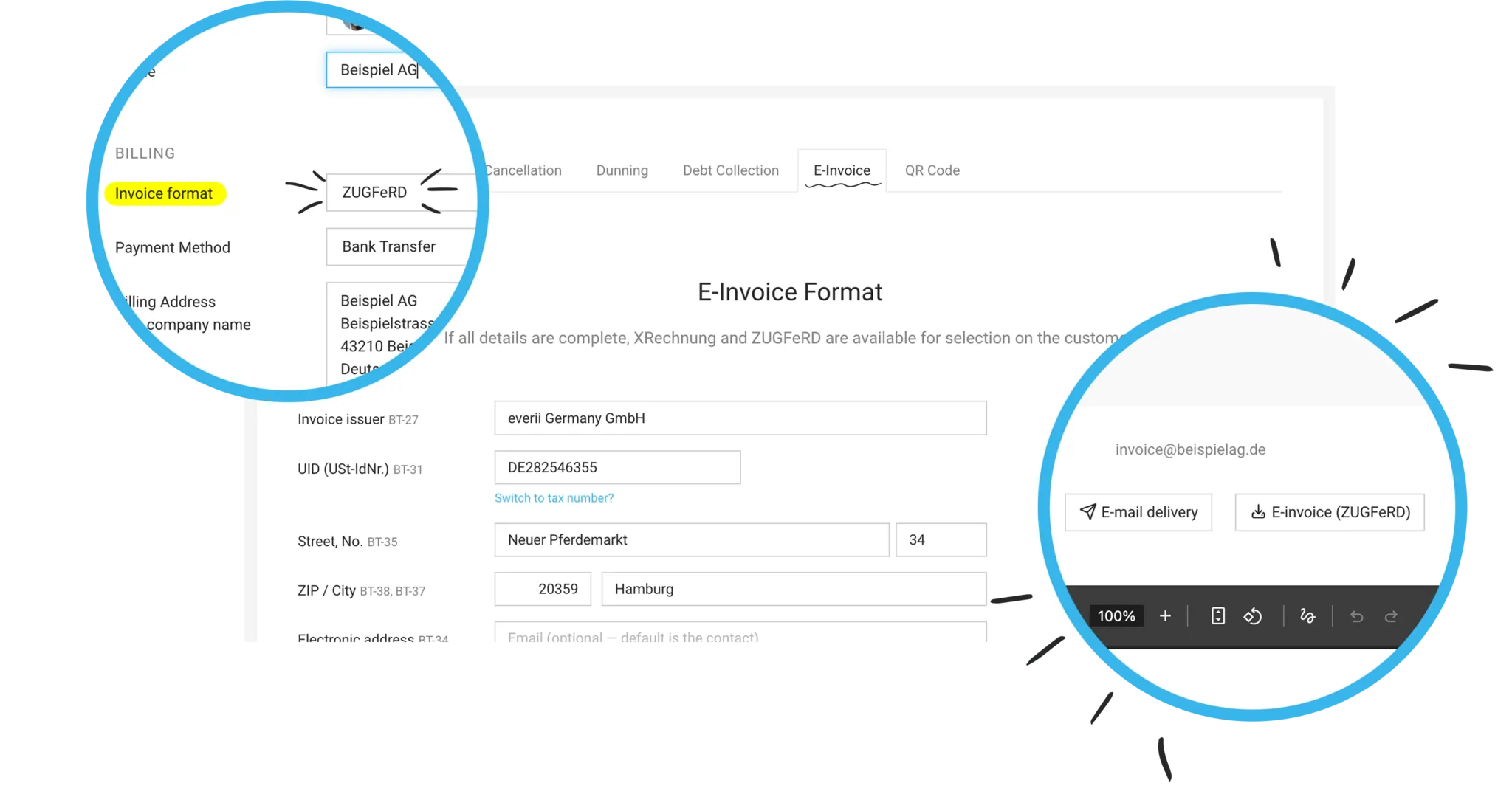
To send invoices in ZUGFeRD or XRechnung format, you need to set up the feature once under Settings > Billing > e-invoice. After that, you can choose between the two invoice formats ZUGFeRD and XRechnung for each client.
Switch Clients to e-invoices
Existing PDF invoices remain unchanged — they are not converted. For new invoices, you set the invoice format per client:
- either individually, directly in the client’s master data, or
- for multiple clients at once under Settings > Billing > e-invoice.
When you save the new invoice format, MOCO checks whether all requirements are met. Depending on the situation, you may need to correct the billing address (see below) or add an email address and VAT ID.
Choose an invoice format
Whether you use XRechnung or ZUGFeRD depends on what your client prefers. Both are equally valid.
A comparison of the two formats
Whether you use XRechnung or ZUGFeRD depends on what your client prefers. Both are equally valid.
A comparison of the two formats
For public authorities: enter the Leitweg-ID
For invoices to German public authorities, you also need the client’s Leitweg-ID (BT-10). MOCO includes it in both formats.
Correct the billing address if needed
Once you have selected an e-invoice format and save the client, MOCO checks the billing address. You may need to store it in a structured way — i.e. company name, street & house number, and postcode and city each on separate lines.
Add email address and VAT ID
An email address for the client is also mandatory for the e-invoice. If you issue invoices with a 0.00% tax rate, the client’s VAT ID must be stored.
For invoices to German public authorities, you also need the client’s Leitweg-ID (BT-10). MOCO includes it in both formats.
Correct the billing address if needed
Once you have selected an e-invoice format and save the client, MOCO checks the billing address. You may need to store it in a structured way — i.e. company name, street & house number, and postcode and city each on separate lines.
Add email address and VAT ID
An email address for the client is also mandatory for the e-invoice. If you issue invoices with a 0.00% tax rate, the client’s VAT ID must be stored.
Create and Send e-invoices
Everything about invoice creation → Create Invoice
Once you have set up e-invoices and switched a client to the invoice format, you create the invoice exactly as before. In the background, MOCO generates the invoice in the format stored for that client.
Once you have set up e-invoices and switched a client to the invoice format, you create the invoice exactly as before. In the background, MOCO generates the invoice in the format stored for that client.
Sending also works as usual — by email directly from MOCO. With XRechnung, only the XML file is sent; with ZUGFeRD, the PDF with embedded data is sent.