
-------

MOCO + ChatGPT
Access MOCO data in ChatGPT.
Chat with your MOCO company data in ChatGPT. Via the MCP server, ChatGPT can access your company data within your existing access rights.
1. Enable the MCP Feature in MOCO
Enable the AI feature under Settings > Account > AI (opt-in) and choose whether ChatGPT should have read-only access or also write access. Data access per user is based on the access rights set in MOCO.
2. Connect ChatGPT to MOCO
- In ChatGPT, click your profile or the workspace menu in the bottom left and select Settings > Apps.
- Under Advanced Settings, enable Developer Mode.
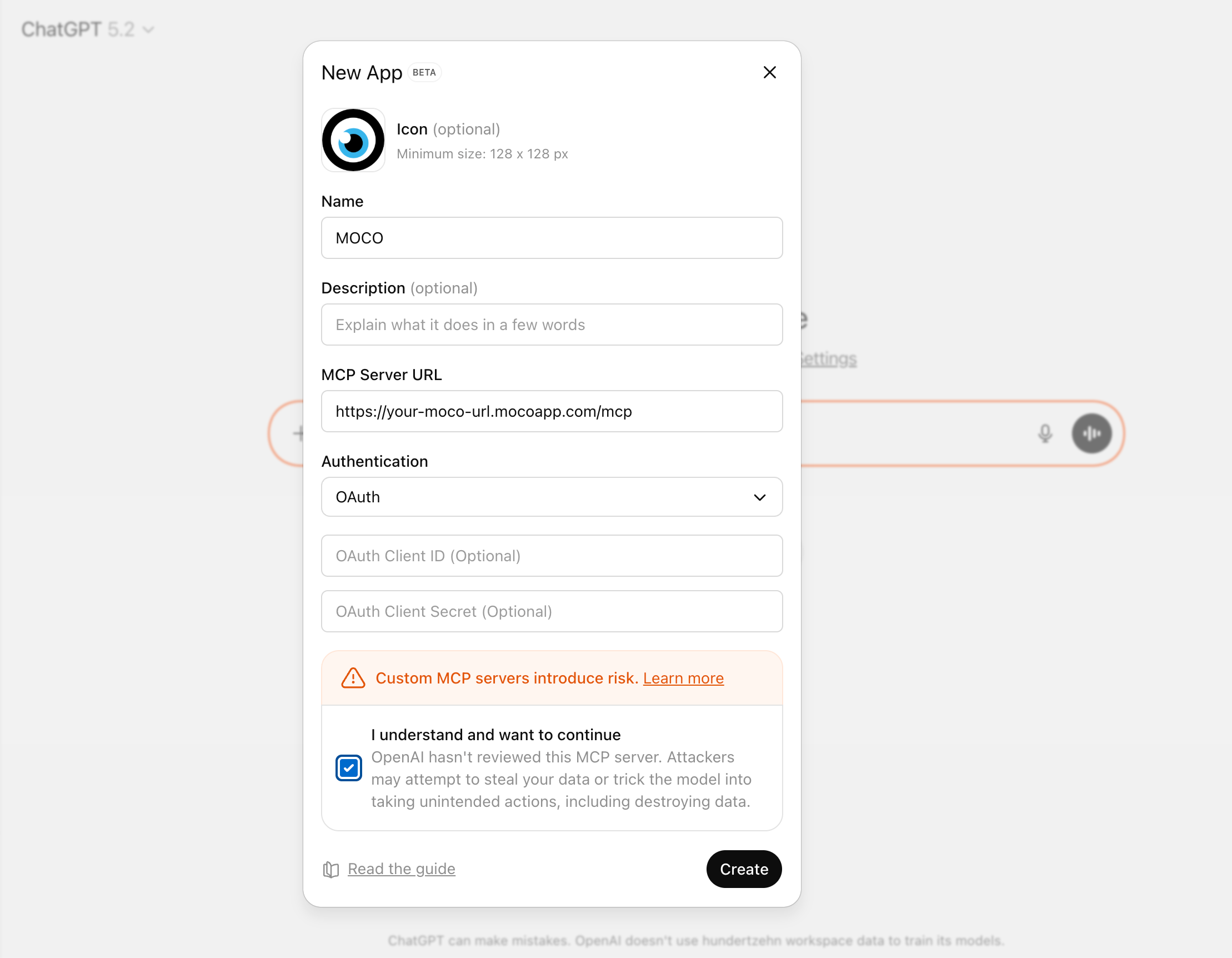
- Under Apps, click Create App and enter the following details:
- Name: MOCO
- MCP Server URL: https://your-subdomain.mocoapp.com/mcp
- Authentication: OAuth
- Leave “OAuth Client ID” and “Client Secret” empty (!)
- Tick “I understand and want to continue”, then click Create.
- In the next step, log in to MOCO using your user credentials.
Once authorisation is successful, Claude will be shown as connected, and the MCP server will be ready to use. You can find example prompts and use cases to try out here.
 (English image not yet available)







