Alter News-Artikel!
» Hier geht's zur aktuellen Online-Hilfe
Article from
Start and Stop Work Time with a Click & View Deviations Directly in Time Tracking.
Start and Stop Work Time with a Click
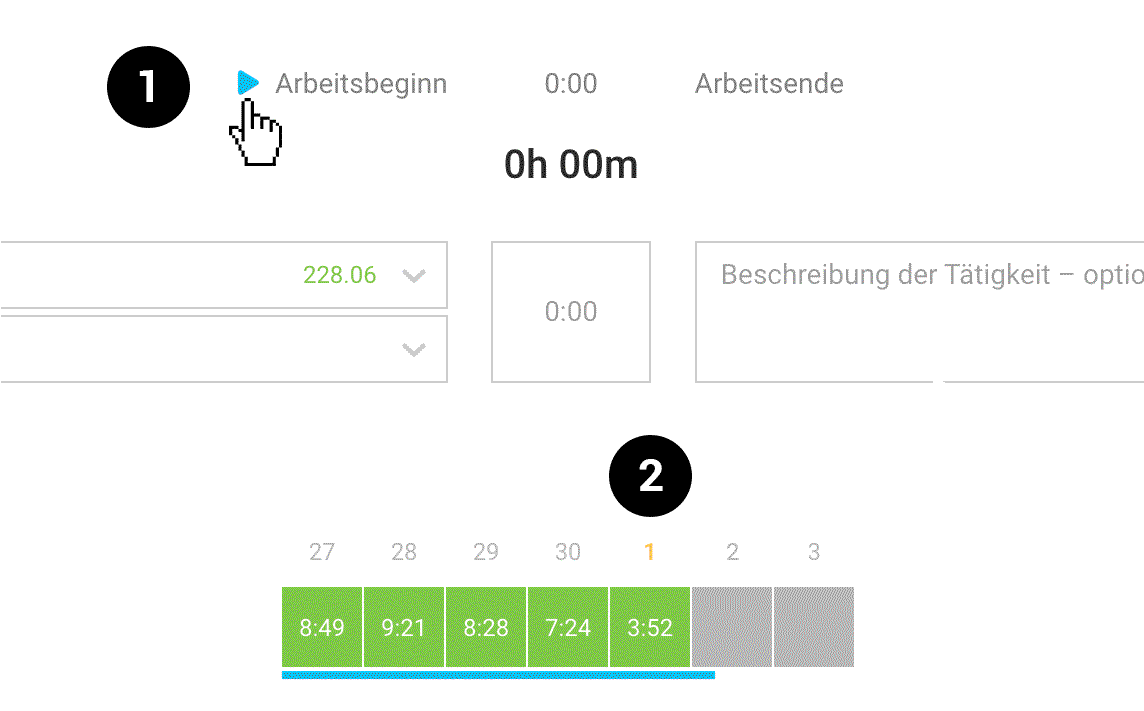
When you hover over, MOCO displays a start and stop button (1) that allows you to track work time without opening the window.
More options for automatic time tracking via smartphone or terminal
 (English image not yet available)
More options for automatic time tracking via smartphone or terminal
(English image not yet available)See Project Time Deviations Instantly
Anyone using the time tracking feature is familiar with the orange indicator under "Work Times" when work time deviates from project time. This alert is now also directly visible in time tracking: the date turns orange (2).
This allows you to quickly adjust project time – for example, using the quick action to fill in.
This allows you to quickly adjust project time – for example, using the quick action to fill in.
Irregularity Display with 0 Target Hours
If there are entries in time tracking despite an absence day, an irregularity is displayed. This is particularly useful when using automatic time tracking combined with a retroactive sick day entry!
All information on time tracking in MOCO
All information on time tracking in MOCO








