Alter News-Artikel!
» Hier geht's zur aktuellen Online-Hilfe
Article from
Proposals with Smart Filters, New Status "Partially Invoiced", Multiple Selection
All proposals are listed under "Acquisition" > "Proposals". Recently, the proposals section has been further developed. Here, we showcase the new features.
Smart Filters
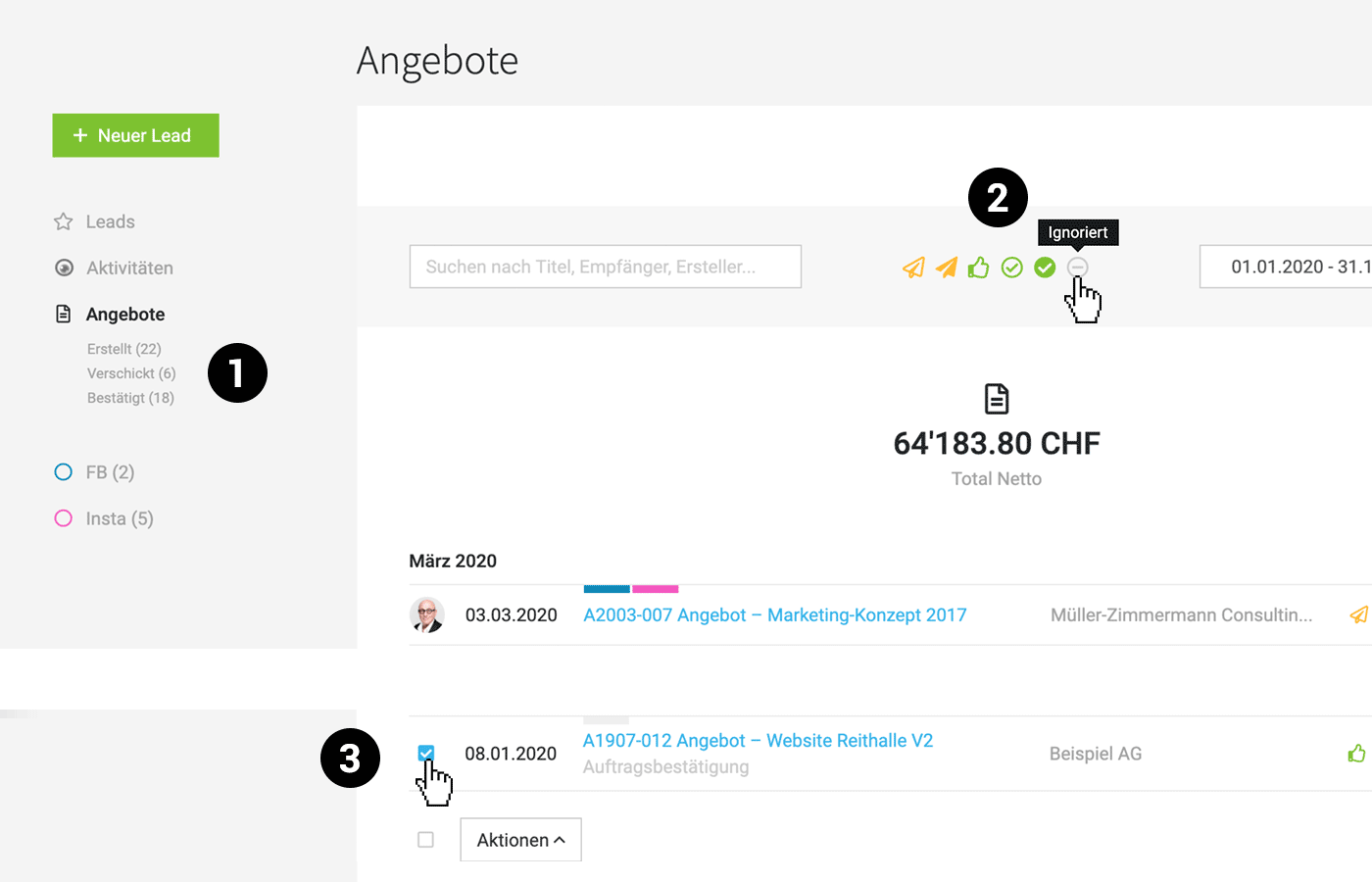
As known from other areas, the proposal list now also features Smart Filters. These display all open proposals. With a single click, you can filter for "pending" proposals (1).
 (English image not yet available)
(English image not yet available)New Status: Partially Invoiced
Set proposals to this status when only part of the proposal has been invoiced. Further developments regarding partial invoicing will continue in MOCO.
The unfilled circle with a checkmark, previously representing "Confirmed", now symbolizes Partially Invoiced (2).
The status "Confirmed" receives a new icon – the thumbs up!
The unfilled circle with a checkmark, previously representing "Confirmed", now symbolizes Partially Invoiced (2).
The status "Confirmed" receives a new icon – the thumbs up!
From "Archived" to "Ignored"
"Ignored" encompasses all proposals that were not successful (rejected proposals, proposal variants, etc.). This status can also be used for proposal templates.
Background: The meaning of "Archived" often raised questions. The status is now consistent with that for invoices.
By default, the "Ignored" status is not selected in the filter area. To filter for ignored proposals, select only this icon, deselect all others, choose the time period, and start filtering by clicking "Show" (2).
Background: The meaning of "Archived" often raised questions. The status is now consistent with that for invoices.
By default, the "Ignored" status is not selected in the filter area. To filter for ignored proposals, select only this icon, deselect all others, choose the time period, and start filtering by clicking "Show" (2).
Multiple Selection
Multiple proposals can be selected on the left via the avatar (3) and assigned a common status or label through "Actions".








