Article from
Change Log for Projects, Leads and Staff.
Using the change log you already know from Invoices and Quotes, you can now track every edit to a project, lead or person in detail.
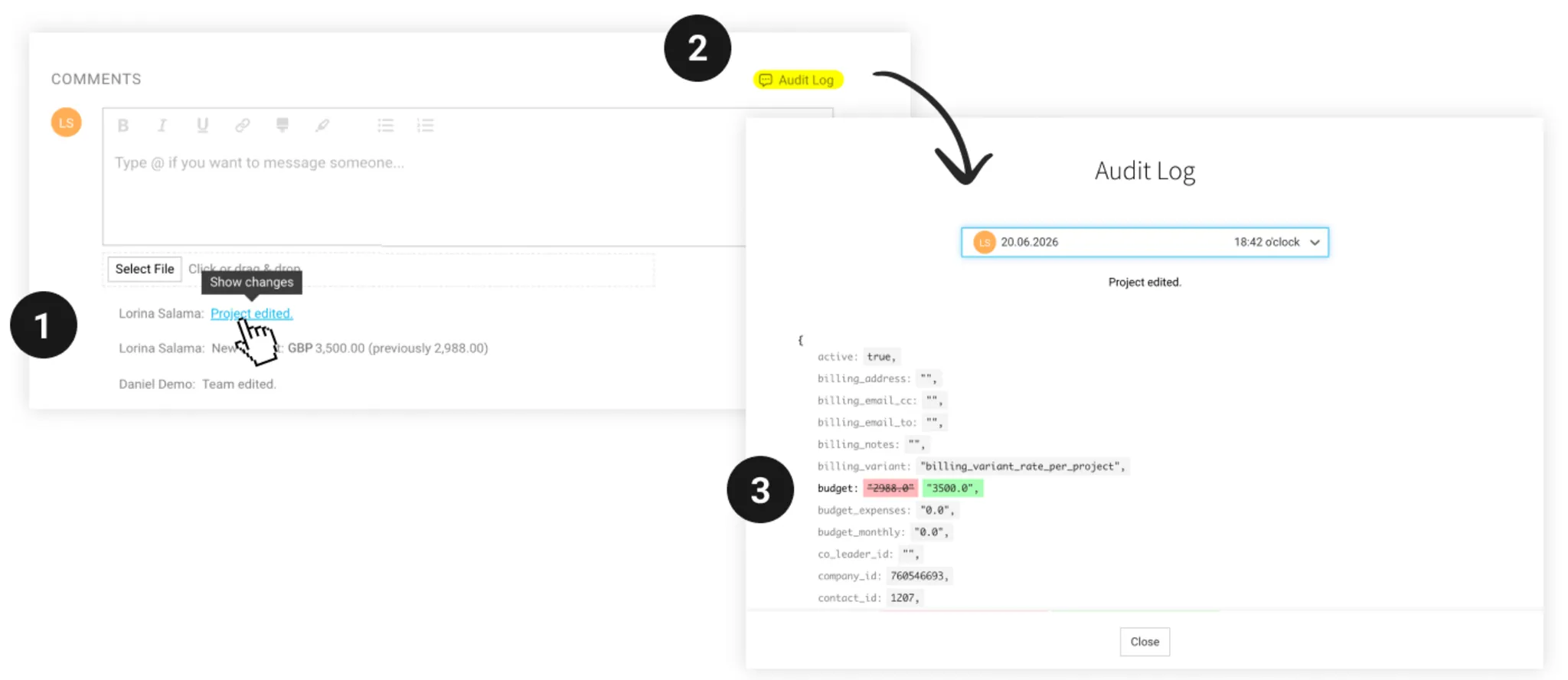
Every change to a project, lead or person (under Staff) is recorded as a comment (1) – including changes that were not previously documented explicitly. You can open the log via “Change Log” (2) – or directly from the relevant comment. The before-and-after comparison shows exactly what has changed: additions are highlighted in green and removals in red (3).
This makes visible changes that previously could only be traced technically in our logs, such as:
This makes visible changes that previously could only be traced technically in our logs, such as:
- Changes to services and the people used for time tracking (team) within a project
- Edits to the project/lead name, additional information, or custom fields
- Updates to an employee’s master data
For particularly important changes – such as an adjustment to lead volume or a status change – there are still specific comments that show the change directly, without any detour. The change log complements these with the full picture.