Article from
Billing: Round Up Bundled Hours or Add a Flat Uplift
In MOCO, you can adjust recorded hours before Billing – without changing time tracking. A new bulk action is now available: select multiple time entries, round them up or add a flat uplift, and you’re done.
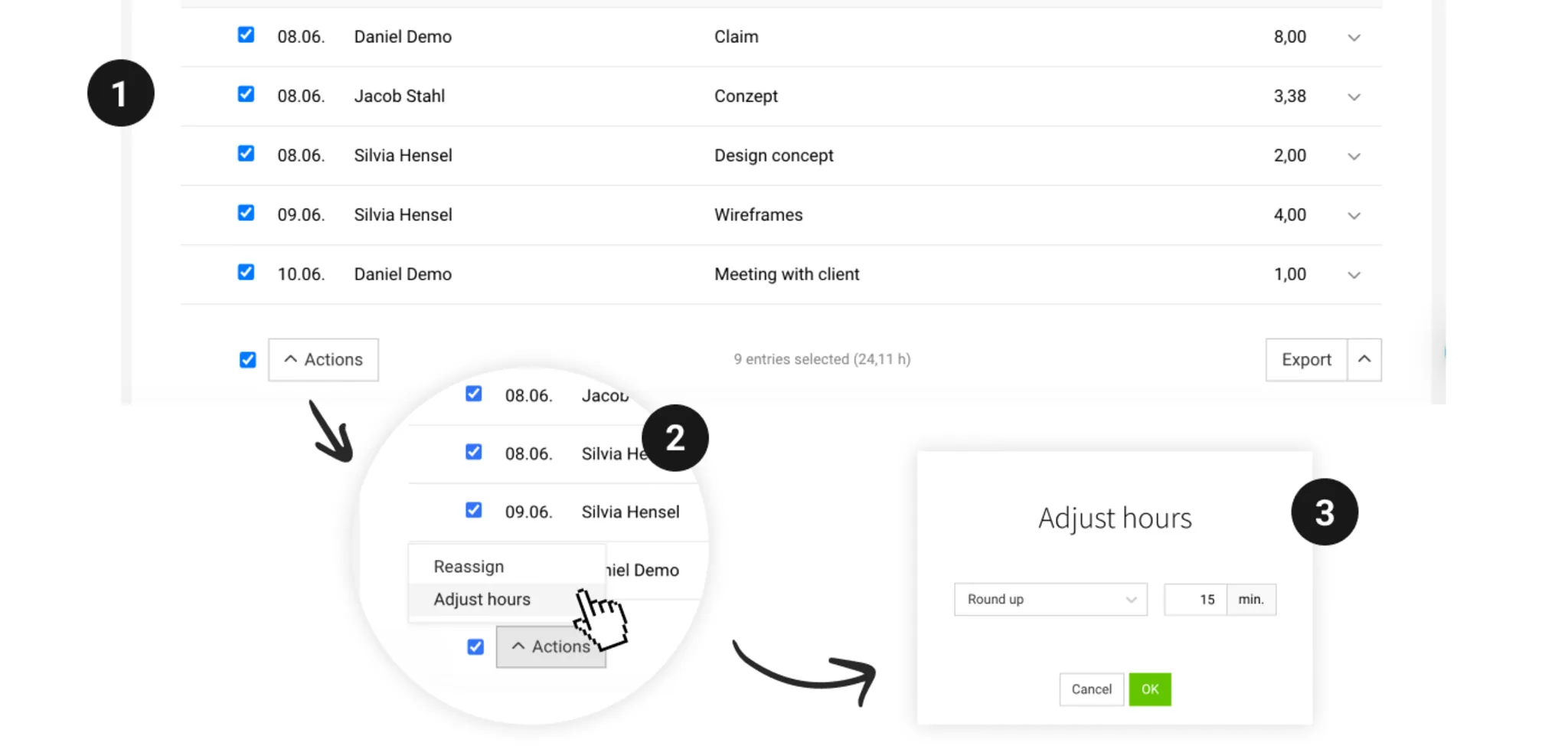
The feature is available in two places: in the Timesheet (project, project group, client, or global) and under Billable Items within a project. This means you can adjust hours both during ongoing project controlling and directly in the step before creating an Invoice.
Adjust Hours
First, select the time entries (1) you want to adjust – individually via checkbox, or all at once. Then click Actions → Adjust Hours (2), choose the appropriate option and the value you want (3) , and confirm the change with OK.
Round Up
Each entry is rounded up so that it can be evenly divided by the specified number of minutes. For example, an entry of 1 h 10 min rounded to 60 min becomes 2 h – rounded to 15 min, it would be 1 h 15 min.
Add a Flat Uplift
Each entry is increased by the specified percentage.
Good to Know
- Next time, MOCO automatically suggests the last option and value you used.
- Entries that have already been adjusted are ignored by the bulk action and won’t be changed a second time. Entries that have already been billed are also skipped.
- You can reset individual adjustments as usual: hover over the number of hours, then click the reset icon.
- Adjusted entries cannot be reallocated. If you need to reallocate them, you must reset them first.