Article from
E-Invoicing: Attachments in ZUGFeRD Format and in Purchases
When creating ZUGFeRD invoices, you can now control whether attachments also appear in the visible PDF. For incoming e-invoices, MOCO lists embedded attachments for checking.
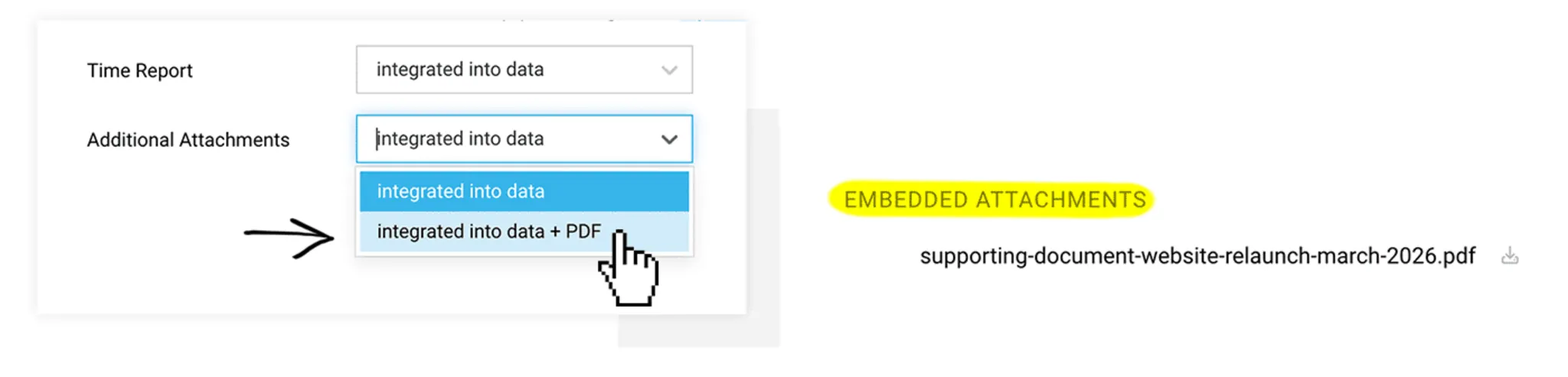
PDF Attachments in ZUGFeRD Invoices
Attachments such as the Timesheet are, by default, embedded directly in the XML structure of ZUGFeRD invoices. Under Settings > Billing, you can specify whether attachments should also appear in the visible PDF:
- integrated in data – attachments are embedded in the XML part
- integrated in data + PDF – attachments are also integrated into the PDF
You can choose whether you only want to add MOCO’s Timesheet as a PDF, or also include any other attachments you have uploaded manually.
Checking Embedded Attachments in Purchases
If a ZUGFeRD invoice or XRechnung contains embedded attachments, MOCO lists them in Purchases. With one click, you can download an attachment and check it.
The attachments are shown in the Purchase draft and in the created Purchase, below the invoice document.








