Article from
iPhone App: Updates for Time Tracking.
You can now find time tracking suggestions in the iOS app. Plus, a running stopwatch no longer blocks the entire app.
 (English image not yet available)
Time Tracking Suggestions
In the web app, you can view suggestions for time tracking via the suggestions icon at the top right or by using the shortcut "B" – favourites, planned projects, and upcoming calendar appointments. These suggestions are now also available in the iPhone app!
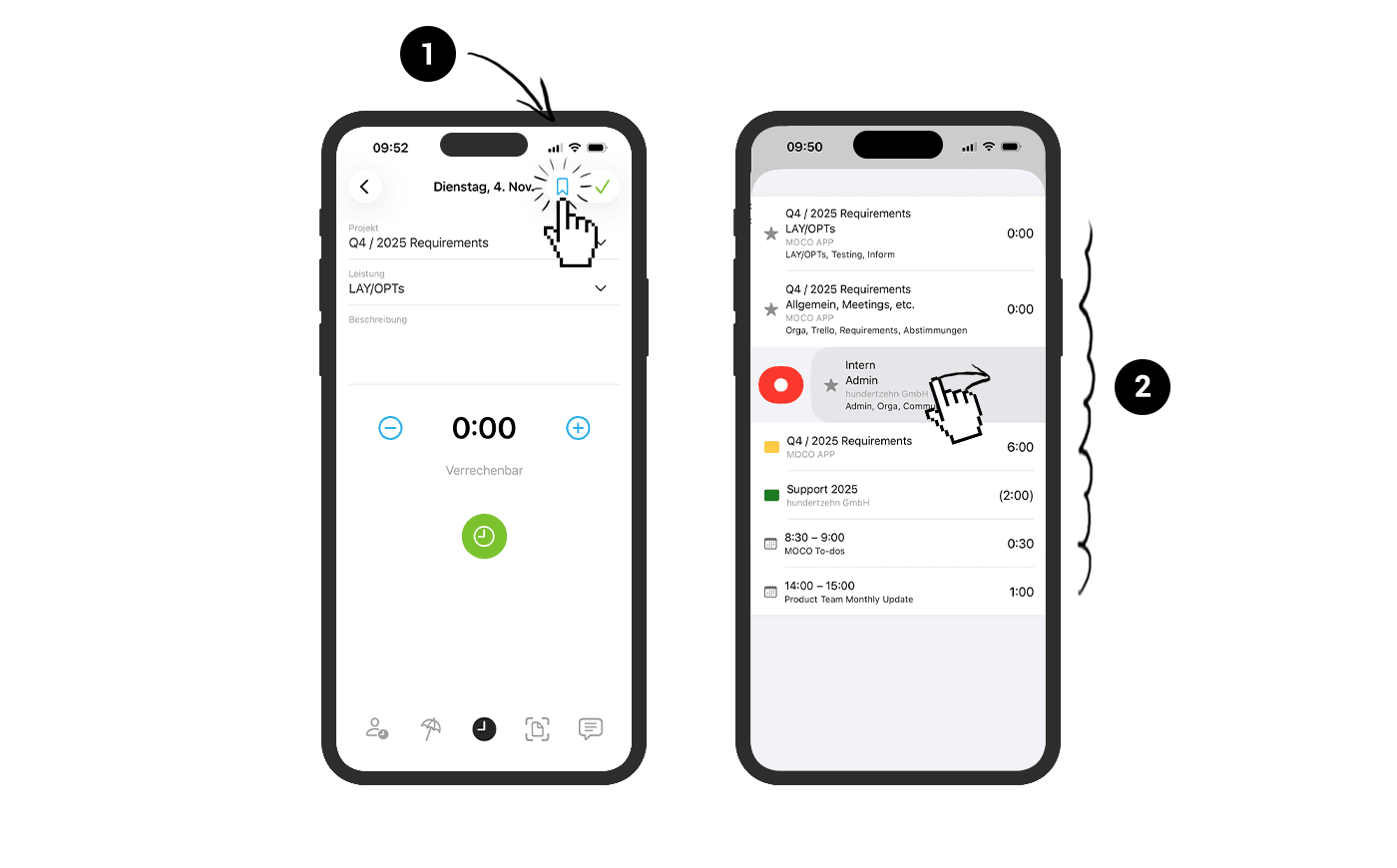
Tap the suggestions icon (1) at the top right of a new entry to display suggestions for the selected day. Swipe right on a suggestion to start the stopwatch directly (for suggestions with project and service) (2). Swipe left to hide suggestions.
Tap the suggestions icon (1) at the top right of a new entry to display suggestions for the selected day. Swipe right on a suggestion to start the stopwatch directly (for suggestions with project and service) (2). Swipe left to hide suggestions.
Running Stopwatch
Now, all other functions can be used while the stopwatch is running. The red-coloured time tracking icon in the menu bar indicates when the stopwatch is active.








