
-------

MOCO + Calendar (Planning)
Synchronise Planning and Absences
Every user can view their planning or absences in the calendar (iCal, Google Calendar, etc.) even without access rights to "Planning."
Benefits of Integration
Absences of all individuals can be displayed in the external calendar
- You can define which additional absences should be shown in the calendar in the settings under "Planning".
- Planned projects and absences are displayed as all-day events
- Your own absences can optionally be synced as appointment blockers
Set Up Connection
1. Go to "External Calendar" under "Profile" at the top right
2. There you will find the URL that you can add to your calendar.
3. Add the MOCO calendar URL to your calendar (= subscribe)
2. There you will find the URL that you can add to your calendar.
3. Add the MOCO calendar URL to your calendar (= subscribe)
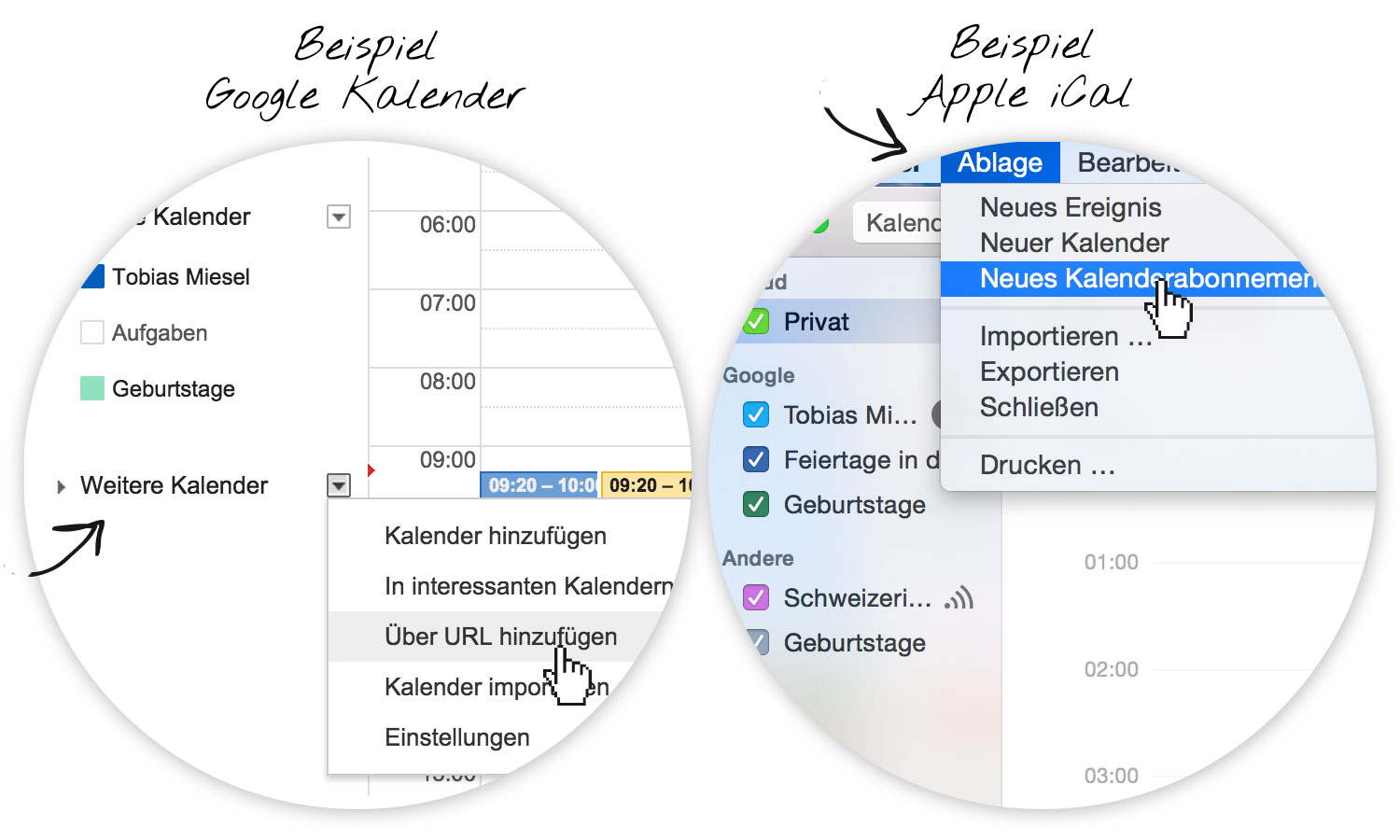 (English image not yet available)







