Article from
Create and Invoice Recurring Additional Service Before Due Date
With the recurring additional service, MOCO automatically generates the service for you on the selected due date. The new "Create" function allows you to anticipate this automation.
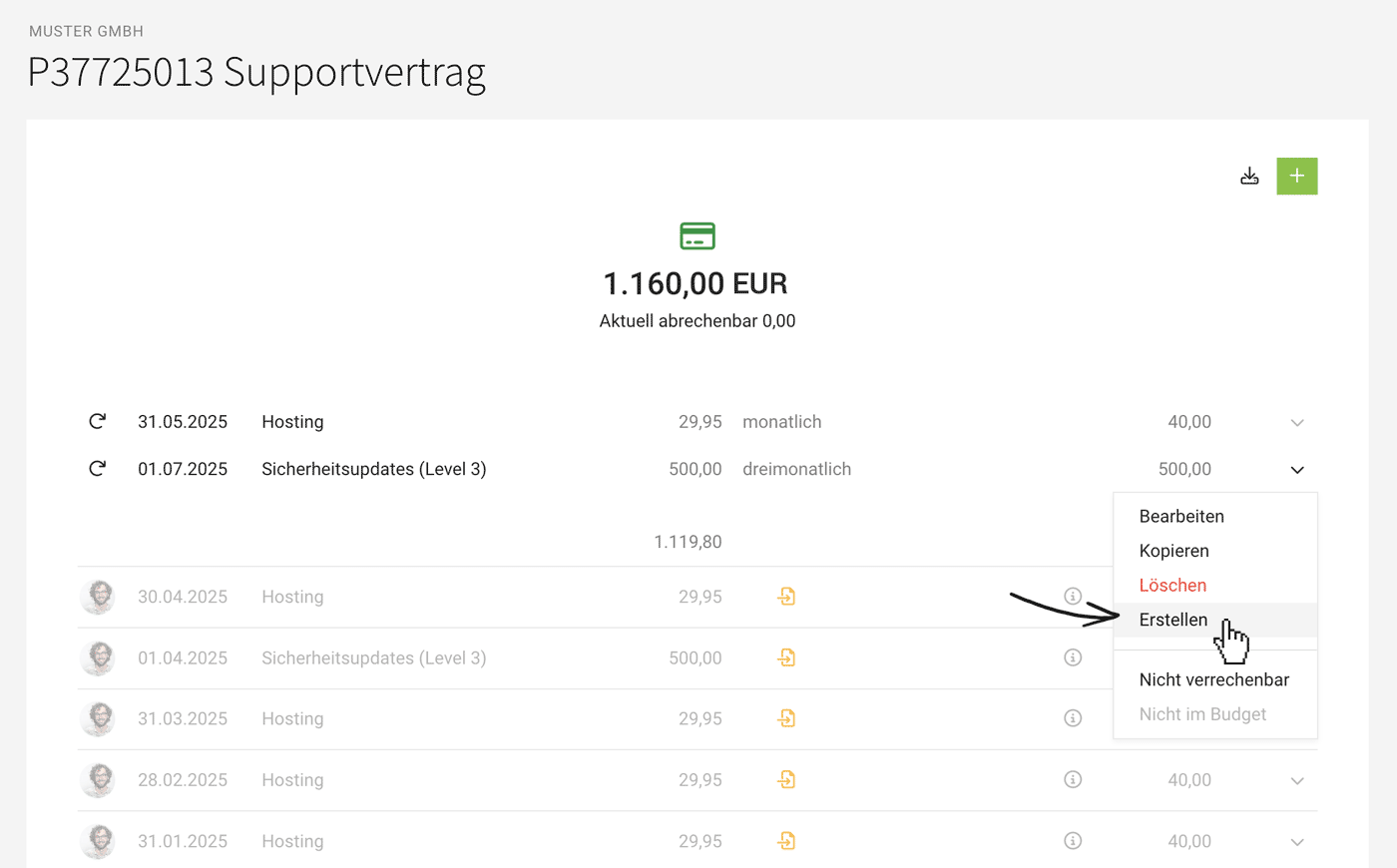 (English image not yet available)
For items like licenses, domains, or hosting that are regularly billed to clients, use recurring additional services in the project. This trigger ensures MOCO automatically generates the additional service for invoicing on the due date.
Want to invoice the service before the due date?
Create
Select "Create" in the dropdown for the recurring additional service (see illustration). This option is available in individual projects and also in the central list. It will be created immediately and ready for invoicing.
Invoicing
When invoicing, ensure you select the additional service, as MOCO by default only pre-selects items that are billable up to today.
Example: If the due date falls on a weekend, you can include the item on the invoice as early as Friday if needed.
All information on additional services
Select "Create" in the dropdown for the recurring additional service (see illustration). This option is available in individual projects and also in the central list. It will be created immediately and ready for invoicing.
Invoicing
When invoicing, ensure you select the additional service, as MOCO by default only pre-selects items that are billable up to today.
Example: If the due date falls on a weekend, you can include the item on the invoice as early as Friday if needed.
All information on additional services








