Alter News-Artikel!
» Hier geht's zur aktuellen Online-Hilfe
Article from
Planning: Quick Wins Part 1.
A few clever little optimisations, such as easily assigning the planned person to the project, allow you to work more efficiently. Planning becomes even more enjoyable.
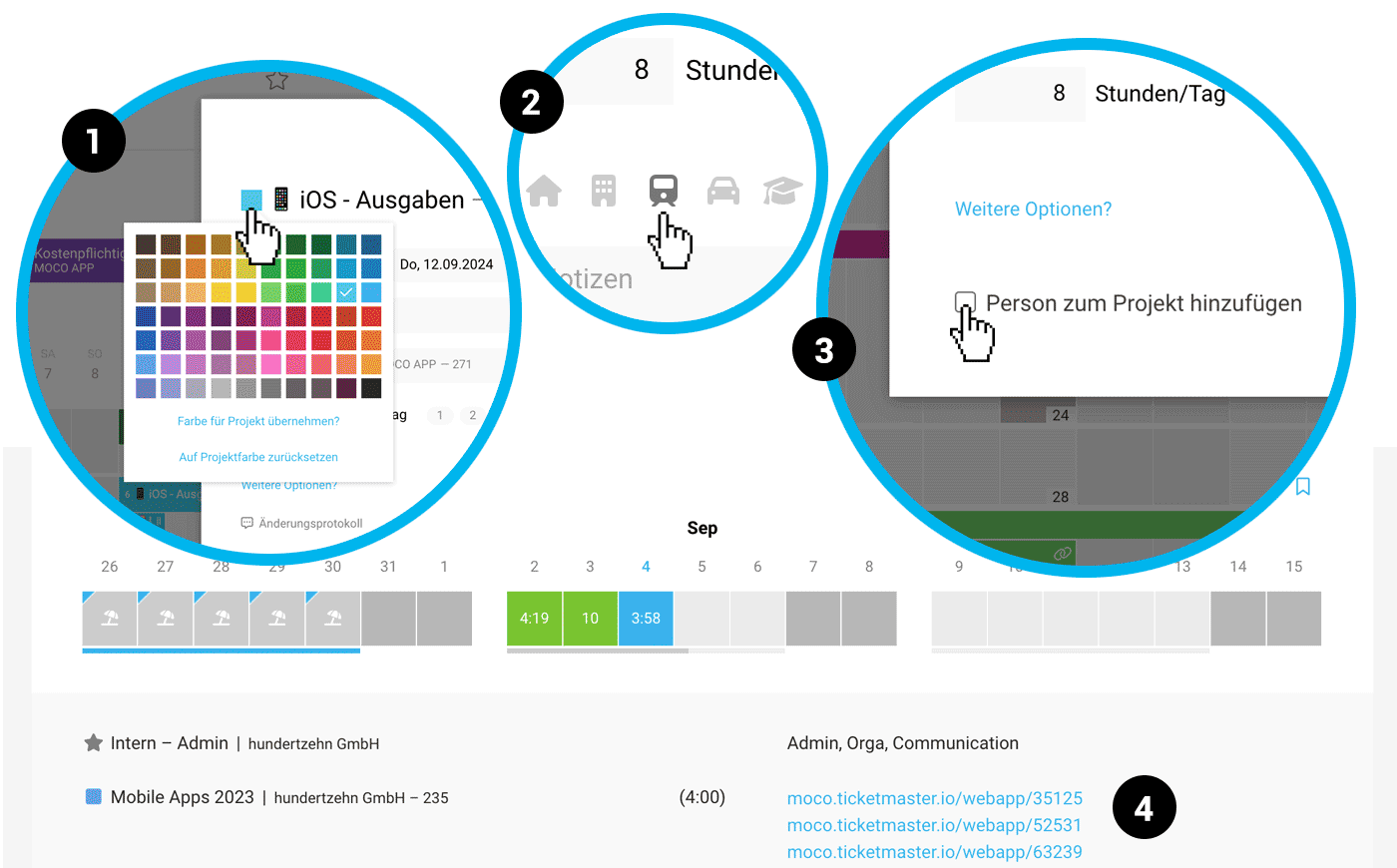 (English image not yet available)
Colour selection directly in the title
You can change the colour of the open entry directly in the title (1). Previously, the colour choice was hidden under "Additional options". You can still change the colour via right-click on the entry.
New "Train" icon
We don't drive by car – we travel by train. In line with this motto, there is now a train icon available (2). This will soon be updated for iOS and Android.
Quickly assign a person for time tracking
If you're planning a project for someone who hasn't been assigned for time tracking yet, you can now add this person to the project directly during planning (3).
Links usable in time tracking
If you add a link as a comment in the planning – for example, to a ticket system like Trello or Jira – it is clickable in the planned person's time tracking (4). This makes time tracking on planned projects and tasks even faster.
More about time tracking on tasks/planning in MOCO
More about time tracking on tasks/planning in MOCO








