Alter News-Artikel!
» Hier geht's zur aktuellen Online-Hilfe
Article from
Quick Wins around Expenditures.
Manage incoming invoices even better with these updates: Enhanced supplier list, more transparent transfer orders, optimized links, retrospective supplier assignment, etc.
 (English image not yet available)
Supplier expenditure list gains full functionality
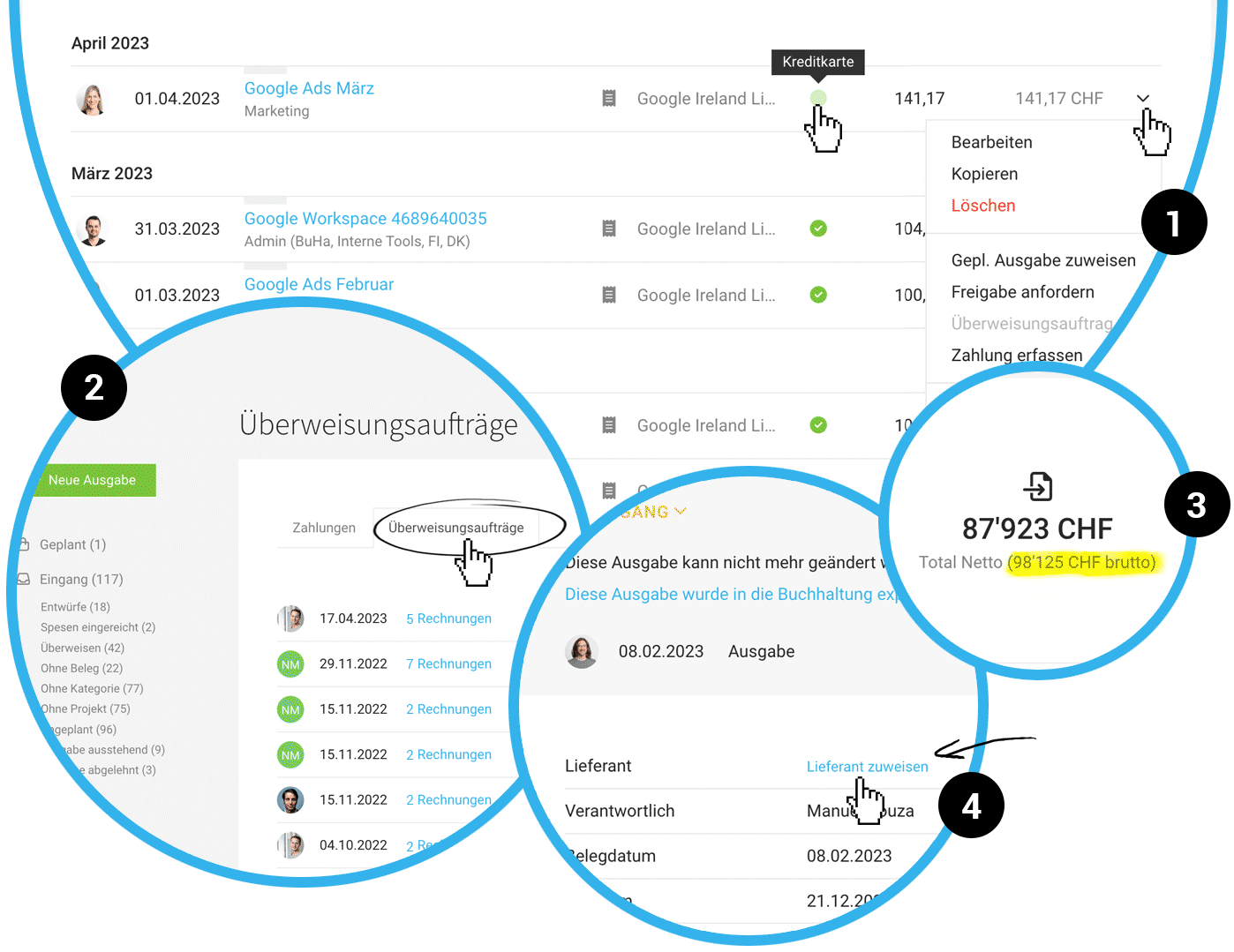
The previously simple expenditure listing in the supplier section has been enhanced: You can now directly manage labels, record payments, view invoice status, and use all actions via the dropdown that are also available in the central expenditures area (1).
Transfer orders more transparent
Previously somewhat hidden, the created transfer orders for online banking are now directly available under "Expenditures" > "Payments". (2) Additionally, all expenditures related to the transfer order are listed and thus traceable with a click. The transfer order is also directly linked within the expenditure itself.
Gross total added
The total sum of expenditures in the list view is now displayed rounded, similar to the list under "Invoicing", and supplemented by the gross amount (3).
Optimized financial report expenditure sum linking
The linking of expenditures in the reports now combines expenditures from the inbox and archive. This makes the sums directly traceable.
Assign supplier retrospectively
If an expenditure has already been exported for accounting, you can still assign the supplier retrospectively (4).








