Alter News-Artikel!
» Hier geht's zur aktuellen Online-Hilfe
Article from
Quick Wins: Personnel, Holiday, Fixed Costs, Period Lock.
During our extended work weekend, we implemented several optimisations that are particularly useful around the turn of the year. Most of these have already been mentioned in the year-end checklist. Here is an overview of the optimisations that have now gone live:
Personnel
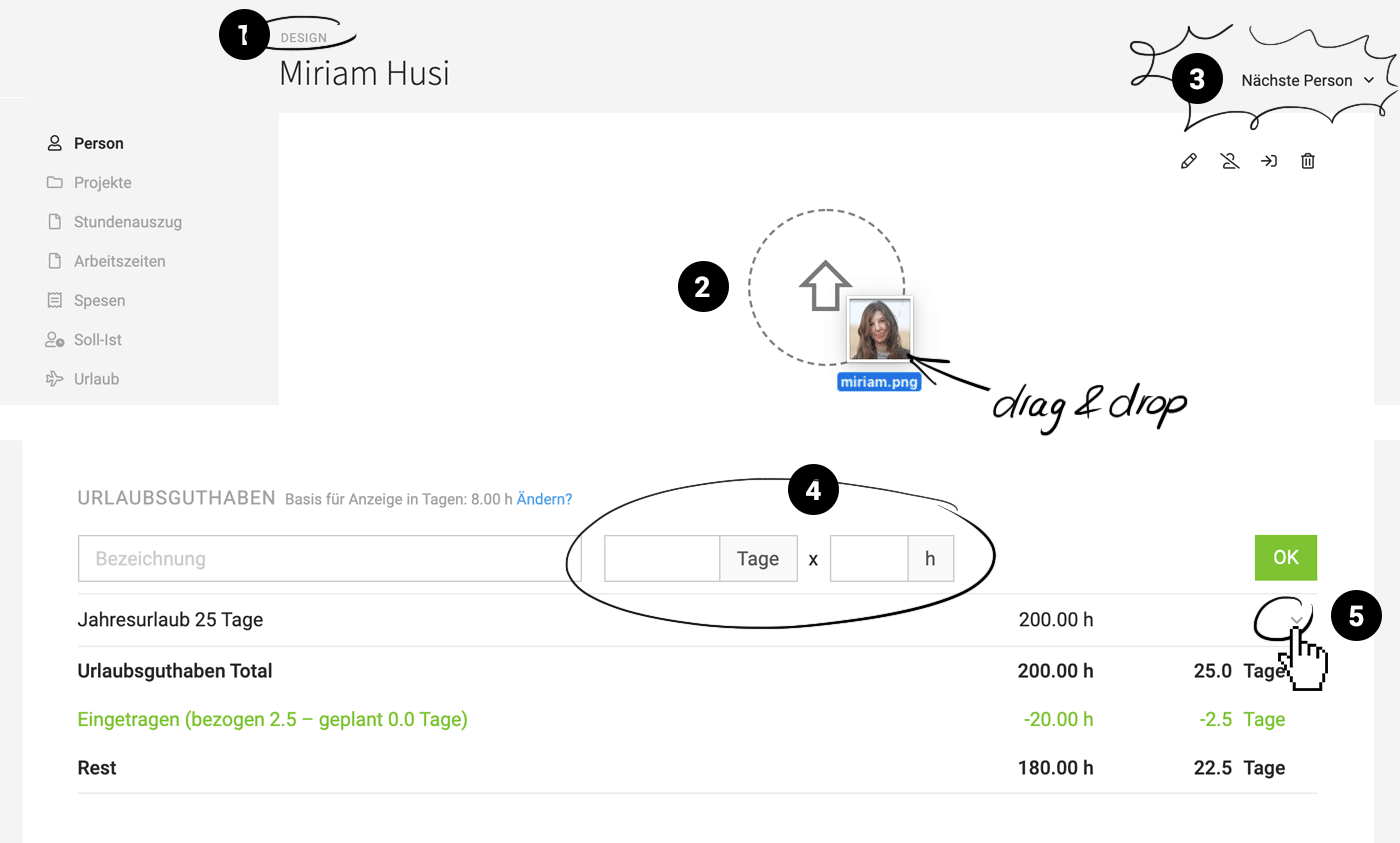
1. One-click access to the team
The team name is displayed above the person's name. This makes it clear which team the person belongs to, and you can quickly jump from any person's page to the team or team report.
2. Upload profile picture via drag & drop
On the saved detail page, you can now drag and drop a photo/avatar (jpg or png) just like with contacts.
3. Easily switch between people
There is now a "Next Person" switcher, allowing you to quickly jump to a selected next person. This simplifies managing holiday and time accounts at the end of the year.
 (English image not yet available)
The team name is displayed above the person's name. This makes it clear which team the person belongs to, and you can quickly jump from any person's page to the team or team report.
2. Upload profile picture via drag & drop
On the saved detail page, you can now drag and drop a photo/avatar (jpg or png) just like with contacts.
3. Easily switch between people
There is now a "Next Person" switcher, allowing you to quickly jump to a selected next person. This simplifies managing holiday and time accounts at the end of the year.
(English image not yet available)Holiday & Public Holidays
4. Easier entry and tracking of balance in the hour-accurate holiday model
Previously, it required a lot of mental effort during a mid-year workload change. Now, you can enter balances in days x hours. The selectable daily basis no longer affects the entry. It merely describes the conversion factor for displaying the hour balance in tangible days.
When you go to "Edit" on the balance entry, the input can be tracked at any time.
5. Copy balance positions to the next year
You may want to carry over annual leave to the next year, but not the special balance with the moving day... In MOCO, you can now simply select "Copy to 2021" from the dropdown on the right for the balances you wish to carry over.
Previously, it required a lot of mental effort during a mid-year workload change. Now, you can enter balances in days x hours. The selectable daily basis no longer affects the entry. It merely describes the conversion factor for displaying the hour balance in tangible days.
When you go to "Edit" on the balance entry, the input can be tracked at any time.
5. Copy balance positions to the next year
You may want to carry over annual leave to the next year, but not the special balance with the moving day... In MOCO, you can now simply select "Copy to 2021" from the dropdown on the right for the balances you wish to carry over.
In the recurring entry for public holidays, half days can now also be entered
This eliminates the need for adjustments in planning.
This eliminates the need for adjustments in planning.
Fixed Costs
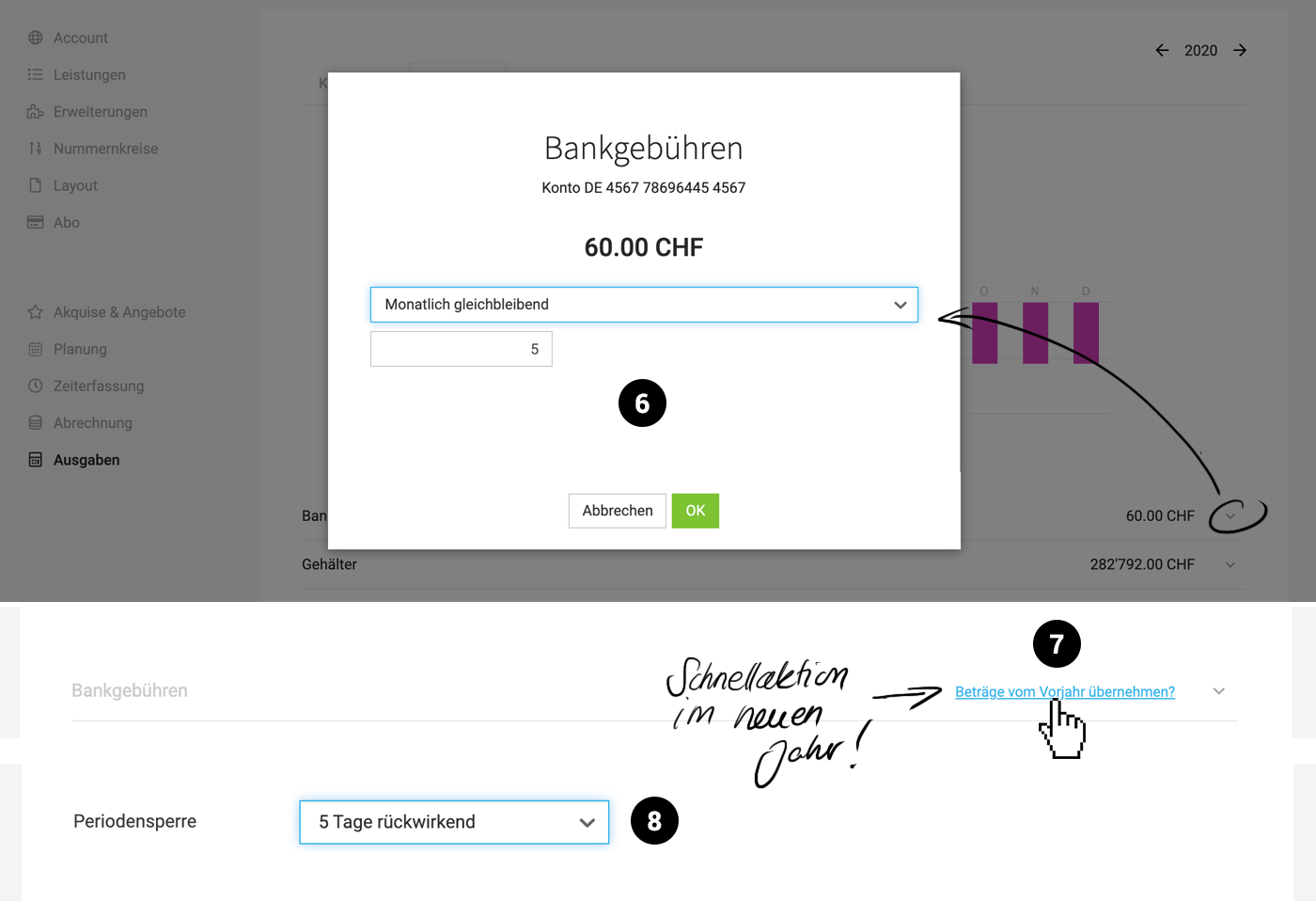
6. Consistent amount needs to be entered only once
In the form, you can choose whether to enter an individual amount per month or a consistent amount. If you choose consistent, the amount only needs to be entered once.
7. Option to carry over from the previous year
In January, you can fill the new year with just a few clicks using the "Carry over amounts from last year?" link.
 (English image not yet available)
In the form, you can choose whether to enter an individual amount per month or a consistent amount. If you choose consistent, the amount only needs to be entered once.
7. Option to carry over from the previous year
In January, you can fill the new year with just a few clicks using the "Carry over amounts from last year?" link.
(English image not yet available)Period Lock
8. Lock after x days
In addition to the defined date, MOCO now offers a selectable number of days after which time tracking will automatically be locked.
Days marked in personal time tracking
On days when time tracking is locked, the green fill is shown as withdrawn. This makes orientation easier. Previously, it was only clear that time tracking was locked when the day was selected, and entries could not be changed.
In addition to the defined date, MOCO now offers a selectable number of days after which time tracking will automatically be locked.
Days marked in personal time tracking
On days when time tracking is locked, the green fill is shown as withdrawn. This makes orientation easier. Previously, it was only clear that time tracking was locked when the day was selected, and entries could not be changed.








