Article from
Overview: Summarise Projects, Companies, and People with AI.
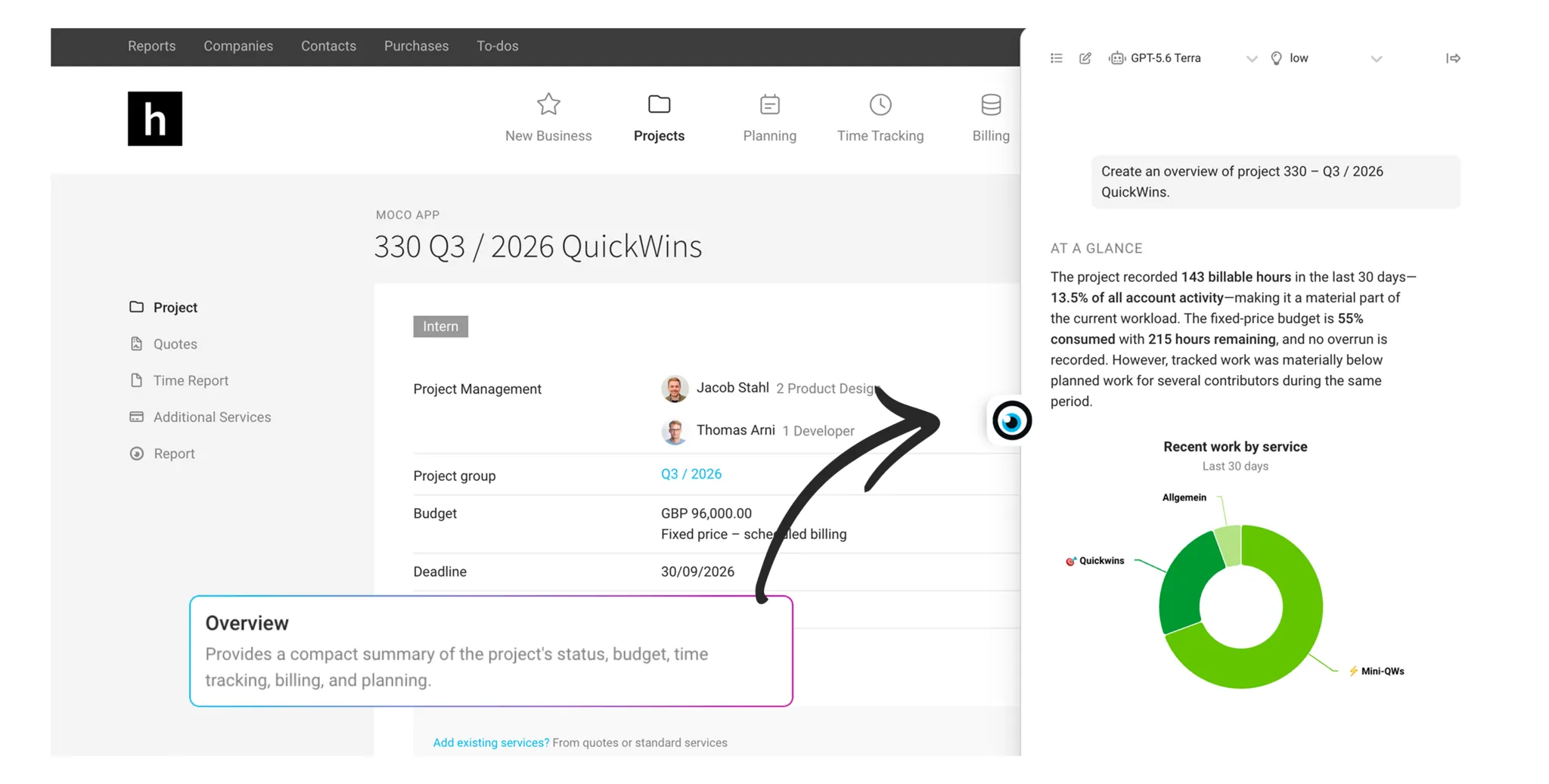
Instead of pulling together all the data yourself, you can use the new AI feature “Overview” to generate a concise summary of a project, a client, a supplier, or specific people at the click of a button.
Enable
Enable the AI feature in Settings under Account > AI.
As before, all AI features are free during the beta phase. The feature is only available to individual users if they meet the minimum requirements for access rights (see below).
As before, all AI features are free during the beta phase. The feature is only available to individual users if they meet the minimum requirements for access rights (see below).
Create an Overview
In a project, for a client or supplier, or under “People” for a person, hover your mouse over the MOCO eye on the right-hand edge of the screen and select the “Overview” action. MOCO takes a moment to think and then writes a succinct report about the item.
Because the overview is generated on demand, it will vary from case to case – MOCO only describes what is genuinely relevant to the situation. It also only includes aspects that the individual user has access to.
Project
You can see at a glance what is currently being worked on, whether the budget and Billing figures are on track, and what is coming up in planning. Anything unusual – such as a budget overrun or a larger discrepancy between planned and recorded hours – is highlighted directly.
Requirement: Access to the project plus restricted access to planning, or full access to Billing.
Requirement: Access to the project plus restricted access to planning, or full access to Billing.
Client
The overview shows activity across all projects, the client’s importance to your business, and the status of open quotes and invoices. This helps you quickly spot, for example, whether an invoice is overdue or whether the order situation has changed.
Requirement: Access to the client plus full access to projects, Billing, or acquisition.
Requirement: Access to the client plus full access to projects, Billing, or acquisition.
Supplier
At a glance, you can see how significant a supplier is in terms of costs, whether purchases have changed recently, and what open or planned payments are coming up.
Requirement: Access to the supplier plus full access to purchases.
Requirement: Access to the supplier plus full access to purchases.
Person
The overview summarises utilisation and time tracking, shows current areas of focus, and flags upcoming absences or plans – without listing individual time entries.
Requirement: Access to the person.
Requirement: Access to the person.