Article from
Personio: Transfer Working and Break Times in Detail
Personio will switch off the previous Attendances API (V1) on 30 August 2026. With the new version (V2), the way working times are synced from MOCO to Personio will change from 1 September.
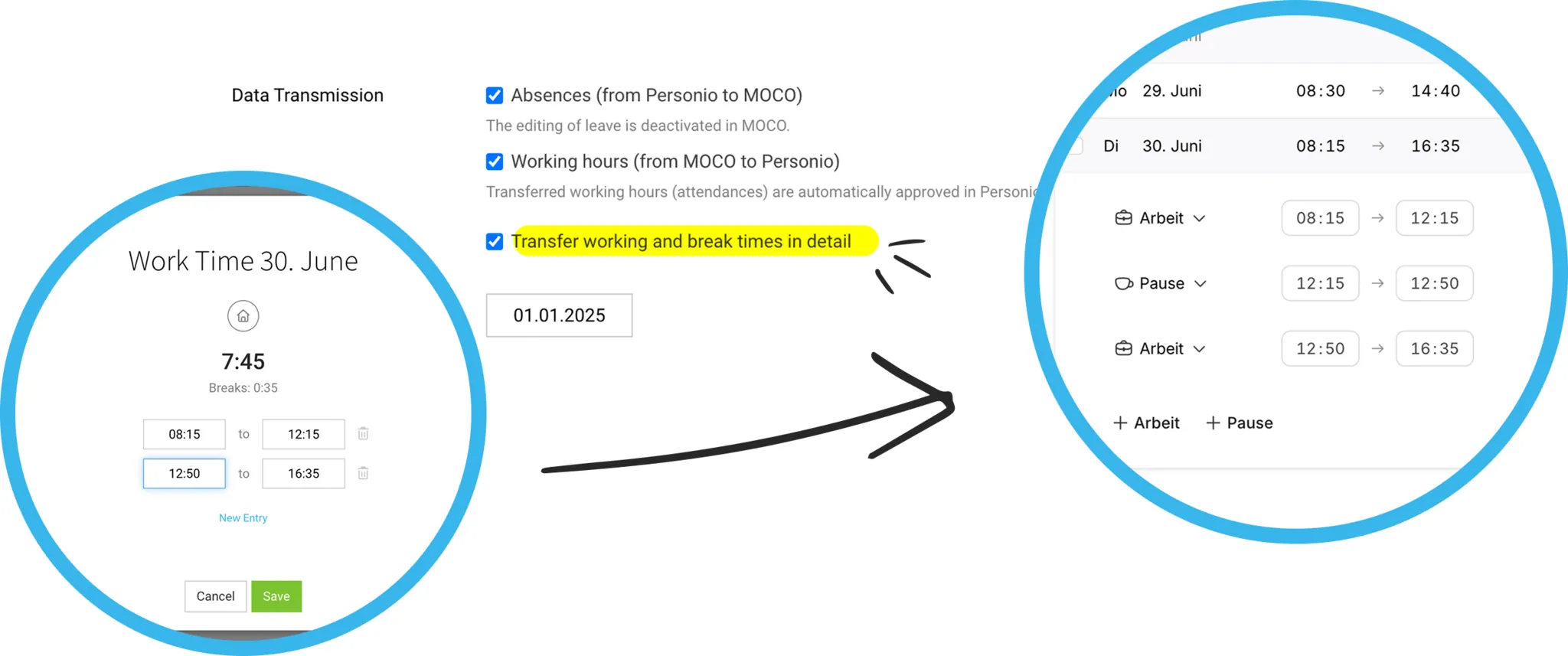
What’s Changing
Until now, MOCO has transferred one consolidated entry per day to Personio: start time, end time, and a flat break duration. Going forward, individual working and break periods will be transferred with the exact start and end times – exactly as you recorded them in MOCO.
For example, if you work from 08:00 to 12:00, take a one-hour break, and then work from 13:00 to 17:00, Personio will show three separate periods in future: morning work, break, afternoon work – instead of a single entry with total time and a flat break.
For example, if you work from 08:00 to 12:00, take a one-hour break, and then work from 13:00 to 17:00, Personio will show three separate periods in future: morning work, break, afternoon work – instead of a single entry with total time and a flat break.
Automatic Switch
From 1 September 2026, all accounts will be switched to the new interface automatically, and working times will be transferred in detail.
Enable Detailed Transfer in Advance
We recommend enabling the new transfer now and testing it at your own pace. Under Settings → Extensions, you’ll find the new checkbox “Transfer working and break times in detail” in the “HR” tab under the data transfer options (1).
If you enable and save this option, newly recorded and updated working times will be transferred in the new format. Entries already in Personio will remain unchanged.
The option is only visible if “Working times (from MOCO to Personio)” is enabled. If you’ve only been using Personio since July 2026, detailed transfer is already enabled automatically – in that case, you won’t see the checkbox.
The option is only visible if “Working times (from MOCO to Personio)” is enabled. If you’ve only been using Personio since July 2026, detailed transfer is already enabled automatically – in that case, you won’t see the checkbox.