Article from
Change Log for Companies, Contacts, and Purchases.
The Change Log now also makes changes to companies, contacts, and purchases fully traceable – including a before-and-after comparison for every single field.
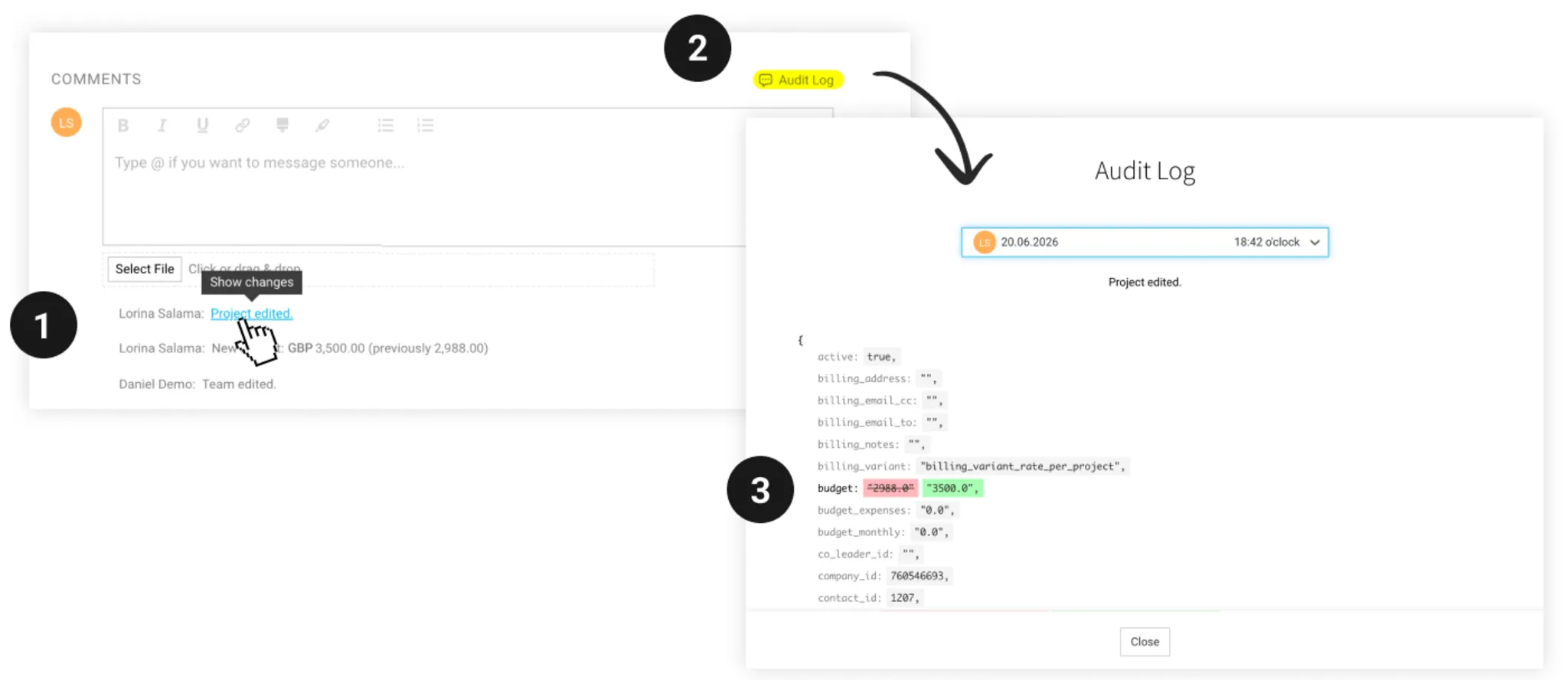
Every change is recorded in the comments section as a system comment – including changes that were not previously documented explicitly. You can open the full history via the “Change Log” link, or directly from the relevant comment. The before-and-after comparison shows exactly what has changed: additions appear in green, removals in red.
This means the following changes, among others, are now traceable:
- Companies: payment terms, billing address, IBAN, invoice format – everything that directly affects outgoing invoices is now documented in full.
- Contacts: it was already visible which fields had changed. What’s new is the exact before-and-after comparison: what was previously in the address? What was the old email address?
- Purchases: whether the amount, line item, or payment method was adjusted later on – the full history is now visible at a glance.
For particularly important changes, there are still specific comments that make the change visible straight away. The Change Log complements these with the complete picture.