Article from
Download All Documents of a Project.
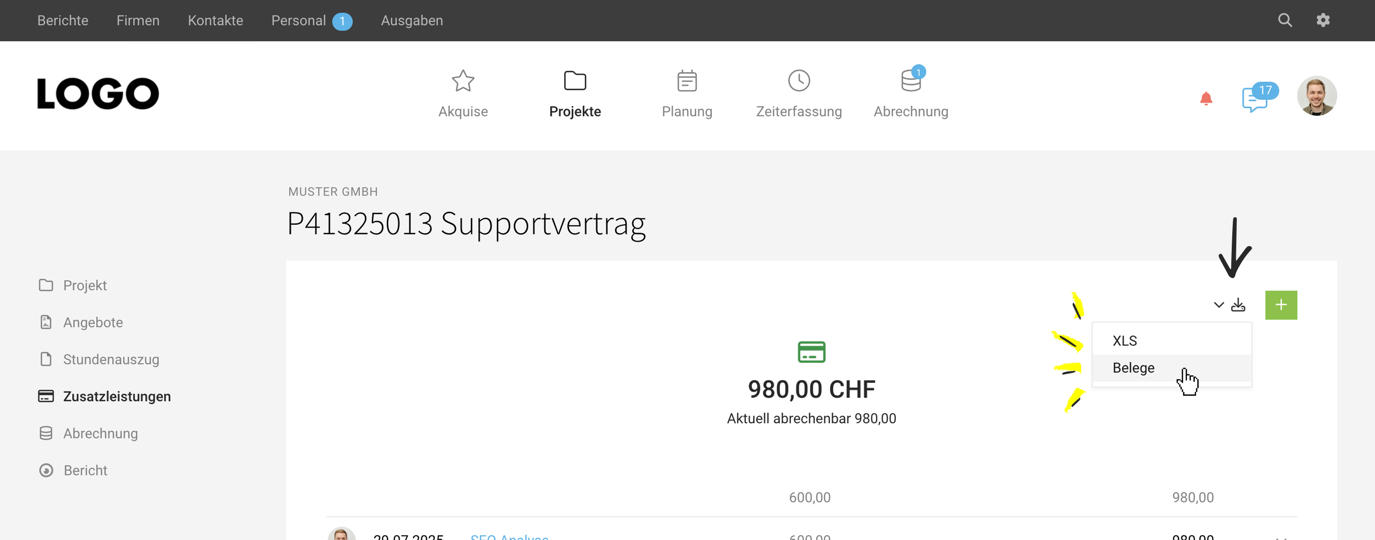
Typically, you record external costs under Additional services in the project. If you want to file the related documents or send them collectively to your client, you can now export them with just two clicks.
 (English image not yet available)
You can find the new option in the project under "Additional services". There, in the top right corner at the export icon, you have the choice to download the additional services as an XLS or – newly – the attached documents themselves.
This can be helpful, for example, if the services are invoiced on a flat-rate basis and documents are therefore not attached to the invoice itself.
For your filing, the new function is also directly available under Projects > Additional services. Here you can download the documents of all projects at once.
All information on Additional services
This can be helpful, for example, if the services are invoiced on a flat-rate basis and documents are therefore not attached to the invoice itself.
For your filing, the new function is also directly available under Projects > Additional services. Here you can download the documents of all projects at once.
All information on Additional services








