Alter News-Artikel!
» Hier geht's zur aktuellen Online-Hilfe
Article from
Planning: New Zoom Options.
Plan the Upcoming Weeks with Greater Detail
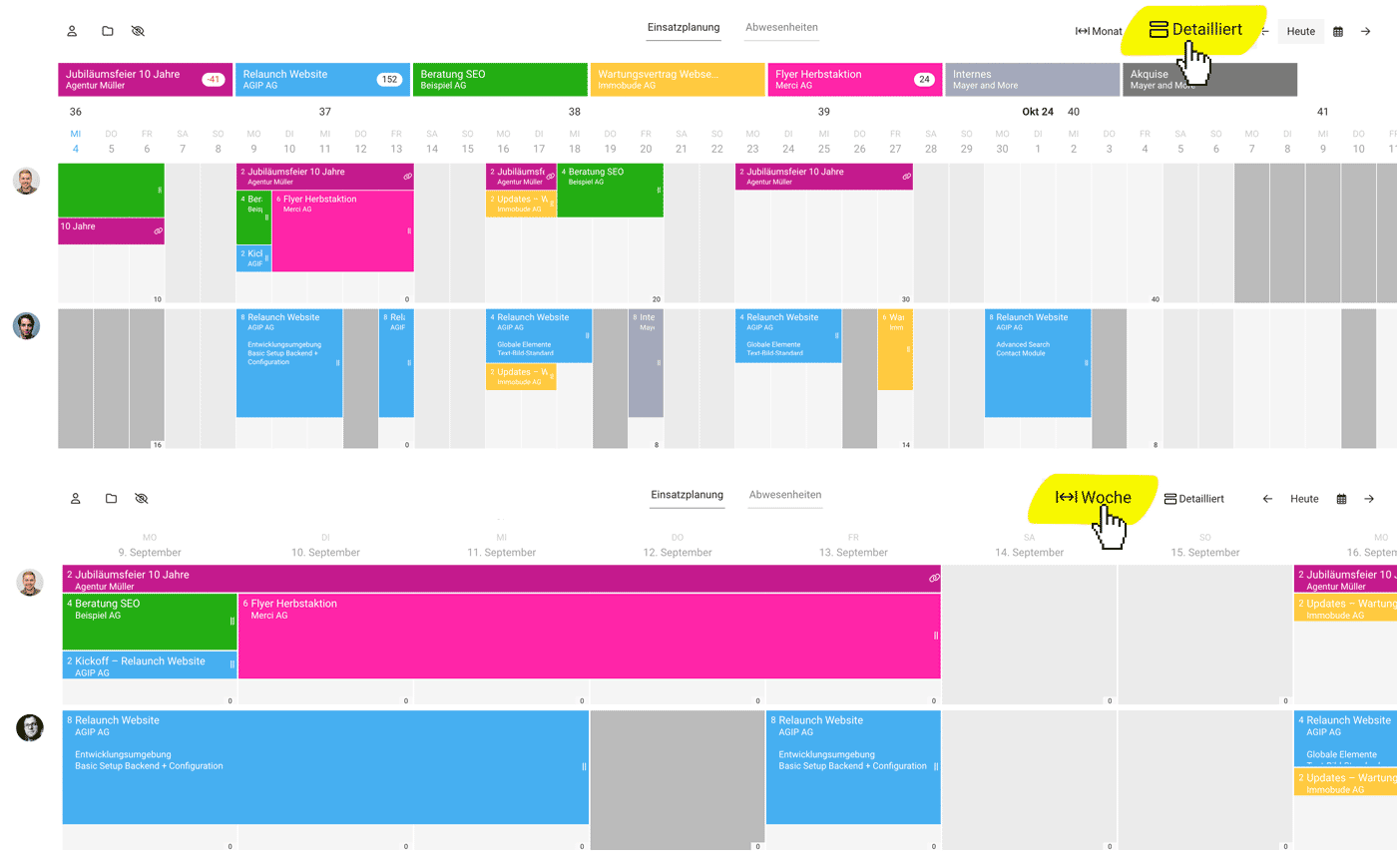
Have you noticed the new Compact/Detailed and Month/Week toggle at the top right? With the new "Detailed" option, you can expand both the monthly and weekly views.
This makes the distribution of workload more tangible and allows for more information to be displayed.
In the detailed weekly view, planning information is more readable thanks to the larger display. For very small teams, the detailed view makes better use of screen height.
 (English image not yet available)
Soon, you'll also be able to focus the planning on yourself using the "Q" keyboard shortcut. And plan services.
All Information on Planning
This makes the distribution of workload more tangible and allows for more information to be displayed.
In the detailed weekly view, planning information is more readable thanks to the larger display. For very small teams, the detailed view makes better use of screen height.
(English image not yet available)Soon, you'll also be able to focus the planning on yourself using the "Q" keyboard shortcut. And plan services.
All Information on Planning








