Alter News-Artikel!
» Hier geht's zur aktuellen Online-Hilfe
Article from
Custom Business Dashboard: Choose & Arrange Tiles.
Different working methods, different responsibilities? Choose now which tiles you want to see under Reports > Overview (Click on the logo).
Configure Dashboard
For the overview, a user still needs full access.
1. Click the settings gear at the top right of the report.
2. Select the most important tiles for you and arrange them in the desired order.
.png "Einstellungen Dashboard") (English image not yet available)
(English image not yet available)
1. Click the settings gear at the top right of the report.
2. Select the most important tiles for you and arrange them in the desired order.
(English image not yet available)New Tiles Available for Selection
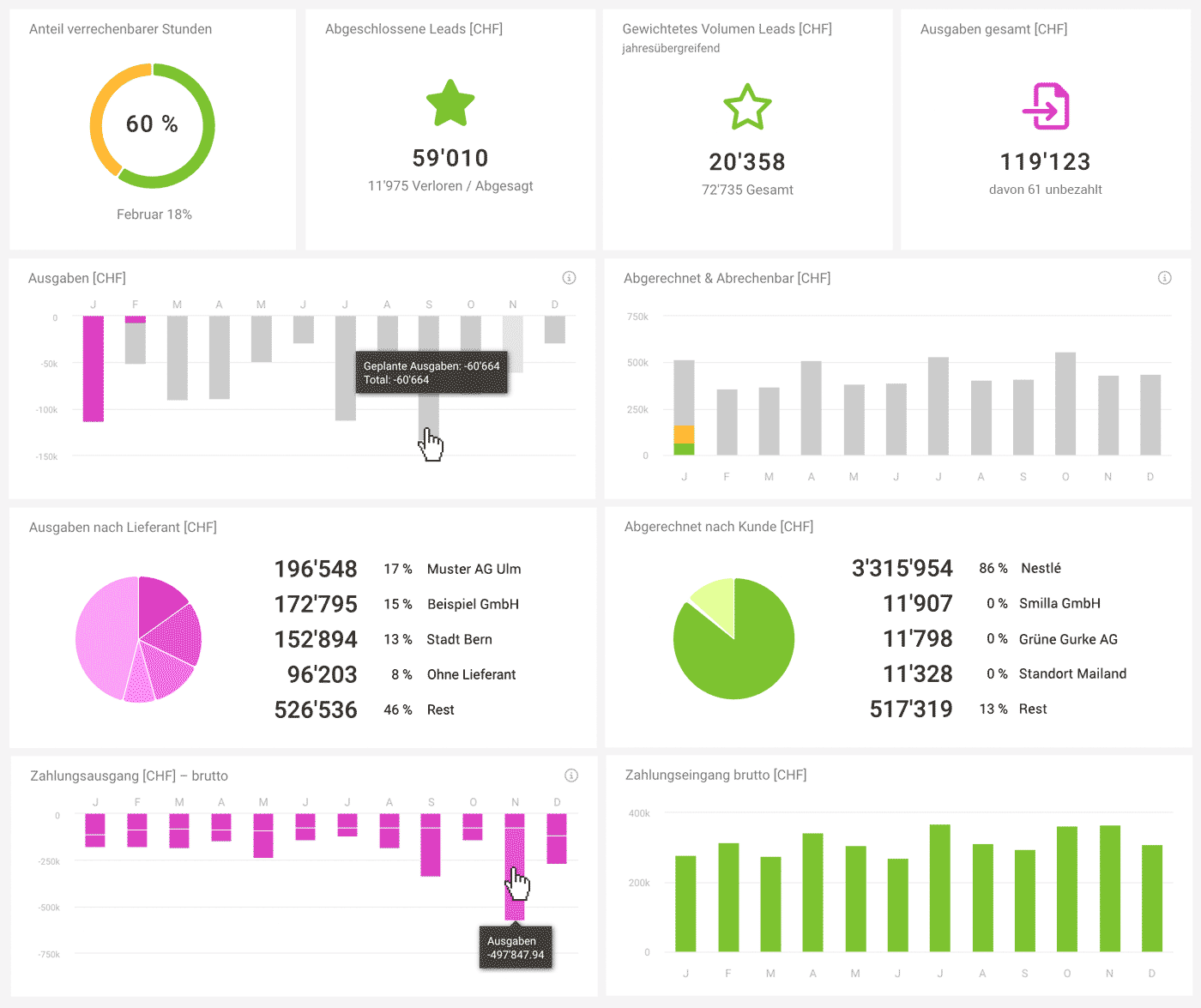
Existing and new tiles are available. The title links lead to detailed reports or lists. As before, all amounts are net – unless it concerns payments – then "gross" is noted in the title. The first version offers the following new tiles:
- Proportion of Billable Hours: Summarises the report under Reports > Time Tracking > Project Time. Indicates how many billable project hours were recorded compared to total hours.
- Completed Leads: Compact info on Leads > Completed. Indicates the volume completed in the year. The completion date counts.
- Weighted Volume of Leads: Tile from the Lead report. Shows the volume calculated over probabilities in the sales pipeline and informs about the volume without weighting below.
- Total Expenditures: Tile from the Expenditures report. Recorded expenditures and how many of them are unpaid.
- Expenditures: Tile from the Expenditures report. Shows recorded and outstanding expenditures monthly. Also planned expenditures.
- Invoiced & Billable: Tile from the Invoicing report. Shows created invoices and how many of them are paid and unpaid.
- Expenditures by Supplier: Existing tile under Finance > Overview, which is intended to be phased out there. Shows the 4 suppliers with the largest expenditure sums.
- Invoiced by Client: Existing tile from Finance > Overview, which is intended to be phased out there. Shows the 4 clients with the largest invoice amounts. Helps identify potential concentration risks.
- Outgoing Payments: Tile from the Expenditures report. Shows monthly outgoing payments. Links to the cash flow report, which breaks down the payments.
- Incoming Payments: Tile from the Invoicing report. Shows monthly incoming payments. Links to the cash flow report, which breaks down the payments.
 (English image not yet available)
More tiles are in development and will follow.
Almost Invisible Accompanying Optimisations
Technically Reestablished
In addition to the new selection, almost all existing reports have been componentised (technically reestablished). This allows the same reports to be reused in different places and ensures better, consistent styling.
Improved Linking
Existing links have been reviewed and titles (where sensible) linked to the detailed breakdown reports.
In addition to the new selection, almost all existing reports have been componentised (technically reestablished). This allows the same reports to be reused in different places and ensures better, consistent styling.
Improved Linking
Existing links have been reviewed and titles (where sensible) linked to the detailed breakdown reports.








