Alter News-Artikel!
» Hier geht's zur aktuellen Online-Hilfe
Article from
Quick Wins April
Something for Everyone :) Overview of various smaller feature updates and UX improvements, as well as API & Webhook updates from recent weeks.
 (English image not yet available)
Directly Choose Proposal Language
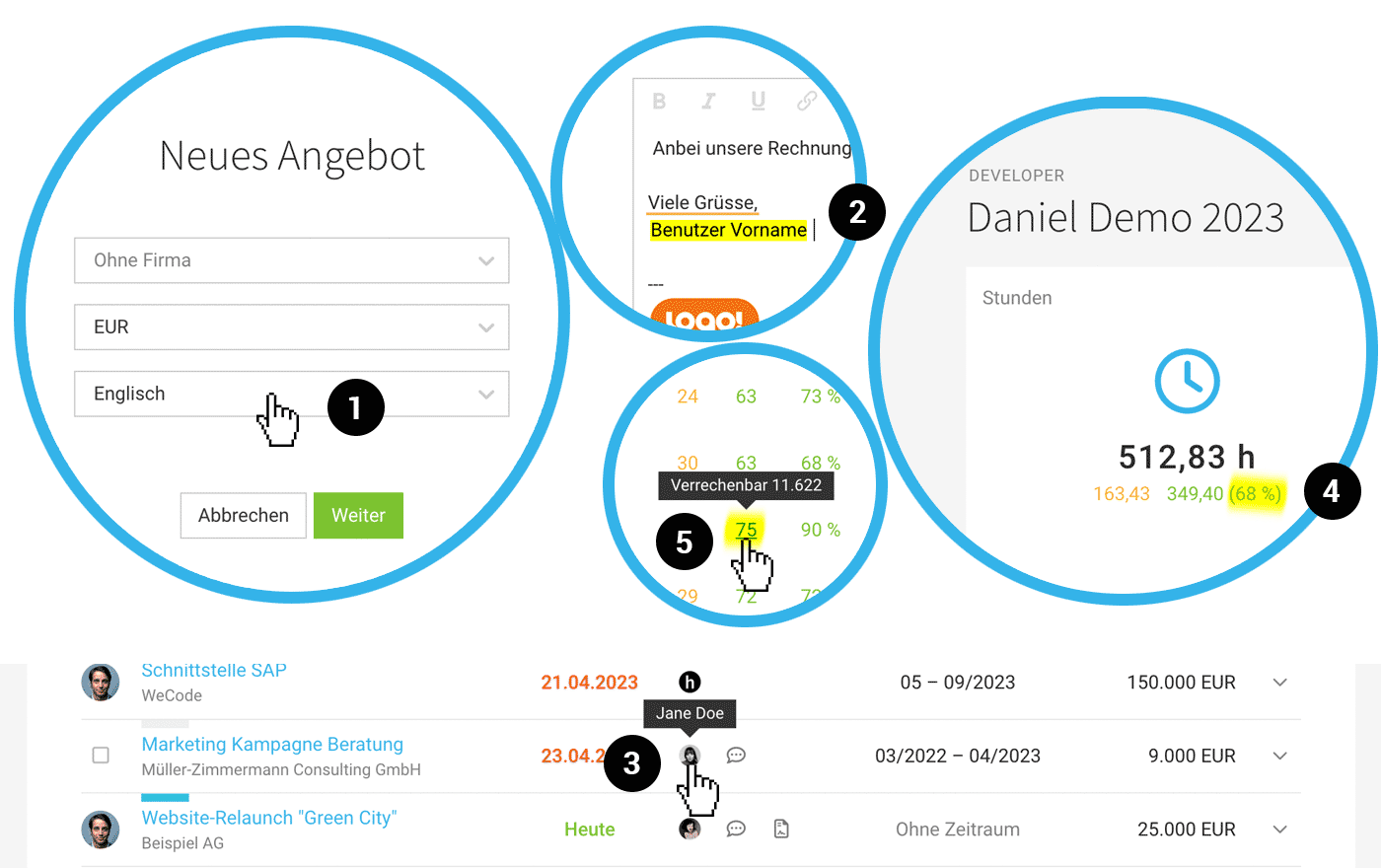
When creating a new proposal directly under "Proposals", you can now select English as the language (1). If you create a proposal directly within the client or project, the language set for the client (account language or English) will be used as usual.
New Variable First Name
For example, in the email greeting, some prefer to use just the first name instead of the full name. Therefore, there is now an additional variable "User First Name"(2).
Lead List with Direct Contact Access
The lead list now also displays the contact – if set (3).
Layout Colour Choice for Info Block and Recipient
You can now set the colour for the recipient address and info block.
Minor UX/OPTs
Notice in Project if Not Displayed in Time Tracking
Occasionally, users wonder why they can't see a newly created project in time tracking, even though they are assigned to it. Usually, there is no service to book time against. MOCO now directly points this out.
Notice if No QR-Invoice is Created
In Switzerland, QR-invoices are mandatory. However, not every invoice generates a QR-invoice. For example, if the invoice is still in draft status, the recipient address cannot be recognized, or the recipient is abroad. MOCO highlights this below the invoice.
Target-Actual Smile Now Always Friendly
The smiley face now appears friendly even if the target hasn't been reached yet. Once the target is achieved, it turns bright blue :). We followed feedback from a few users who found a sad face demotivating – assuming this change is positive or barely noticeable for everyone else.
Personal Report: Percentage of Billable Hours Now Also Displayed
Similar to the overall report under "Reports" > "Time Tracking" > "Project Time", the percentage of billable hours is now also shown in the individual personal report (4).
Occasionally, users wonder why they can't see a newly created project in time tracking, even though they are assigned to it. Usually, there is no service to book time against. MOCO now directly points this out.
Notice if No QR-Invoice is Created
In Switzerland, QR-invoices are mandatory. However, not every invoice generates a QR-invoice. For example, if the invoice is still in draft status, the recipient address cannot be recognized, or the recipient is abroad. MOCO highlights this below the invoice.
Target-Actual Smile Now Always Friendly
The smiley face now appears friendly even if the target hasn't been reached yet. Once the target is achieved, it turns bright blue :). We followed feedback from a few users who found a sad face demotivating – assuming this change is positive or barely noticeable for everyone else.
Personal Report: Percentage of Billable Hours Now Also Displayed
Similar to the overall report under "Reports" > "Time Tracking" > "Project Time", the percentage of billable hours is now also shown in the individual personal report (4).
Overall Project Time Report: Display of Amount for Billable Hours per Person
In addition to showing the number of billable hours, the tooltip now also displays the corresponding monetary value (5).
Fixed Footer in Project Timesheet
With many entries, the "fixed footer" allows for quicker selection and rebooking of specific entries. Unnecessary scrolling is eliminated.
Tooltips in Global Timesheet
Long and truncated project names and descriptions in the global timesheet are now fully displayed in a tooltip.
API & Webhooks
- Project group has been added to the project attributes, and projects can now be filtered by project group.
- Schedules (absences) are now available as a webhook.
- Expenditures can now be assigned to projects.
- Already invoiced time entries can be displayed with the invoices.








