Alter News-Artikel!
» Hier geht's zur aktuellen Online-Hilfe
Article from
Quick Wins for Proposals & Invoices, Personnel, API & More.
 (English image not yet available)
Proposals & Invoices
Search Service Catalogue
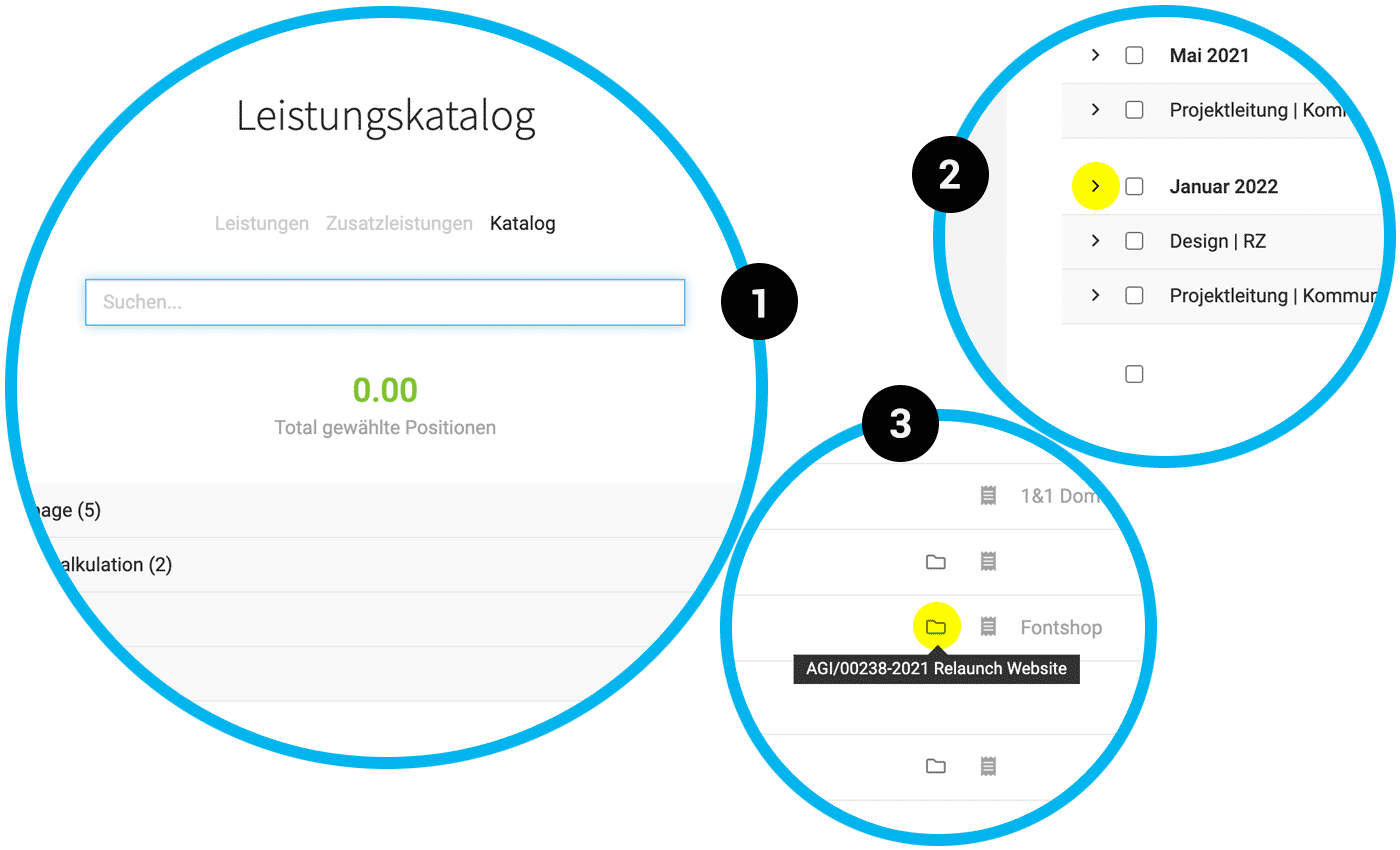
When inserting predefined services into a proposal or an invoice, you can now find your desired entries faster with a find-as-you-type search (1).
Invoice Export Indicates Invoice Type
The Excel export under "Invoicing" now also includes the "Invoice Type" column.
Search by Invoice Gross Amount
Using the filter search under "Invoicing," you can quickly find an invoice by the invoice amount in more specific cases.
When inserting predefined services into a proposal or an invoice, you can now find your desired entries faster with a find-as-you-type search (1).
Invoice Export Indicates Invoice Type
The Excel export under "Invoicing" now also includes the "Invoice Type" column.
Search by Invoice Gross Amount
Using the filter search under "Invoicing," you can quickly find an invoice by the invoice amount in more specific cases.
Personnel
Edit Target Hours at Top Level
You can now adjust the target hours (weekly model) and access rights directly when entering the person – after saving. For already entered persons, you can jump there with one click via the global search (magnifying glass top right or "/" on the keyboard).
Select Person's Language
You can now choose the user's language directly when creating a new person. This determines the language in which the person receives the invitation and enters MOCO. Previously, a newly created user was always greeted in the account language and could only change the language in their profile afterwards.
You can now adjust the target hours (weekly model) and access rights directly when entering the person – after saving. For already entered persons, you can jump there with one click via the global search (magnifying glass top right or "/" on the keyboard).
Select Person's Language
You can now choose the user's language directly when creating a new person. This determines the language in which the person receives the invitation and enters MOCO. Previously, a newly created user was always greeted in the account language and could only change the language in their profile afterwards.
General
Timesheet: Open Entire Month with One Click
In addition to individual services, the month can now also be opened with one click (2).
Project Info in Expenditure List
A tooltip on the project icon (3) shows the assigned project.
Shared Project Report Enhanced
For projects with a monthly budget, the report field for the month is now also displayed in the shared project report.
In addition to individual services, the month can now also be opened with one click (2).
Project Info in Expenditure List
A tooltip on the project icon (3) shows the assigned project.
Shared Project Report Enhanced
For projects with a monthly budget, the report field for the month is now also displayed in the shared project report.








