Alter News-Artikel!
» Hier geht's zur aktuellen Online-Hilfe
Article from
Quick Wins around Expenditures.
Entry: All expenditures without receipt or category at a glance
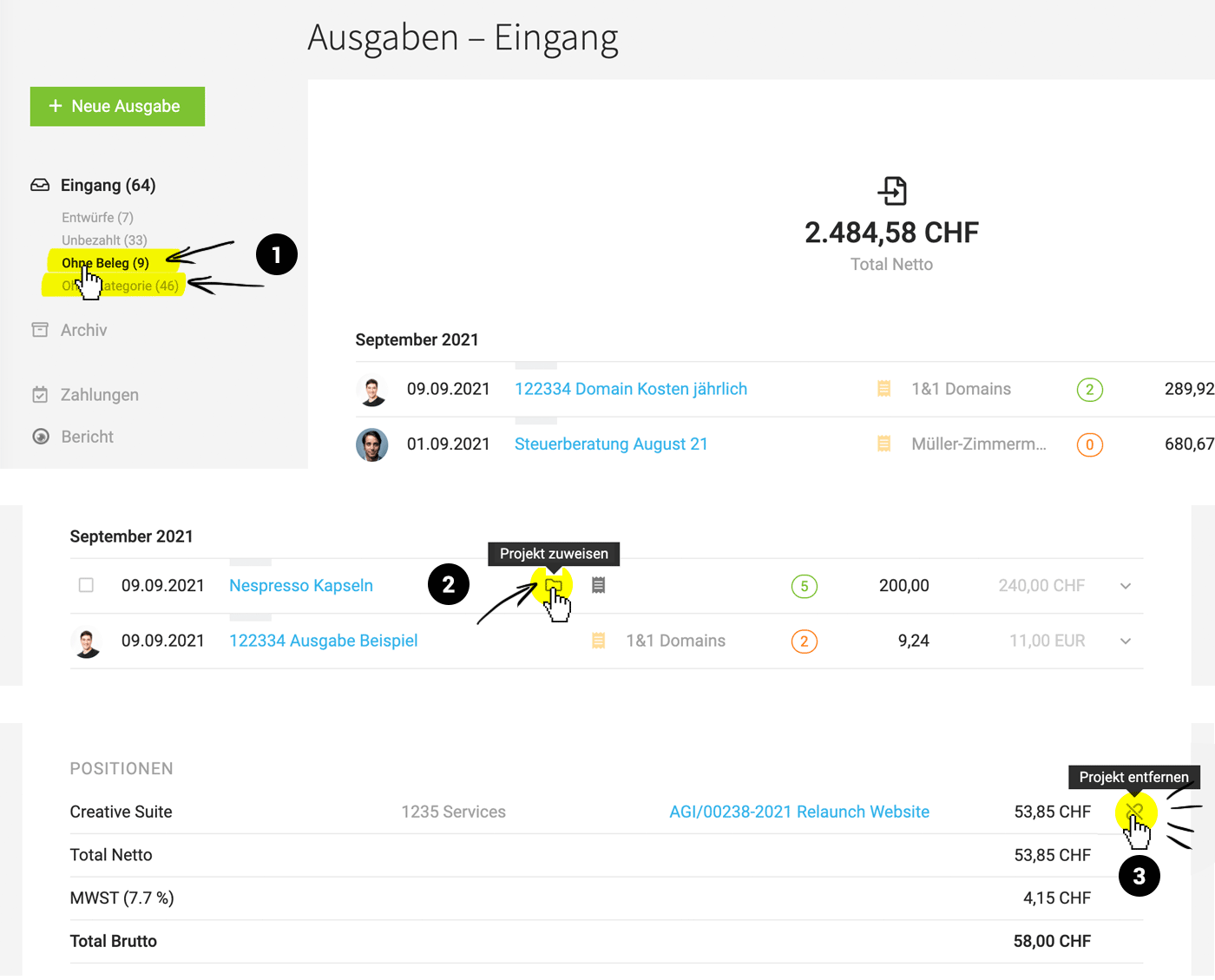
Clicking on the Smart Filter "Without Receipt" filters all expenditures missing a receipt. Similarly, there's a new Smart Filter "Without Category" (1).
Assign projects directly from the list
Clicking the folder icon in the expenditures list brings up the assignment option immediately. Exception: If the expenditure has been split into multiple items (2).
Change project assignment directly at expenditure
The assigned project can now be removed directly at the expenditure. To do this, select the linking symbol (to remove assignment) (3). If necessary, the corresponding additional service in the project can be deleted in the same step (requires full access to expenditures).
 (English image not yet available)
Pre-fill one of the last three invoices
After selecting the supplier, MOCO offers the last three distinct invoice data for pre-filling.
Optimisations for keyboard input operation
Payment modals can be closed with ESC, and the expenditures form starts with the focus on the responsible person.
Clicking on the Smart Filter "Without Receipt" filters all expenditures missing a receipt. Similarly, there's a new Smart Filter "Without Category" (1).
Assign projects directly from the list
Clicking the folder icon in the expenditures list brings up the assignment option immediately. Exception: If the expenditure has been split into multiple items (2).
Change project assignment directly at expenditure
The assigned project can now be removed directly at the expenditure. To do this, select the linking symbol (to remove assignment) (3). If necessary, the corresponding additional service in the project can be deleted in the same step (requires full access to expenditures).
(English image not yet available)Pre-fill one of the last three invoices
After selecting the supplier, MOCO offers the last three distinct invoice data for pre-filling.
Optimisations for keyboard input operation
Payment modals can be closed with ESC, and the expenditures form starts with the focus on the responsible person.








