Alter News-Artikel!
» Hier geht's zur aktuellen Online-Hilfe
Article from
Quick Wins: Visual Optimisation & API Enhancement.
 (English image not yet available)
Displaying Exceeded Budget
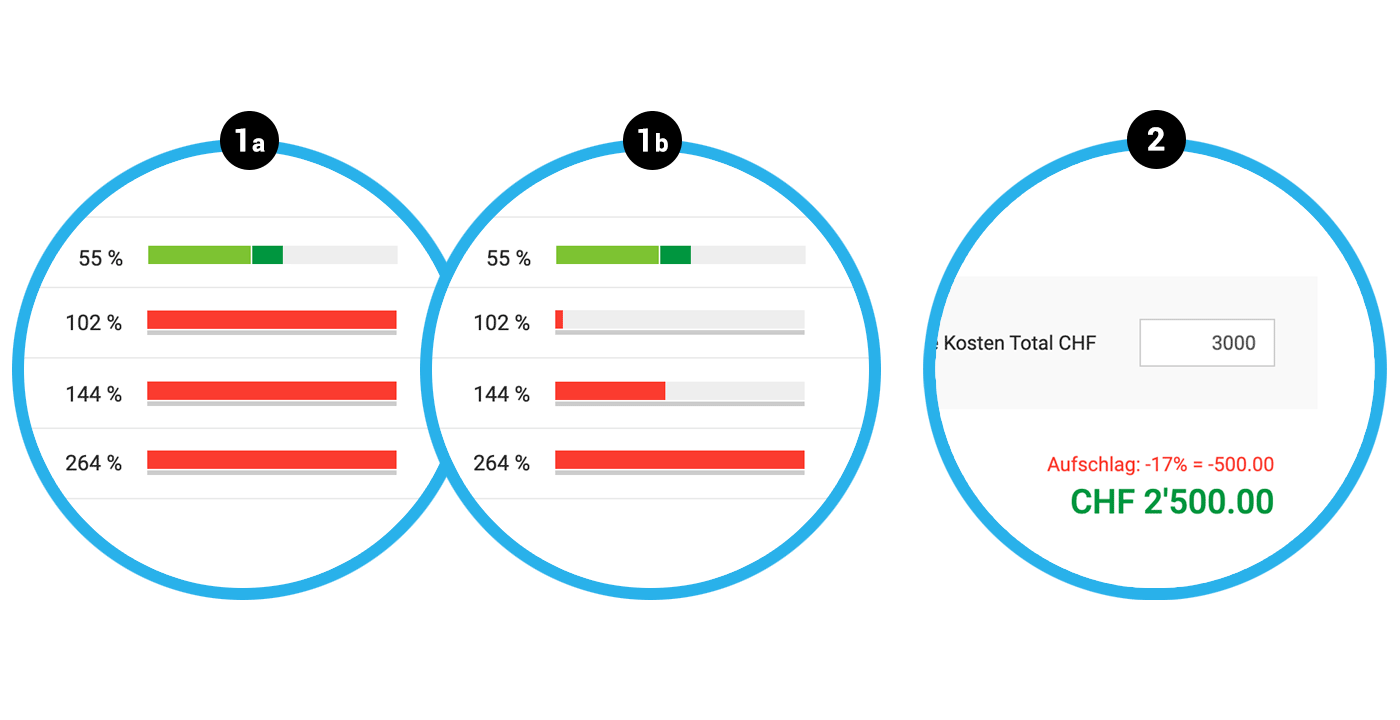
The budget progress bar in the project list indicates how much of the estimated project services have already been recorded. If the services exceed 100%, the progress bar turns red.
Instead of colouring the entire bar red (1a), the red bar now increases with greater budget overruns (2a).
Advantage: A project at 103% has significantly less impact than a project with a 200% budget overrun. This allows the eye to quickly identify which projects are still "ok" and which are clearly going off track.
Instead of colouring the entire bar red (1a), the red bar now increases with greater budget overruns (2a).
Advantage: A project at 103% has significantly less impact than a project with a 200% budget overrun. This allows the eye to quickly identify which projects are still "ok" and which are clearly going off track.
Costs & Margin of an Additional Service
Instead of the unit price costs, the total costs are now entered under "Own Costs" in the additional service (2). Since the amount is stored as total costs when an expenditure item is assigned, this standardisation makes sense.
If the costs exceed the amount of the additional service, MOCO displays the negative margin in red (2). This helps to quickly identify potential errors.
If the costs exceed the amount of the additional service, MOCO displays the negative margin in red (2). This helps to quickly identify potential errors.








