Alter News-Artikel!
» Hier geht's zur aktuellen Online-Hilfe
Article from
Announcement: Planning V2 Available Online from Week 35
The new planning system, including series entries and further performance optimisations, will be available online for everyone from week 35. For accounts still using V1, rest assured: existing entries will be carried over, and previous functionalities are covered.
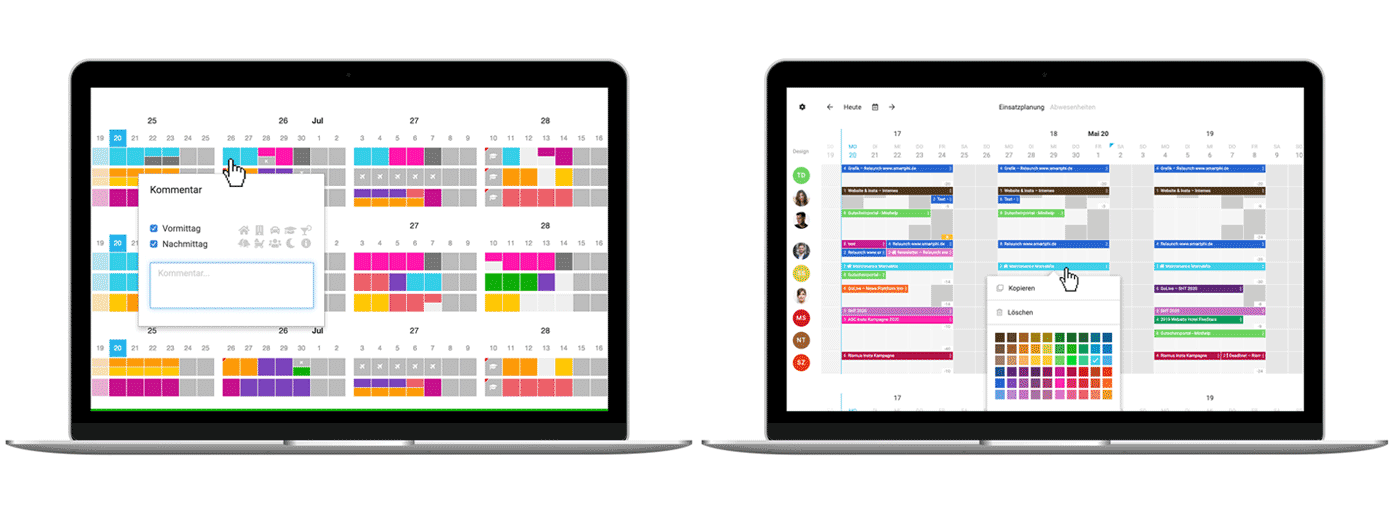
Hello V2
It's finally here. Planning V2 can fully replace the previous planning system, offering greater flexibility and reliability in planning. In addition to the approximately 100 Early-Bird accounts, all other accounts will now be migrated. All existing entries will be transferred. We highlight the changes compared to V1 under "What's Been Optimised".
Information for Newcomers
Information for Newcomers
- On your first visit to the new planning version, you'll be greeted with an information message. This links to this news page and also offers a small video tutorial!
- It's best to refresh open browser windows to update the app.
- Decimal numbers in project entries result from the precise conversion of previous entries into specific hour numbers. In the future, the number of hours can be selected directly when making an entry.
People are creatures of habit, and it may take a few days to get used to the new look and functionality. Give yourself 1-2 weeks to adjust. Feedback from Early Birds has shown that you can acclimate well and appreciate the optimisations!
Watch the video!
Watch the video!
What's Been Optimised
✅ More generous appearance with more space for planning by reducing people to avatars + tooltips.
✅ The project bar at the top is removed – remaining hours are displayed in the entry when selecting a project.
✅ Entries can be dragged/clicked in – even over multiple days.
✅ Hours per day freely selectable – including quick selection option.
✅ Weekends can also be planned normally.
✅ Weekends can also be planned normally.
✅ Multiple projects can be entered in one day: Allows for more detailed planning in the coming weeks if needed.
✅ Days can be overplanned.
✅ Entries can also take 0 hours: e.g., as placeholders for unconfirmed orders or marking milestones/deadlines.
✅ Additional symbols are available for selection.
✅ Description/symbol (optional) are displayed directly. Useful for making phases, etc., visible.
✅ Easier team selection at the top left via the settings icon.
✅ 2 levels for projects and absences: Absences and projects can be entered in parallel.
✅ Projects and absences cannot be accidentally deleted by simple clicking.
✅ Additional symbols are available for selection.
✅ The new comprehensive report (Reports > Planning) and the export now cover the entire year. Utilisation is displayed graphically and is thus quicker to grasp.
✅ The planning preview in the weekly email has changed according to the new entry method.
✅ Requested leave is displayed.
✅ Display of over/underload directly in planning.
✅ Series entry: Weekly repetition directly in the entry modal under "More Options".
✅ Display of over/underload directly in planning.
✅ Series entry: Weekly repetition directly in the entry modal under "More Options".
Tips
- Move entries via drag and drop – copy with the "Alt" key pressed.
- Adjust the colour for the entry or the entire project with a right-click on the entry.








