Alter News-Artikel!
» Hier geht's zur aktuellen Online-Hilfe
Article from
iPhone App: Stopwatch and Check-in.
The June update introduces the following new features:
Stopwatch
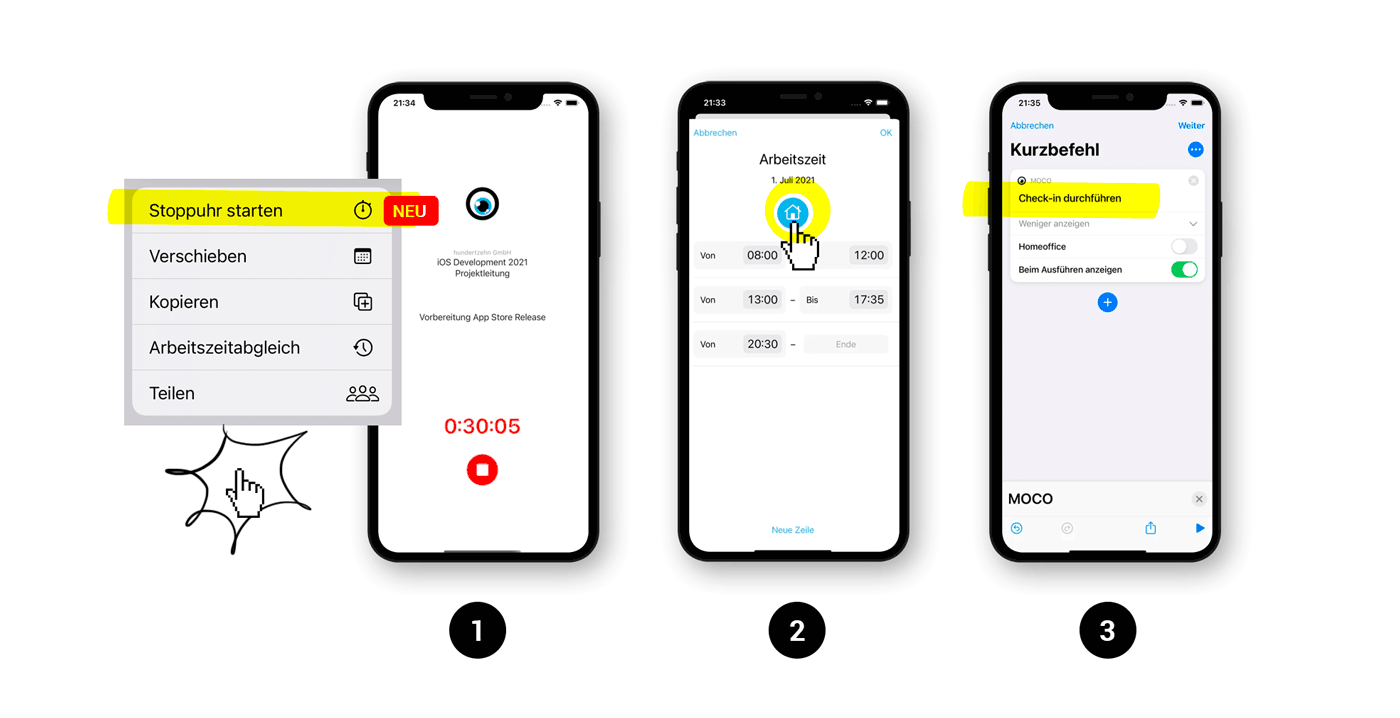
The stopwatch can be started when creating a new entry or for an existing entry in today's view (via the context menu (1) – long press). The stopwatch synchronizes live with the web app and can be started and stopped in both locations.
 (English image not yet available)
(English image not yet available)Check-in / Check-out
The iPhone app can be integrated with Apple's "Shortcuts" app. MOCO offers two actions for automation:
- Check-in ("Clock in" for a new work phase)
- Check-out ("Clock out" to end an ongoing work phase)
This allows for various personalized automations, such as:
- Check-in upon arrival at a specified location (Check-out similarly)
- Check-in when connecting to a specified Wifi
- Check-in by touching an RFID tag (stickers that can be placed at various locations such as a desk or entrance door).
- and more.
Home Office
When recording working hours, Home Office can also be logged as on the web (2). Alternatively, it can be automatically recorded during Check-In (3).








