Article from
Leads: Lists Reloaded.
In the Leads section, the grouped view has been replaced by a flexibly sortable list. Keep track of all leads with new filters and inline edit options.
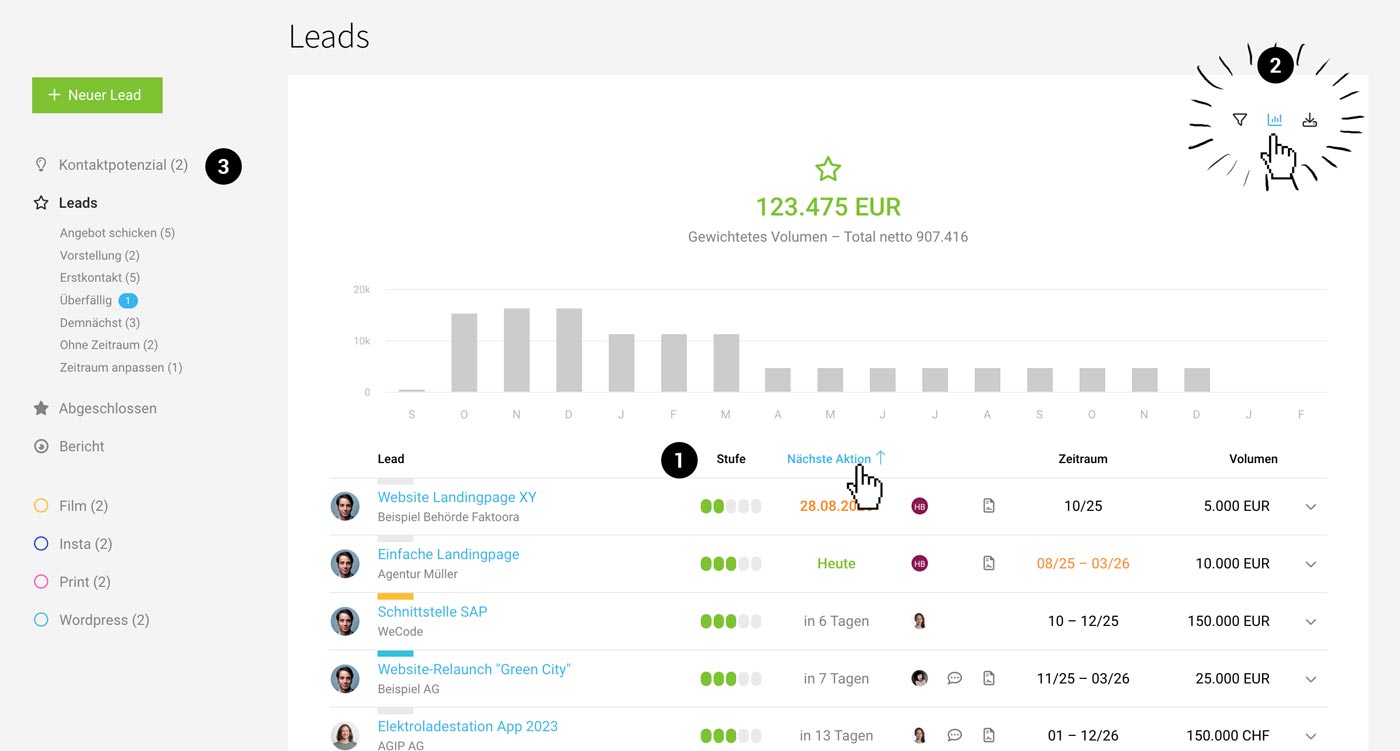 (English image not yet available)
Flat, Sortable List
Active and completed leads are now organized in sortable lists for greater flexibility. Use the familiar Smart Filters or the new filter option to quickly search by acquisition stage. The list can be sorted by various columns such as "Next Action" (1).
New Filter Options
Using the filter (press F or click the filter icon at the top right), you can now also filter by Company or Acquisition Stage.
New Inline Edit Options
You can now not only change the date for the "Next Action" and the time frame directly in the lead list, but also update the Stage and Volume or add a brief Comment.
Display Volume by Time Frame Chart
The chart is now hidden by default and can be displayed as needed (2).
Contact Potential
The Contact Potential status (for acquisition ideas) has been given its own menu item above the leads (3), to better represent the logical flow from Contact Potential → Lead → Completed. Additionally, you can use the new "Company" filter here as well.








