Alter News-Artikel!
» Hier geht's zur aktuellen Online-Hilfe
Article from
Various Quick Wins & UX Improvements.
 (English image not yet available)
Projects
Planned Invoicing in the Project List
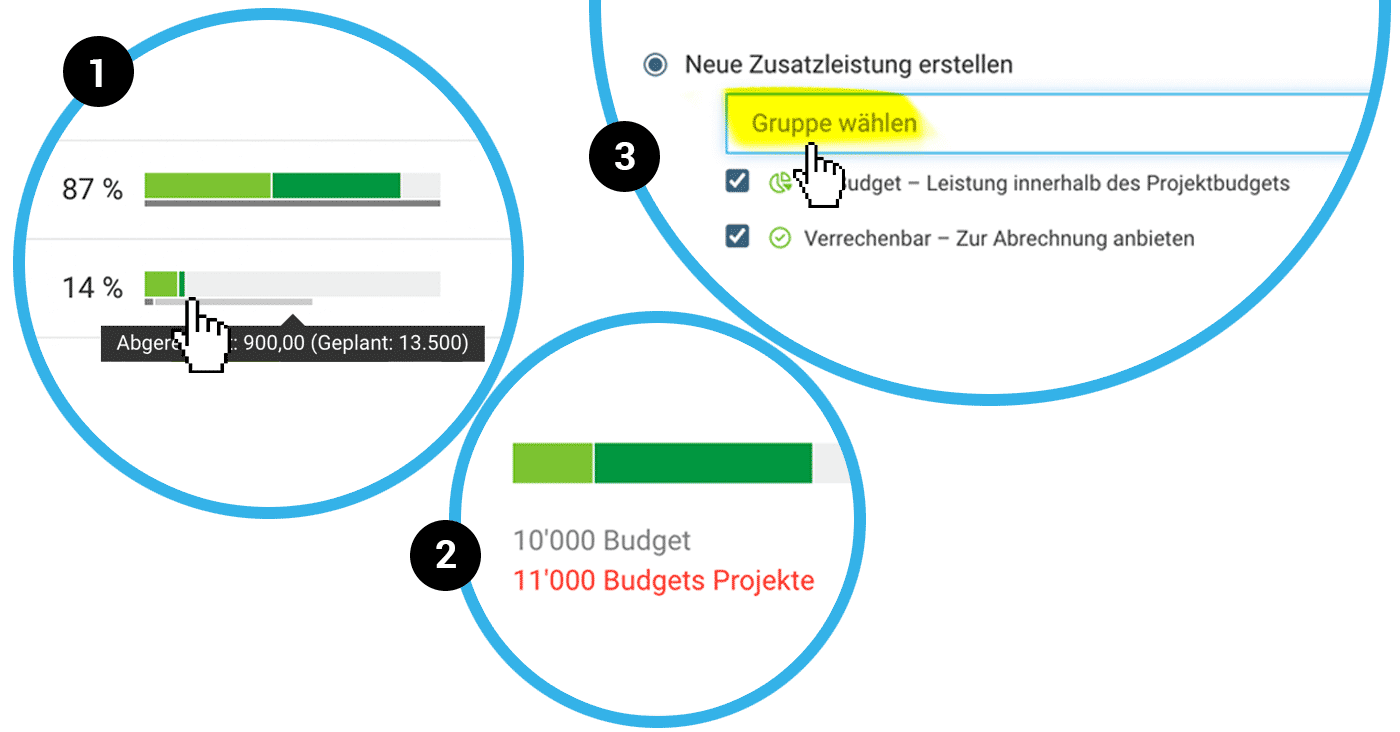
In the budget progress chart, alongside the information about the amount already invoiced, the planned invoicing amount according to the invoicing schedule is now displayed in light grey (1).
More about invoicing schedules
More about invoicing schedules
Project Group Budget Control
In the project group report, when a group budget is set, the sum of the project budgets is compared. The red display quickly indicates if the group budget is too small (2).
If no group budget is set, the project budgets are automatically summed as the group budget.
More about project groups
If no group budget is set, the project budgets are automatically summed as the group budget.
More about project groups
Time Tracking
Share Timesheet Entry with All in One Click
When sharing a timesheet entry in time tracking, you can now select all individuals with one click.
More about sharing timesheet entries
More about sharing timesheet entries
Optimised Dropdown
For better readability of the project name in the time tracking dropdown, the display of the client name takes up less width.
Expenditures
Assign Expenditures to Cost Group
When assigning expenditures to a project, you can directly choose the cost group (3).
More about cost groups
More about cost groups
Minor UX Improvements
- In bulk invoicing (Invoicing > Billable), the selected period is displayed in the next step but is no longer changeable – a new note has been added to indicate this.
- For the English user interface, the term "Expenditure" is now used for "Ausgaben", while "Expenses" remains for personal expenses. Previously, this was not clearly distinguished and applied.
- When recording fixed cost amounts (monthly variations), the month is no longer just shown as a placeholder but is displayed below the field, ensuring clarity about which month is being edited, even for later changes.








