Article from
Income: Categories, Revenue Accounts & Cost Centres.
Assign categories to services and analyse income by category and cost centre. Provide cost centre and revenue account details for accounting if needed.
Your grid for all services
You can name services as you wish. They can be renamed in projects or freely defined in proposals. Categories allow you to create a grid over all services. Through this grid, you can evaluate income and, if necessary, pass on cost centre and revenue account details to accounting.
You can name services as you wish. They can be renamed in projects or freely defined in proposals. Categories allow you to create a grid over all services. Through this grid, you can evaluate income and, if necessary, pass on cost centre and revenue account details to accounting.
Define Categories
You can find the new option under Settings > Accounting > Revenue. Activate it, create your categories, and specify revenue account and/or cost centre if needed. Also, choose whether the category applies to services, additional services (usually external services), or both.
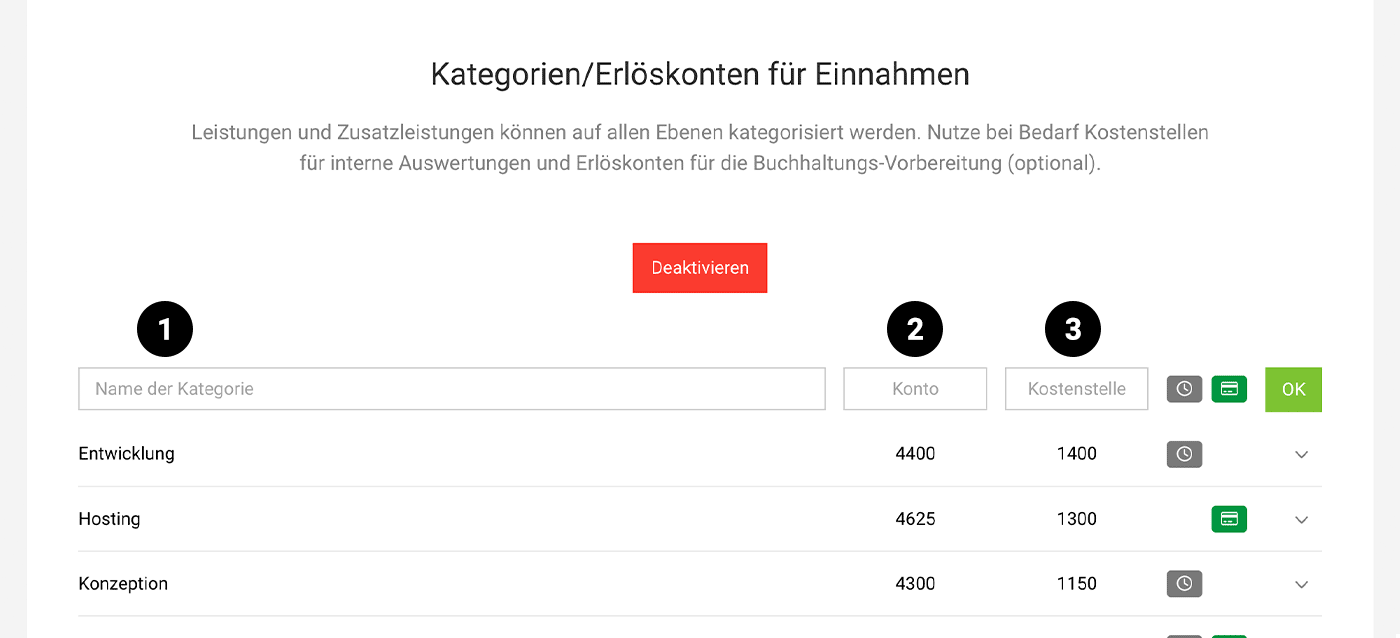
Category, Account, Cost Centre
Full flexibility: Apart from the fact that services/positions do not have to be assigned to a category, each account can decide how to use the categorisation of services and which of the three levels are relevant for their own company.
 (English image not yet available)
(English image not yet available)Category (1)
Categories can be defined without further details. This allows you to simply evaluate income by category.
Account (2)
Decide if you want to record revenue accounts for preparatory accounting. This is an additional level available to you through the categories for accounting preparation.
Cost Centre (3)
If you define cost centres for internal controlling, assign your cost centres to the categories. You can also pass these on to accounting.
Assign Categories
Categories that are consistent and remain flexible
You assign the categories via the icon label on the services or positions in MOCO. The assignment can be made anywhere and, once assigned, carries through to the invoice. It can also be overwritten if needed.
- Standard services (see illustration)
- Standard additional services
- Service catalogue
- Proposals
- Projects
- Invoices
.png "Standardleistungen Kategorien wählen") (English image not yet available)
(English image not yet available)Example: If you assign a category to a standard service in the settings and include this service in a proposal, project, or invoice, the category will also be carried over.
Existing content remains unchanged
The categories do not retroactively affect existing content (proposals, invoices, etc.). Already created proposals and invoices will not be altered.
Existing content remains unchanged
The categories do not retroactively affect existing content (proposals, invoices, etc.). Already created proposals and invoices will not be altered.
Report & Excel Export
When using categories, the following evaluation options are available:
Invoicing > Report
Similar to the evaluation of categories for expenditures, the report under "Income by Category" displays the amount and percentage of total sales by (business) year:
.png "Bericht Einnahmen nach Kategorie") (English image not yet available)
(English image not yet available)
(English image not yet available)Excel Export under "Invoices"
The export of individual invoice items under "Invoicing" now includes the columns "Category", "Cost Centre", and "Revenue Account". In Excel, you can aggregate and evaluate the invoice items by type.
Accounting Export
When exporting outgoing invoices to DATEV (CSV and direct transfer), the information is provided depending on the depth of use:
Categories
The invoice items are grouped by category, and a booking entry is created for each. This can be traced in MOCO under "Invoicing" > "Accounting" via the tooltip:
.png "Erlöse Kategorien Tooltip") (English image not yet available)
(English image not yet available)Revenue Accounts
Stored revenue accounts are provided (otherwise the standard account applies).
Cost Centres
Stored cost centres are transferred to KOST1 or KOST2 by selecting the type "Service (Category Cost Centre)":
.png "datev-kostenstelle-einnahmen") (English image not yet available)
(English image not yet available)Other accounting exports will also be supplemented with the information in the coming weeks.








