Article from
Expenditures: Cost Centres for Budgets.
With the newly definable cost centres at the budget level, you can automatically assign a cost centre to each recorded expenditure along with the budget.
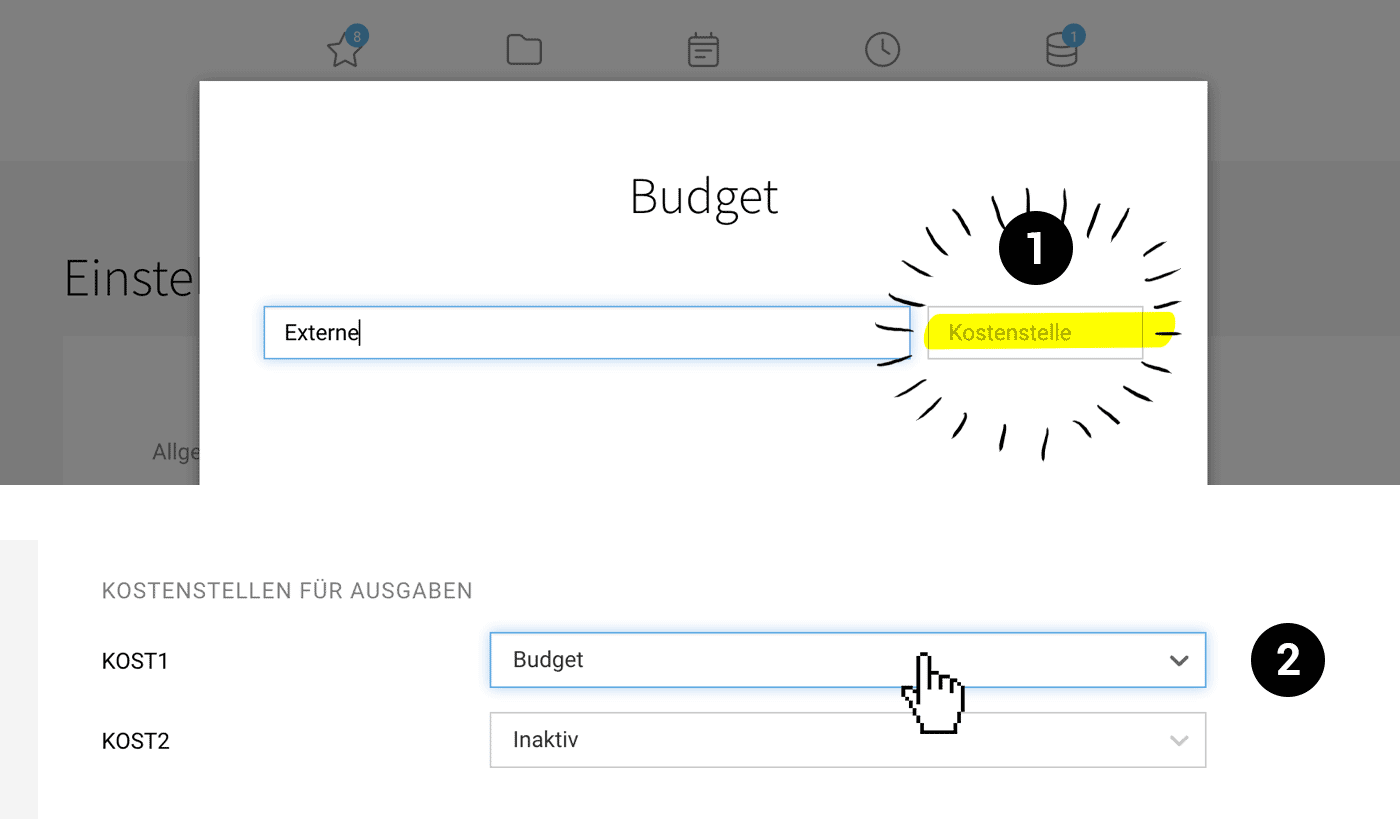 (English image not yet available)
Define Cost Centres for Expenditure Budgets
In the settings under "Expenditures" > "Budgets", you manage the expenditure budgets. To define a cost centre for existing budgets, edit them and fill in the corresponding field (1).
The cost centre is also automatically included in the Excel export under "Expenditures" > "Budgets".
Tip: Use the "Without Budget" Smart Filter
To ensure that all expenditures are assigned a budget, use the "Without Budget" smart filter. This allows you to specifically filter expenditures in the list that have not yet been assigned a budget – and make the assignment afterwards.
The cost centre is also automatically included in the Excel export under "Expenditures" > "Budgets".
Tip: Use the "Without Budget" Smart Filter
To ensure that all expenditures are assigned a budget, use the "Without Budget" smart filter. This allows you to specifically filter expenditures in the list that have not yet been assigned a budget – and make the assignment afterwards.
Automatic Transfer of Cost Centres to Accounting
You can for DATEV transfer the cost centre to the fields KOST1 or KOST2. To do this, select in the settings > Accounting > Cost Centres via the "Budget" dropdown (2).








