Article from
Simple Instead of All-in-One – How to Find the Right Setup for Your Project Business.
All-in-One sounds tempting. However, in practice, a few well-connected, streamlined tools often lead to faster results. MOCO was developed precisely for this scenario. In this article, we show how MOCO becomes the core of your setup and what integration options are available.
What Companies with Project Business Really Need
Agencies, consultancies, and IT service providers work on a project basis. This means they need tools that keep track of project figures, capacities, and finances – not shop connections, warehouses, or internal chats. Time tracking, invoicing, planning, reporting – these are the real levers for efficiency.
Large tool platforms may seem attractive at first glance. But those who try to do everything often end up doing nothing well. Attempting to squeeze project planning, communication, CRM, accounting, time tracking, and more into a single tool leads to overloaded interfaces, steep learning curves, and weak performance in core functions.
Best-of-Breed: The Smarter Way
Instead of opting for All-in-One, many successful companies choose a Best-of-Breed setup: a set of fewer specialized tools like MOCO that work together optimally through interfaces. This increases flexibility, user-friendliness, and data quality. At the same time, tools can be more easily swapped or supplemented as requirements change. You choose only what you really need – and can expand at any time. This keeps your setup streamlined, powerful, and adaptable.
 (English image not yet available)
(English image not yet available)MOCO as the Heart of Your Setup
MOCO is not everything – but exactly what you need for your project business: Time tracking, project controlling, invoicing, client acquisition, capacity planning, personnel & contact management, invoice receipt, reports. No data storage, no chat function, no warehouse. Instead, a clear focus on business processes – simple, fast, intuitive.
And the best part: MOCO offers very comprehensive integration options. You can individually enhance MOCO – exactly how it fits your setup.
And the best part: MOCO offers very comprehensive integration options. You can individually enhance MOCO – exactly how it fits your setup.
Options for Expansion
MOCO deliberately distances itself from jack-of-all-trades tools. The focus: Streamlined processes, clear data, fast results. If you want more, you can connect suitable tools with just a few clicks.
- API & Webhooks: The solution for developers or companies with special requirements. For example, if data from your own systems needs to be mirrored in MOCO or real-time actions triggered. The possibilities are almost limitless – from ERP connections to individual analyses.
- Zapier & Make: Suitable for automated workflows, such as creating new projects from forms directly in MOCO or synchronizing tasks from other tools. Zapier is ideal for simple, visually configurable processes without code, while Make is suitable for more complex scenarios with conditions and logic. A real lever for teams looking to automate repetitive tasks.
- Browser Extension (e.g., for Trello, Jira, awork): Ideal if your team primarily works in a task management tool and needs to track time directly there. The extension allows booking directly from the task view without switching tools – including linking to the task in MOCO. Perfect for operational teams that love quick entries.
- Direct Integrations: The simplest option for those using existing tools like Personio, Pliant, or DATEV. These connections are usually activated in just a few clicks and offer immediate noticeable benefits: Less double entry, better data consistency, more transparency.
Practical Examples: Creating Immediate Individual Value with These Direct Integrations.
MOCO + Personio:
With the Personio integration, you benefit from a seamless HR process: Absences are maintained in Personio and automatically transferred to MOCO, working hours flow hourly from MOCO back to Personio.
Double maintenance is eliminated, and both systems are synchronized. This reduces errors, increases transparency, and saves time in capacity planning – a real advantage in everyday project life.
Double maintenance is eliminated, and both systems are synchronized. This reduces errors, increases transparency, and saves time in capacity planning – a real advantage in everyday project life.
- Record absences only in Personio and automatically synchronize with MOCO.
- Record working hours only in MOCO and synchronize with Personio.
- Overview in both tools on the same data basis
MOCO + DATEV:
The direct connection of MOCO with DATEV (DUO) makes your accounting leaner and more secure. Incoming and outgoing invoices are transferred as booking suggestions with a click from MOCO to DATEV Unternehmen online, where the tax advisor can finalize them. Decide yourself or together with the tax office to what extent you pre-account the invoices.
This saves you and your tax advisor enormous time and gives you an overview of which invoices are already in accounting at any time.
This saves you and your tax advisor enormous time and gives you an overview of which invoices are already in accounting at any time.
- With one click, transfer invoices from MOCO to DATEV Unternehmen Online.
- Fewer errors, less effort for you and the tax consultancy, high data security.
- Simple synchronous management as no invoice is duplicated or forgotten.
 (English image not yet available)
MOCO + Pliant:
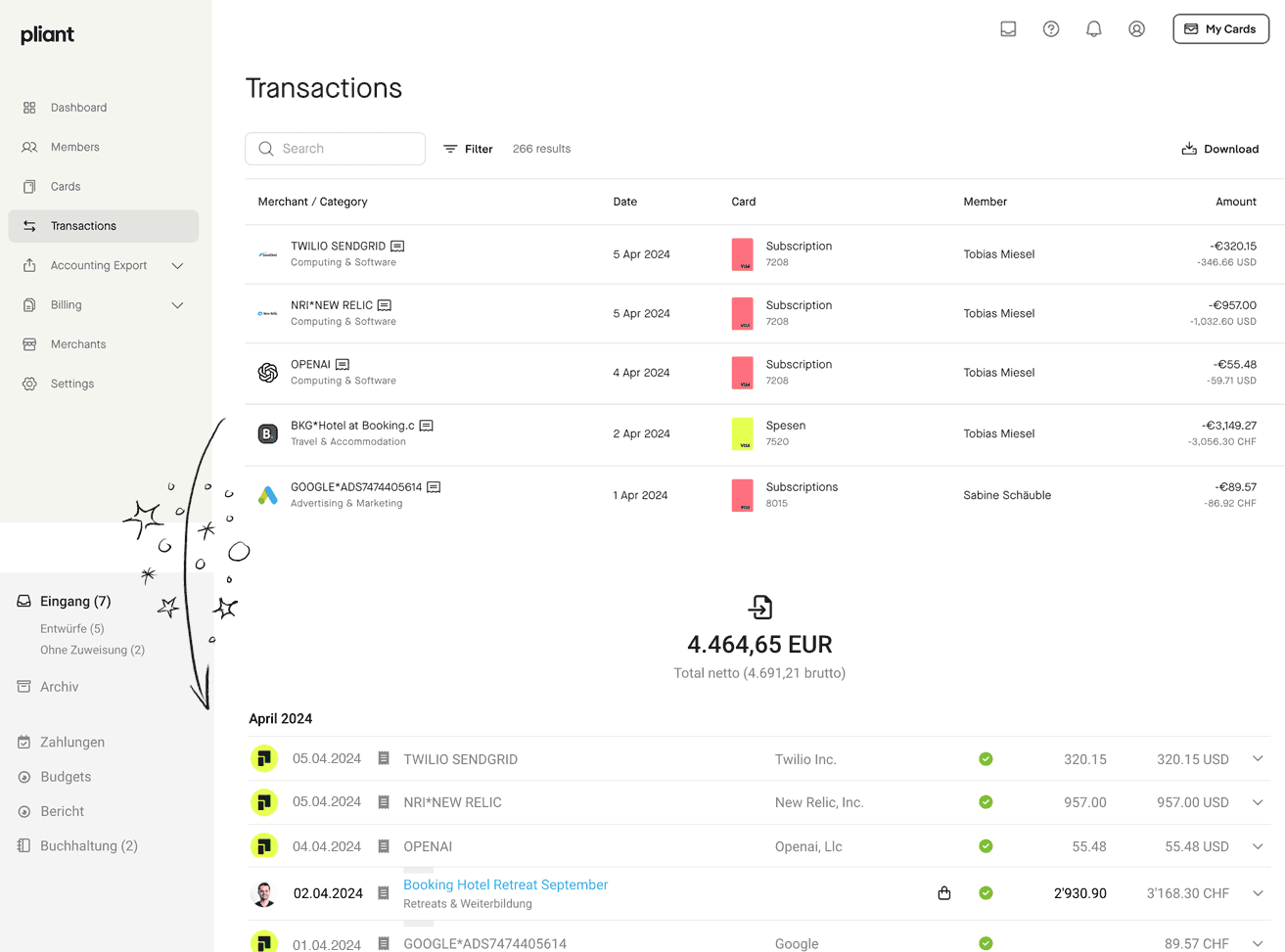
Pliant automates your personal expenses processes: All credit card payments and receipts are directly transferred from Pliant to MOCO. The cash flow remains up-to-date, manual post-processing is eliminated, and you always have full control over all expenditures.
Receipts are OCR-read and directly assigned to payments – including synchronization between both tools. This reduces inquiries, creates transparency, and saves a lot of time in the monthly closing.
Receipts are OCR-read and directly assigned to payments – including synchronization between both tools. This reduces inquiries, creates transparency, and saves a lot of time in the monthly closing.
- Credit card payments and receipts are automatically synchronized from Pliant to MOCO. Use the OCR option.
- If the receipt is recorded for payment later in Pliant or MOCO, the receipt is also synchronized retroactively.
- Real-time transparency in the cash flow report, no more manual post-processing needed.
 (English image not yet available)
Conclusion: Work Smarter, Not Harder
All-in-One sounds convenient but is often a compromise. Those who really want to have their project business under control rely on specialized tools with a clear focus – and a central core like MOCO. Thanks to integrations and open interfaces, MOCO can be optimally integrated into your individual setup.








