Alter News-Artikel!
» Hier geht's zur aktuellen Online-Hilfe
Article from
Financial Reports: The New Overview (Invoices vs. Expenditures)
The financial report "Overview (Beta)" is now the definitive overview. The old report will be discontinued. We explain what this means in more detail here.
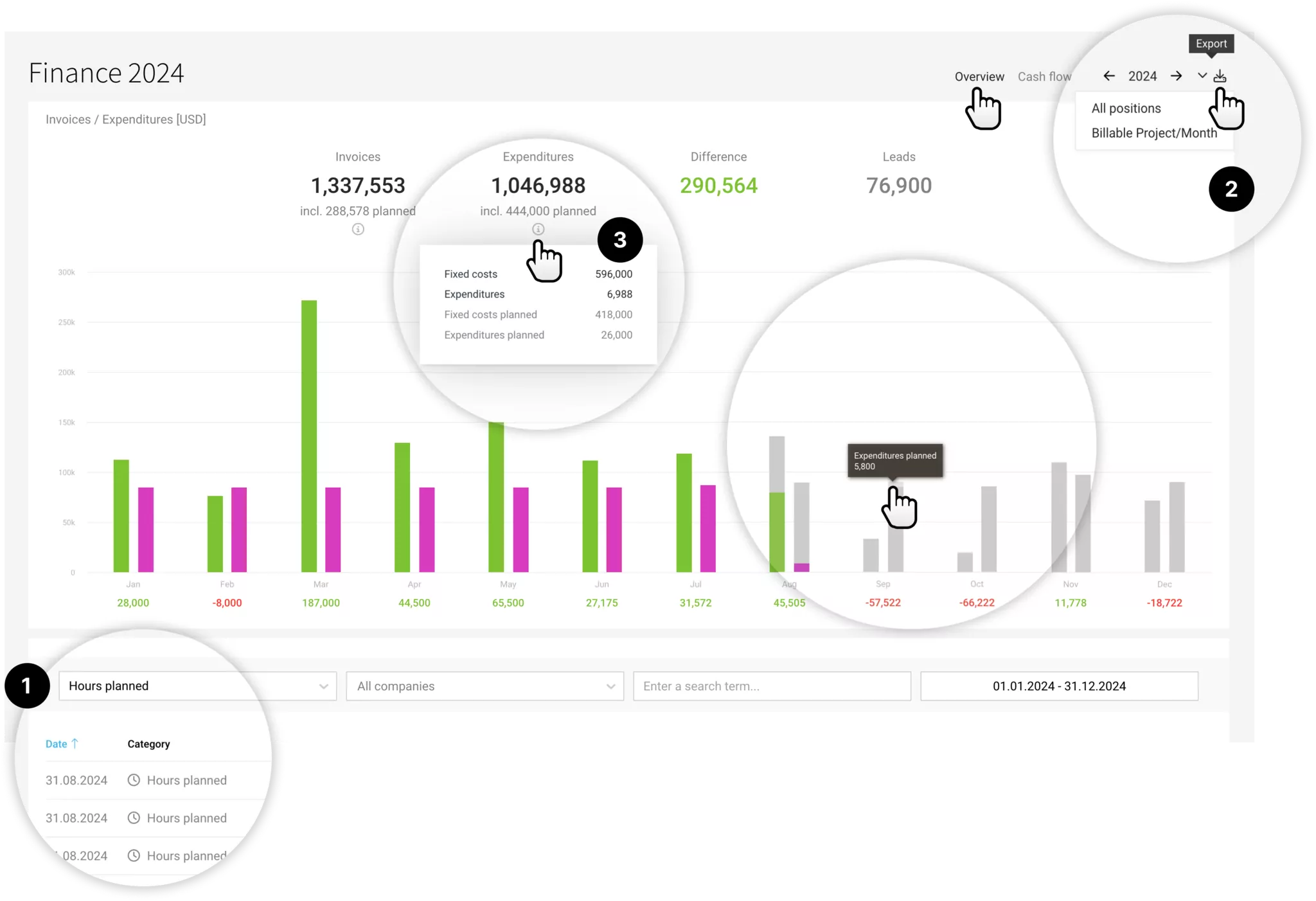
New Data in the Overview
Planned Expenditures from Projects
Planned project expenditures are now included in the report – and accordingly in the "Cashflow" report.
Learn more about planning expenditures
Learn more about planning expenditures
Planned Hours
Planned hours for projects with the invoicing type "Time & Material" are now also included in this report, and you can filter directly by this category (1) – similarly in the "Cashflow" report.
The revenue forecast for time and material projects is currently done through planning. Planned hours were previously shown in the old report – and are now included in the new report as well.
Calculation: All planned hours from tomorrow onwards are included as a monthly and project total in the financial reports: Under invoices/expenditures net with the invoicing date as the end of the month – in the "Cashflow" report gross and considering the client's payment terms. The total is calculated using the "Uniform" hourly rate, "Hourly rate per person" using the person's rate, and "Hourly rate per service" using the average of all services (as the service cannot be directly derived from the planning – but this is expected soon).
Using the "Hours" category selection, you can specifically narrow it down (1). The project name links directly to the planning for the respective month – allowing you to track or adjust the planned hours.
Learn more about planning
The revenue forecast for time and material projects is currently done through planning. Planned hours were previously shown in the old report – and are now included in the new report as well.
Calculation: All planned hours from tomorrow onwards are included as a monthly and project total in the financial reports: Under invoices/expenditures net with the invoicing date as the end of the month – in the "Cashflow" report gross and considering the client's payment terms. The total is calculated using the "Uniform" hourly rate, "Hourly rate per person" using the person's rate, and "Hourly rate per service" using the average of all services (as the service cannot be directly derived from the planning – but this is expected soon).
Using the "Hours" category selection, you can specifically narrow it down (1). The project name links directly to the planning for the respective month – allowing you to track or adjust the planned hours.
Learn more about planning
Export Billable Project/Month
The export, which was previously found in the old overview, is now also offered in the new report (2).
Compact Key Figures
The figures have been updated to be more illustrative: They provide an overall view of the year – the proportion of planned amounts is displayed below. Under the "i" you will find the corresponding detailed information (3)
Other Optimizations
- Invoice Status Overview Removed
The status of invoices is removed under the "i" in favor of the report focus. Accounts receivable management takes place under "Invoicing" > "Invoices". You can also quickly filter for outstanding payments under "Cashflow". - Optimized Categories
Individual categories can be specifically filtered using the category filter. The category names have been optimized (dropdown, listing, and export). - Minor optimizations regarding color, spacing, and column widths
Notes
- Previous tiles "Expenditures by Supplier" and "Billed by Client" can be displayed in the overview if needed (settings in the top right).








