Alter News-Artikel!
» Hier geht's zur aktuellen Online-Hilfe
Article from
Quick Win: Assign Multiple Expenditure Items in One Step.
If multiple items are recorded for an expenditure, you can now select and assign them in one step.
Applies to only about 10% of all expenditures
Our data analysis shows that about 10% of all expenditures have more than one item recorded. Previously, if you wanted to assign an expenditure with multiple items to a project, each item had to be assigned individually. This could be tedious and needed optimization. For the 90% of expenditures with only one item, nothing changes.
Simplified Assignment
The individual assignment can now be skipped. During each assignment (1), you will see all expenditure items in the popup and can select or deselect them as you wish (2). If you want to assign just one item directly, it is already pre-selected. If an item has already been assigned, you will see that too.
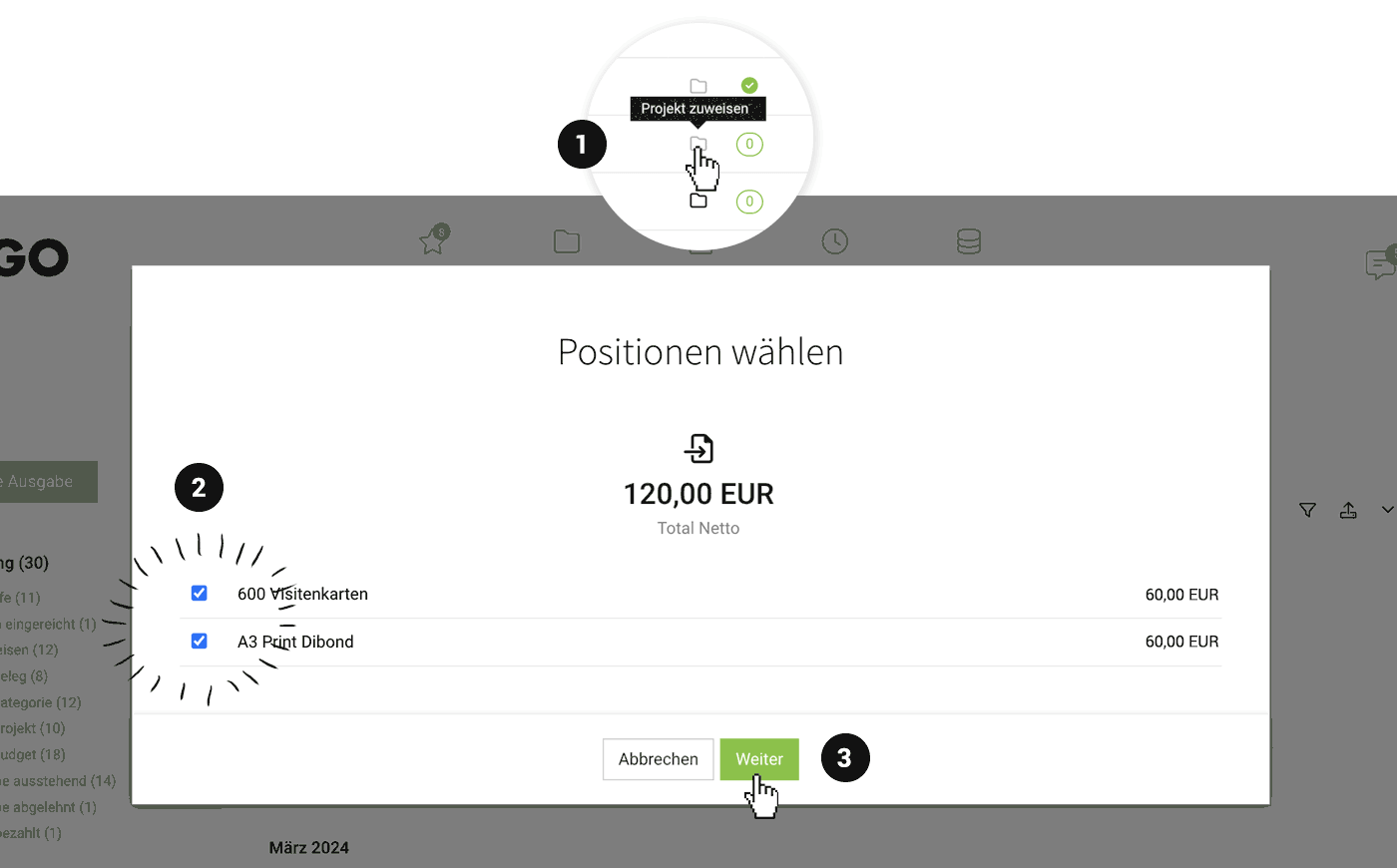 (English image not yet available)
Additional Benefit: Create an Additional Service from Multiple Items
Not only does the individual assignment of items disappear. If you assign multiple items in one step (3), an additional service is created from them, which can be directly invoiced to the client.
Preview: This optimization paves the way for the release of planned expenditures (expenditure forecast). The rollout of planned expenditures starts in April – we will inform you as usual. It does not change any familiar processes.
Link: Record Multiple Items








