Alter News-Artikel!
» Hier geht's zur aktuellen Online-Hilfe
Article from
Integrate External Projects.
Is part of your project being handled by a partner company, and you want to keep an eye on the overall progress? Simply link the external subproject. This eliminates the need for separate reporting or duplicate timesheet entries.
 (English image not yet available)
In some projects, service packages from the proposal are passed on to partners and not handled internally. If they also use MOCO, you can now integrate the externally created MOCO project into your own project report. Your project budget will then show not only your internal efforts (hours and additional services) but also include the status of the external project budget.
Request Link to External Project
To link an external MOCO project, you need the shared link to the project report. This can be activated and copied in the project report at the top right. Ask your partner to provide you with this link.
Link Project in Your Own Report
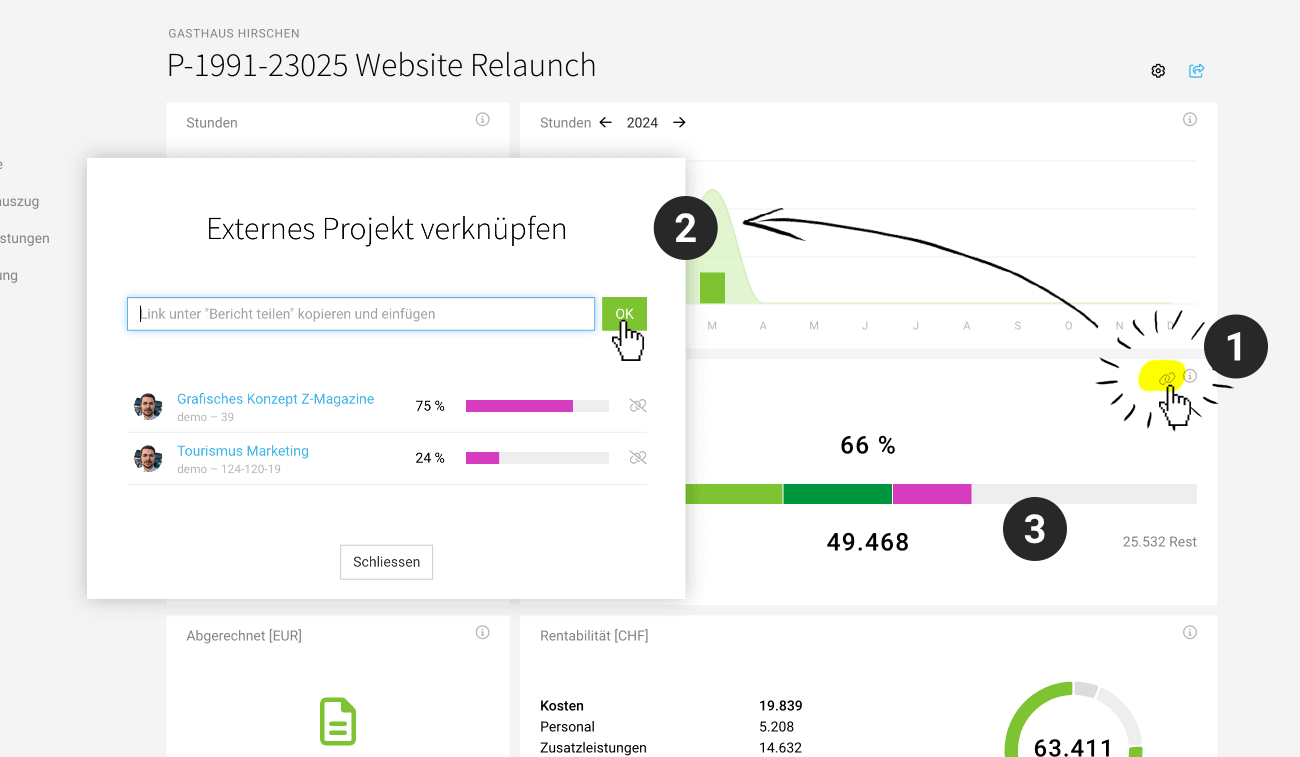
In your own project report, there is a new "Link" icon in the "Performed" tile (1). Clicking it opens a popup where you can enter the link to the external project report (see above) (2). Confirm the entry, and the externally used project budget will be reflected in your budget bar – and deducted from your available budget (3).
Good to Know 👇
- In your project report, the externally consumed budget is shown in purple (like costs). In the modal, you can check the amount effectively performed in the external project.
- If the expected external costs are set up as an additional service (as we recommend, for example, for freelancers), the additional service should be declared as "not in budget," otherwise the budget will be deducted twice.
- The status of the external budget is synchronized every four hours.
- Internal projects cannot be linked. Use project groups for this.
- Both projects – your own and the external – must be in the same currency.
- This feature is not available for retainer projects. Retainers cannot be integrated either.








