Article from
Access Rights: Define and Assign Roles.
In addition to individual access rights per user, you can now define and assign user roles. Simple, tailored, and flexible.
Benefits
- Clear Structure for growing teams.
- Faster Onboarding of New Users: No need to deliberate or clarify which rights should be granted.
- More Control: Roles are managed in the settings. A role can only be changed for a person with full access to personnel.
- High Customization: Roles are optional and can be applied to specific individuals only.
Define Roles
You can find the new settings area under "Settings" > "Security" > "User Roles".
.png "Benutzerrollen Rechtesystem Admin MOCO ERP") (English image not yet available)
(English image not yet available)
Role "Admin" (1)
A role named "Admin" is already created. It can be assigned to the account holder and others (with default rights to personnel and settings). The name and access rights are customizable.
Define Additional Roles
There, you can define as many roles as you like via "+ New Role" (2). You assign access rights for each area directly in the list by clicking on the circles.
Default for Newly Created Users
Previously, new users only had access rights to time tracking. If you want to set a different default, select the checkbox "Default for newly created users" (3) for a role.
Account Holder & Security
The account holder is selected as before in the settings under "Account". Only they can (as before) for security reasons:
(English image not yet available)Role "Admin" (1)
A role named "Admin" is already created. It can be assigned to the account holder and others (with default rights to personnel and settings). The name and access rights are customizable.
Define Additional Roles
There, you can define as many roles as you like via "+ New Role" (2). You assign access rights for each area directly in the list by clicking on the circles.
Default for Newly Created Users
Previously, new users only had access rights to time tracking. If you want to set a different default, select the checkbox "Default for newly created users" (3) for a role.
Account Holder & Security
The account holder is selected as before in the settings under "Account". Only they can (as before) for security reasons:
- grant access to reports and settings
- delete the account
Assign a Role to a Person
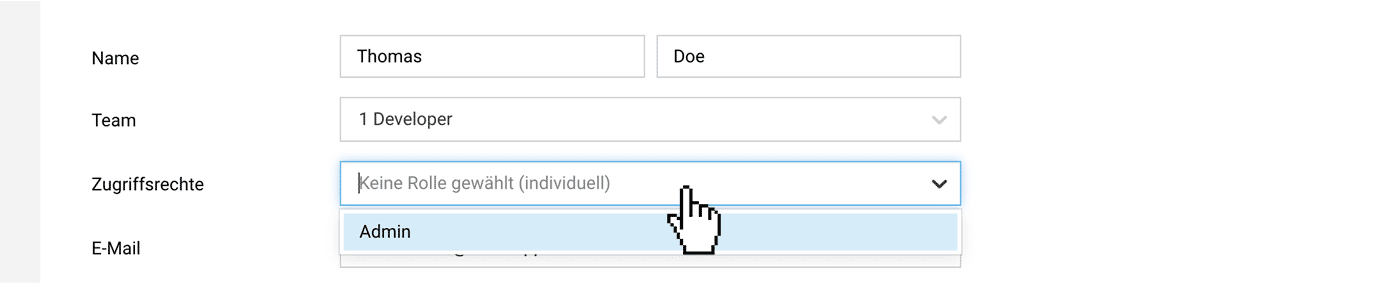
Under "Personnel," you can assign one of the created roles when adding or editing a user.
 (English image not yet available)
In the personnel list, it is visible by the disabled, withdrawn circles that a role is assigned to a person.
No Role → Individual Access Rights
If no role is assigned, access rights can still be granted individually per person as before.
(English image not yet available)In the personnel list, it is visible by the disabled, withdrawn circles that a role is assigned to a person.
No Role → Individual Access Rights
If no role is assigned, access rights can still be granted individually per person as before.








