Alter News-Artikel!
» Hier geht's zur aktuellen Online-Hilfe
Article from
Optimised Recording of Expenditure Budgets and Fixed Costs.
With the update, the recording of annual budgets is moved to the settings, simplified – and you can already record budgets for 2025. The technical update also benefits fixed costs.
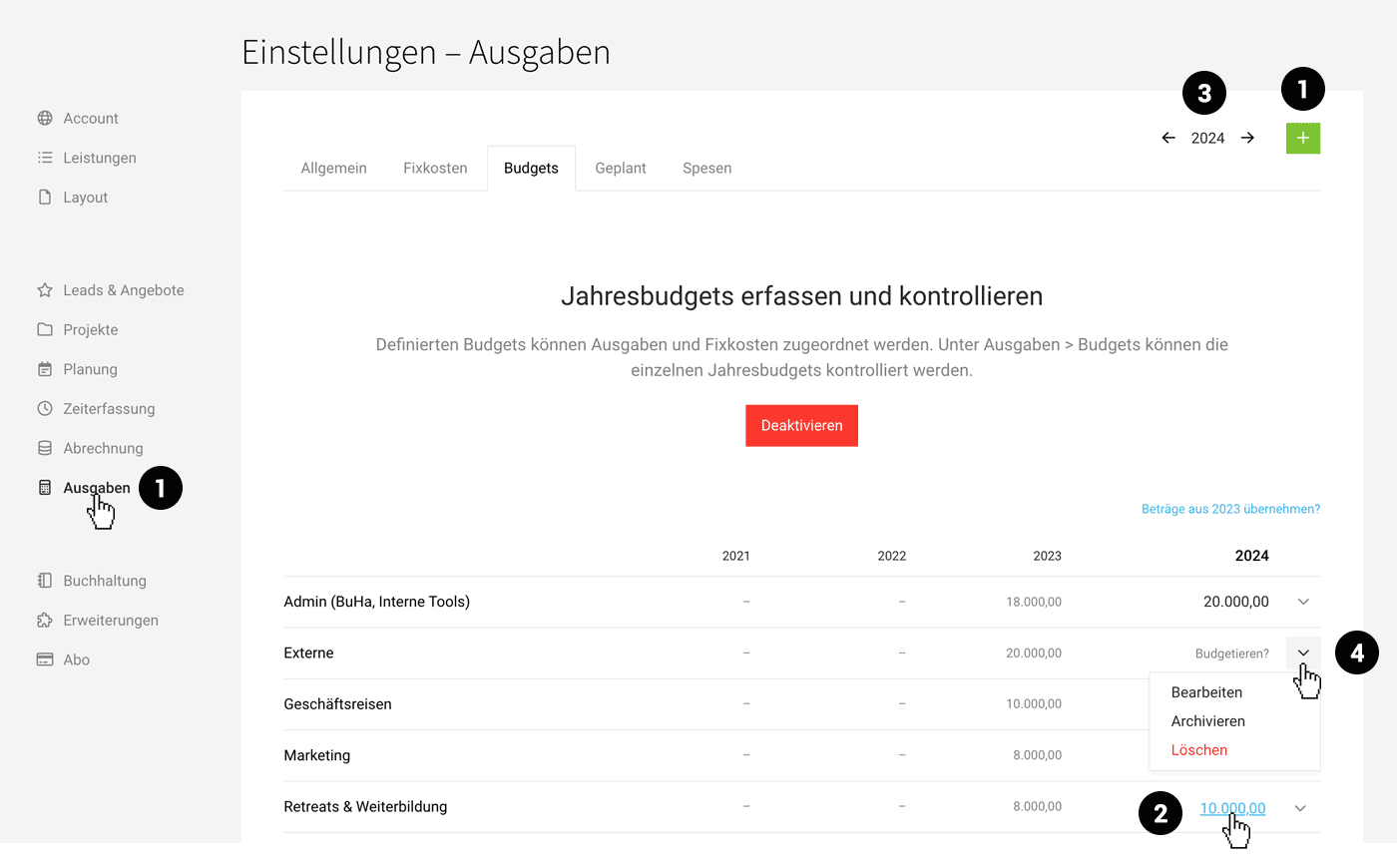 (English image not yet available)
Relocation of Annual Budgets
You will now record the annual budgets in the settings (1). Budget control continues as before in the "Expenditures" section under "Budgets".
Define Amount per Year
After naming the budget during recording, you enter the amounts directly in the list via "Budget?". To adjust an amount later, click on the already recorded amount (2) in the chosen year.
You can compare amounts from previous years and also record amounts for upcoming years over the year-end (3).
You can compare amounts from previous years and also record amounts for upcoming years over the year-end (3).
Archive or Delete Budgets
If an expenditure budget is no longer needed in the new year, this item can be archived (4). The evaluation for previous years remains intact.
Only budgets with no (remaining) amounts can be deleted.
Only budgets with no (remaining) amounts can be deleted.
Fixed Costs Optimisation
The fixed costs also utilise the new mechanism: items can no longer be accidentally deleted. If you no longer need a fixed cost item, choose "Archive".








