Alter News-Artikel!
» Hier geht's zur aktuellen Online-Hilfe
Article from
Create & Send Reminders with One Click.
As an agency, consultancy, or IT service provider, there are certain sensitive client relationships to consider. Targeted reminder creation makes sense in these cases. With the new bulk actions, you can efficiently create and send reminders for all overdue invoices, while still excluding and handling some manually.
Create Reminders with One Click
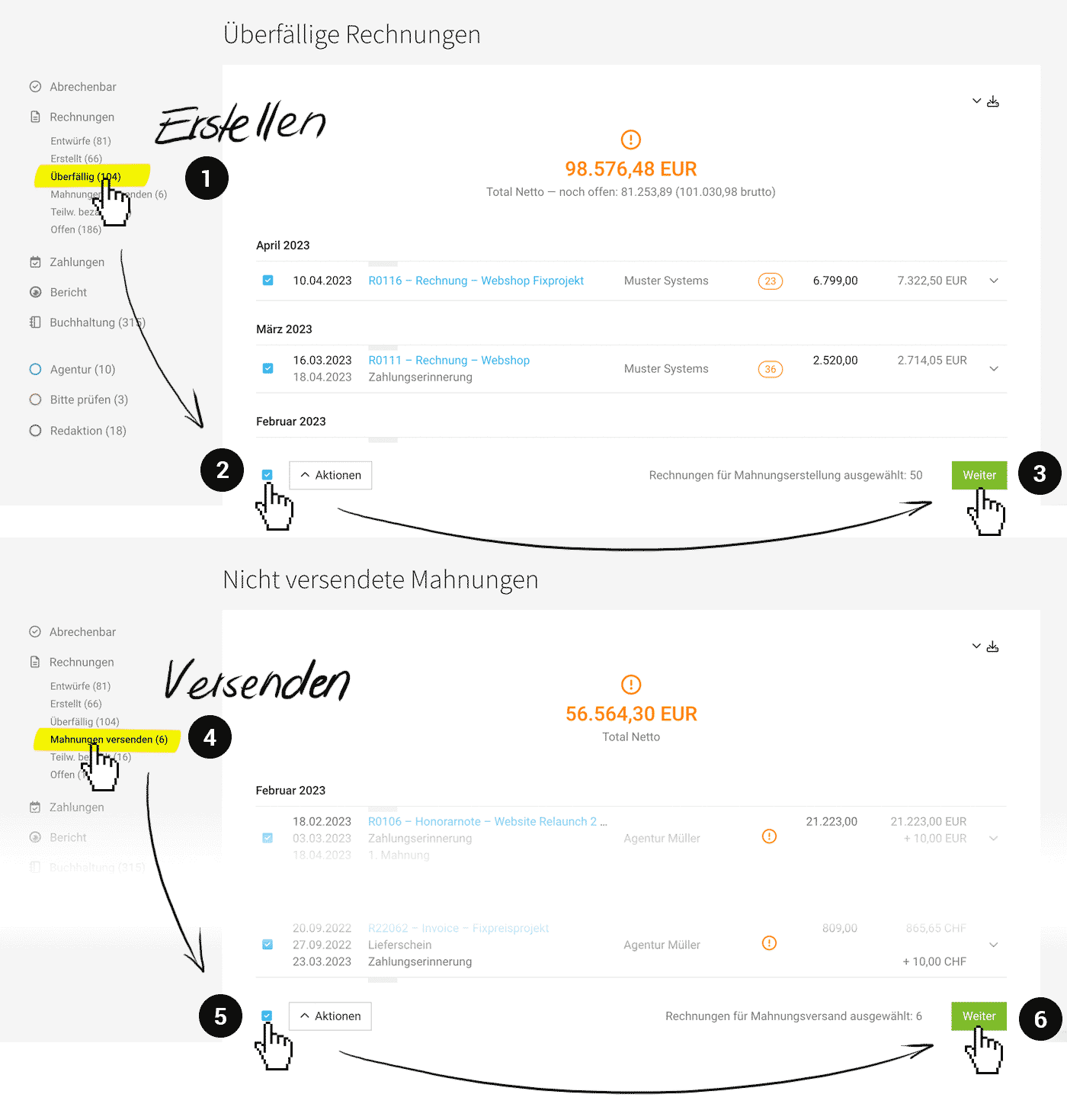 (English image not yet available)
Select Invoices
In the invoice list (Invoicing > Invoices), go to the Smart Filter "Overdue" (1). Here, all overdue invoices are listed. Select all or specific overdue invoices (2) and then click "Next" (3) at the bottom right to review the selected invoices again.
Review
The "Create Reminders" modal opens, and MOCO offers control before creation: The invoices are displayed grouped by reminder level.
Note: Invoices that already have at least 3 reminders created are ignored, as it is assumed that manual handling is sensible. A further letter can be created and sent manually. Others may wish to hand the case over to a debt collection agency.
Note: Invoices that already have at least 3 reminders created are ignored, as it is assumed that manual handling is sensible. A further letter can be created and sent manually. Others may wish to hand the case over to a debt collection agency.
Confirm Creation
After confirmation, the reminders are created. Depending on the reminder level, the individually stored standard texts (equipped with variables) in the settings are used.
All created, yet unsent reminders can be quickly found via the Smart Filter "Send Reminders" (4).
All created, yet unsent reminders can be quickly found via the Smart Filter "Send Reminders" (4).
Send Reminders with One Click
Select Invoices with Reminders
In the invoice list (Invoicing > Invoices) under the Smart Filter "Send Reminders" (4), select all or relevant invoices (5). Then initiate the review before sending by clicking "Next" (6) at the bottom right.
Review
The "Send Reminders" modal opens. As with bulk invoice sending, MOCO checks if an email address is stored and offers a brief preview of the email text.
Confirm Sending
With confirmation, all reminders are sent.








