Article from
Case Study: MOCO Optimally Enhanced – Tools, Slack Commands, Chatbots.
A contribution by Jörg Herbst, newcubator GmbH (22 employees, Dortmund & Hannover)
As "software people," we regularly question whether and how our software landscape can be optimized. Besides MOCO, we also use a few other tools. Here, we present our selection and how we have integrated MOCO.
Our "Toolbox"
We introduced MOCO in 2020 when we were looking for software for both project and personnel management. The decisive factor was the efficient implementation and intuitive operation of the software. It now covers our entire project management, including time tracking, and personnel management. We also use the DATEV interface, through which all invoices are automatically transferred to our accountant.
 (English image not yet available)
Slack is the perfect addition for our internal communication and collaboration. With Slack Premium and the "Huddle" feature, it creates a virtual communication space that closely resembles an office atmosphere.
Miro is used for collaborative work on boards. Even before the pandemic, we worked in a hybrid model – either in the office or remotely. However, we usually preferred in-person meetings and intensively used whiteboards. During the pandemic and "remote only" period, this was no longer possible, so we chose Miro as the best alternative.
Commitly became our new financial planning software in 2021. The goal was to manage our company with a reliable liquidity plan independently of the accountant. The tool also retrieves figures from MOCO.
Gitlab convinced us as a task management software. Although some features are missing and the system feels more technical than competitors, Gitlab suited us best as a software company. Not least because the API leaves almost nothing to be desired.
Kenjo is our new software for personnel development. We chose Kenjo because it complements MOCO's personnel management by focusing clearly on the development of our employees. Especially in remote leadership, functioning feedback channels are even more important.
(English image not yet available)Slack is the perfect addition for our internal communication and collaboration. With Slack Premium and the "Huddle" feature, it creates a virtual communication space that closely resembles an office atmosphere.
Miro is used for collaborative work on boards. Even before the pandemic, we worked in a hybrid model – either in the office or remotely. However, we usually preferred in-person meetings and intensively used whiteboards. During the pandemic and "remote only" period, this was no longer possible, so we chose Miro as the best alternative.
Commitly became our new financial planning software in 2021. The goal was to manage our company with a reliable liquidity plan independently of the accountant. The tool also retrieves figures from MOCO.
Gitlab convinced us as a task management software. Although some features are missing and the system feels more technical than competitors, Gitlab suited us best as a software company. Not least because the API leaves almost nothing to be desired.
Kenjo is our new software for personnel development. We chose Kenjo because it complements MOCO's personnel management by focusing clearly on the development of our employees. Especially in remote leadership, functioning feedback channels are even more important.
Slack Slash Commands
Besides using purchased tools, we also get hands-on, but in a very clear and reduced framework. In-house developments are always maintenance-intensive and must clearly surpass ready-made solutions.
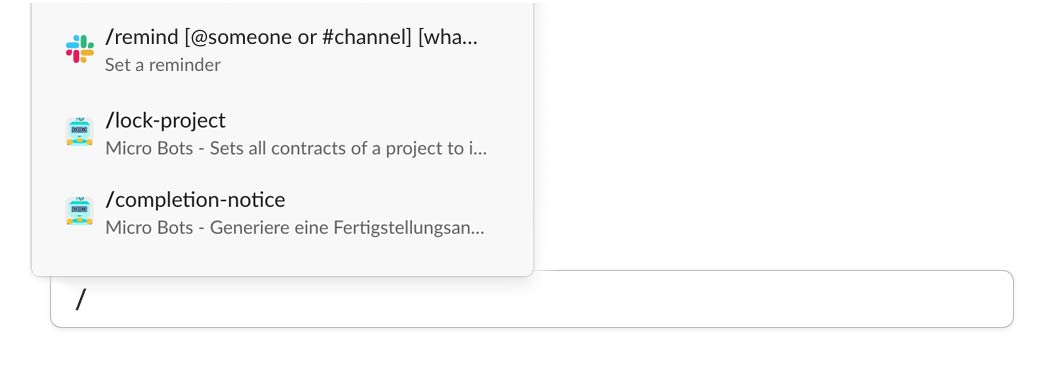
Therefore, we primarily use Slack Commands and Chatbots to automate clear workflows. Here's a brief overview of what Slack Commands are and an example of how we use them.
Slack is a great tool for company communication and internal collaboration. The software allows the integration of other software through the API interface. Especially Slack Slash Commands is an extremely helpful way to connect your agency management software or ERP. Slack Slash Commands are short commands that you can simply type in Slack using a "/" (slash) and execute. Individual, previously manual processes can thus be automated, increasing the productivity of the entire company.
 (English image not yet available)
Therefore, we primarily use Slack Commands and Chatbots to automate clear workflows. Here's a brief overview of what Slack Commands are and an example of how we use them.
Slack is a great tool for company communication and internal collaboration. The software allows the integration of other software through the API interface. Especially Slack Slash Commands is an extremely helpful way to connect your agency management software or ERP. Slack Slash Commands are short commands that you can simply type in Slack using a "/" (slash) and execute. Individual, previously manual processes can thus be automated, increasing the productivity of the entire company.
(English image not yet available)Example: Automatic Project Invoicing
Project invoicing is done by entering a short command in the Slack channel. Our bot automatically creates the timesheet for the project, writes the invoice, closes the project in the project management software MOCO, and locks it for further time tracking. This has not only made work easier for us but also ensured higher quality, as uniform standards always apply. Initially, it is a bit unusual, but in the long run, everyone was happier.
Example: Reminder & Organization of Birthdays
We are always happy to welcome new members to our team, but more colleagues also mean more birthdays to remember throughout the year. To ensure we don't forget any, we built a bot that uses the employee data maintained in MOCO. It queries the birthdays of all employees daily via the MOCO-API and thus cannot overlook anyone. As a result, it can open a private Slack channel with all employees except the birthday person three weeks in advance. In a short message, the bot not only informs everyone that the birthday is approaching but also calls for ideas for a gift. On the birthday itself, the bot sends another message reminding everyone to congratulate. One day after the birthday, the Slack channel is automatically archived. The following year, the archived channel is simply reused and reopened. This has the advantage that we can read the previous year's communication and discussions again and avoid the idea of giving the same gift again.
» https://github.com/newcubator/micro-bots/blob/main/docs/birthday.md
Our Slack Commands are open source
» Available on Github
» Direct link to Birthday Bot
Our Slack Commands are open source
» Available on Github
» Direct link to Birthday Bot
 (English image not yet available)
Jörg Herbst, CEO newcubator
Newcubator is a constantly growing team of software architects, UX designers, project managers, as well as web, backend, and frontend developers. At the two locations in Dortmund and Hannover, individual software solutions based on new technologies are developed together with the client.
More interesting links
» How we select software








