Article from
New Report: Actual vs. Planned.
The new planning report vividly highlights whether work was carried out as planned and identifies any discrepancies among individuals and projects.
You can find the new report under "Reports > Planning". While "Utilisation" shows the extent to which capacities were allocated, "Actual / Planned" additionally answers whether work was done according to plan. For each person, all planned and actual hours for the selected period are listed.
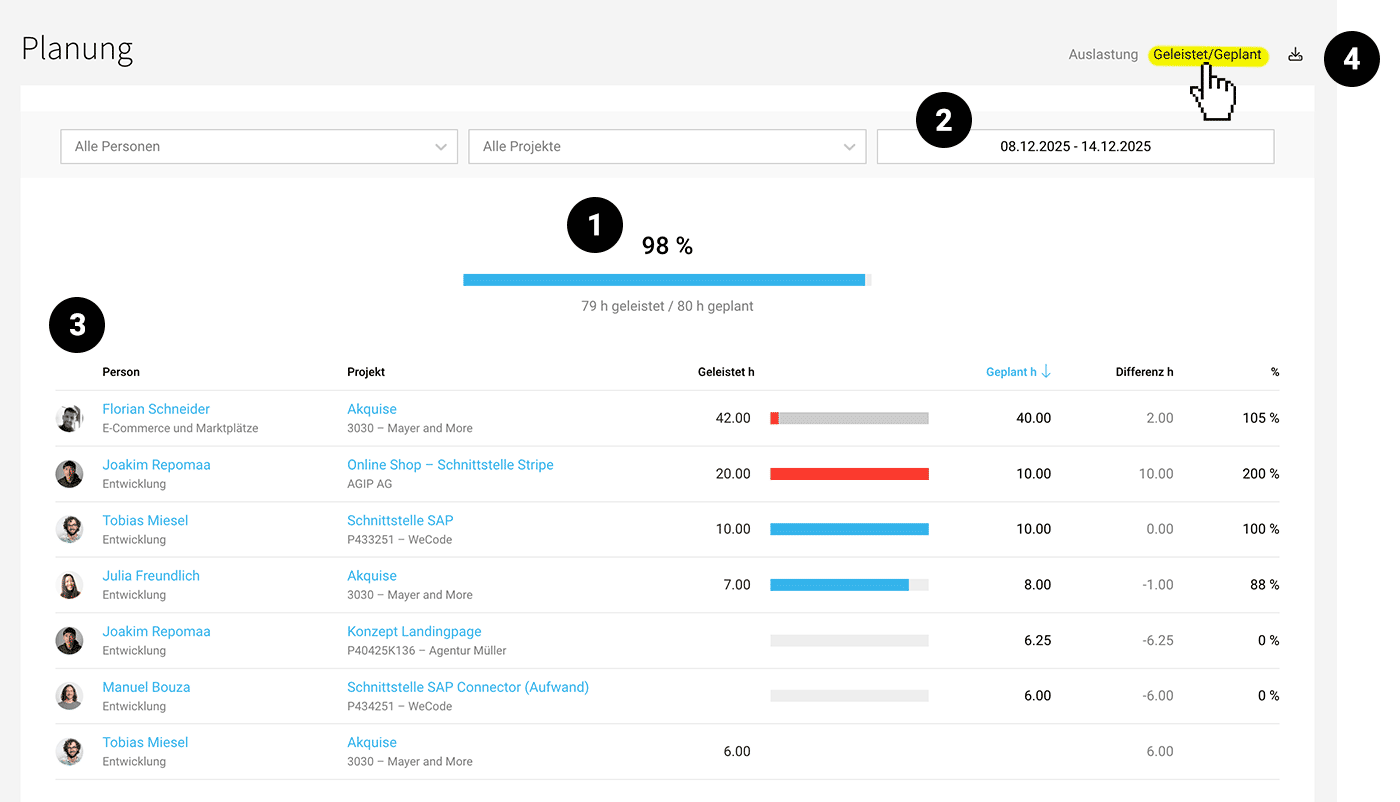
The key figure above (1) provides an overview of whether work was done on planned projects. By default, the time period (2) is set to the previous week.
 (English image not yet available)
The list (3) breaks down and shows for each person and project: Actual hours, Planned hours, the difference, and the fulfilment rate in percentage (actual / planned). The bar visualisation allows for quick orientation.
If hours are recorded on a project that was not planned in the capacity planning, no bar is displayed. These are also not included in the summary key figure.
Using the filter (2), you can specifically narrow down by people and projects. Additionally, you can export (4) the filtered view as an XLS file.
All individuals with full or partial access to "Reports" in the Pro plan can view the report.
All individuals with full or partial access to "Reports" in the Pro plan can view the report.








