Article from
Your Resource Planning in MOCO.
Resource planning is the backbone of every successful project business. It ensures projects start smoothly, teams aren't constantly overloaded, and clients receive reliable commitments. However, everyday reality often paints a different picture: overbooked staff, frantic project juggling, and a lack of oversight. Discover how a structured workflow can professionalise your capacity planning in this article. Say goodbye to resource planning in Excel – here comes your MOCO workflow.
 (English image not yet available)
Structured Project Planning is Essential
In many companies with project-based operations, there is a significant overestimation of what can actually be achieved within a week or a month. The result: employees are perpetually busy – or rather, overloaded.
A solid workload is crucial for motivation and good results. Occasional peaks are part of the service business. But when overload becomes a permanent state, it has consequences:
👉 Projects suffer because buffers are missing.
👉 Sick leave increases.
👉 New staff need to be trained, which costs time and money.
👉 Turnover grows.
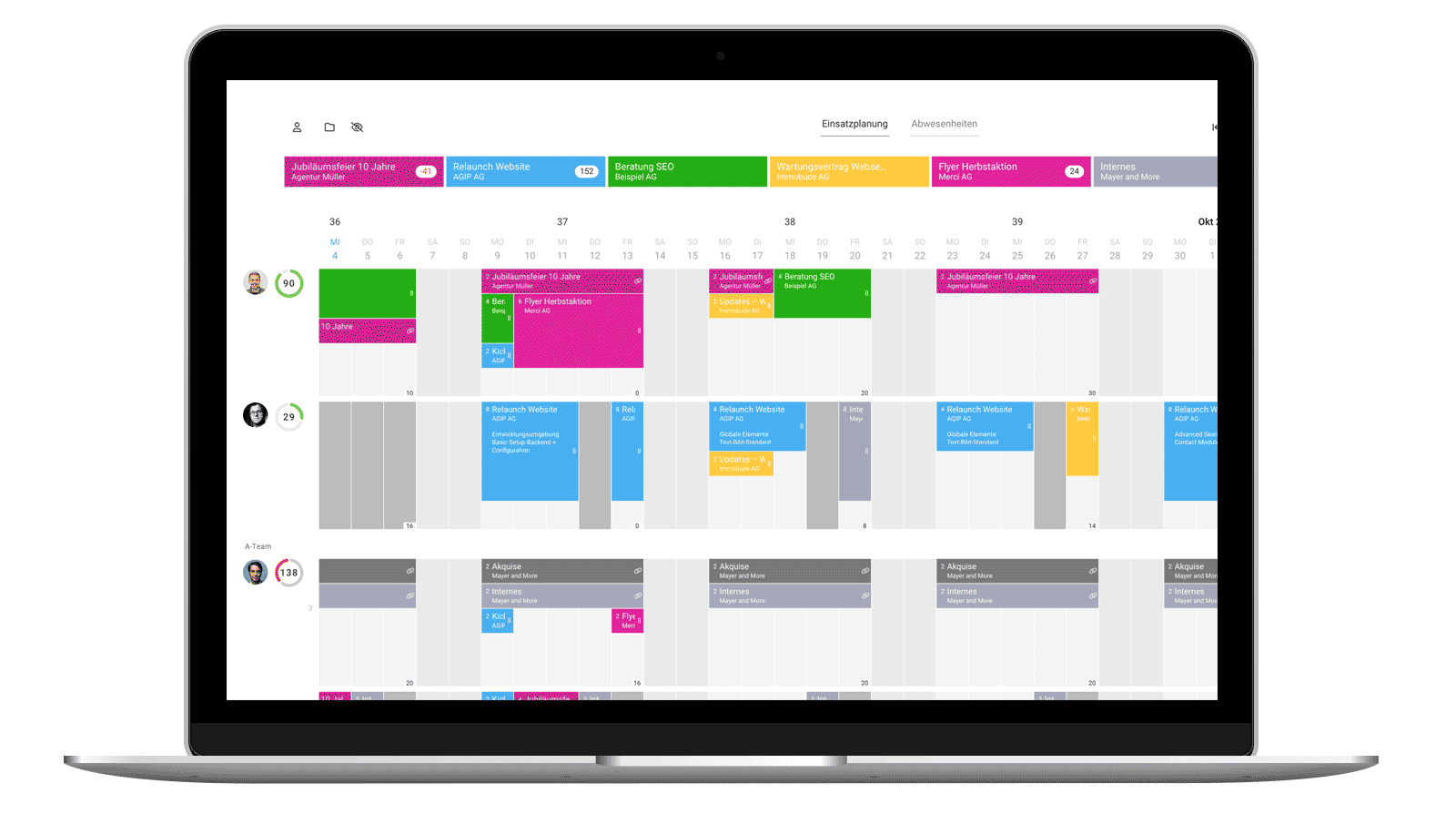
Resource planning is therefore not a nice-to-have, but an essential reservation system for your company. Just like on an airplane, a seat (in your case, work hours) can only be allocated once. A clearly defined workflow ensures projects remain manageable – without constant chaos.
Resource planning is therefore not a nice-to-have, but an essential reservation system for your company. Just like on an airplane, a seat (in your case, work hours) can only be allocated once. A clearly defined workflow ensures projects remain manageable – without constant chaos.
 (English image not yet available)
Everyone Pulling Together: Uniting Interests
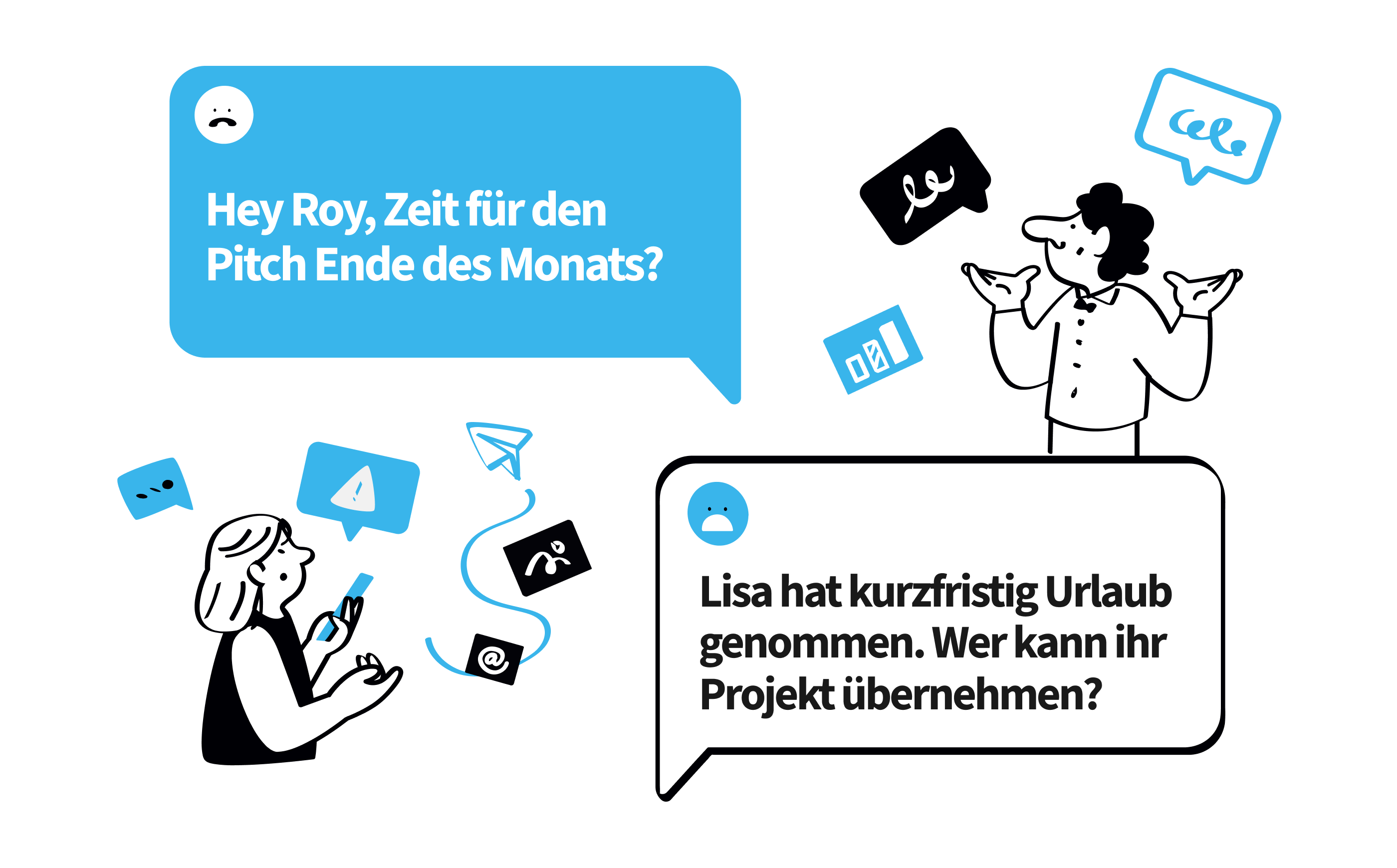
Anyone who has tried to plan resources without a clear system knows the problem: every role in the company has its own goals and priorities.
Project Managers:
They want to ensure their projects are reliably equipped with the right capacities. Competition for the same staff among projects can disrupt planning. Therefore, they coordinate with other project managers, the team leader, and the employee themselves.
They want to ensure their projects are reliably equipped with the right capacities. Competition for the same staff among projects can disrupt planning. Therefore, they coordinate with other project managers, the team leader, and the employee themselves.
Team Leaders:
They are responsible for ensuring their team is optimally utilised. This involves balancing holidays, internal tasks, and external projects.
They are responsible for ensuring their team is optimally utilised. This involves balancing holidays, internal tasks, and external projects.
Salespeople:
They need to know at all times which resources are still available to make realistic commitments to clients. Without this overview, proposals quickly become risky.
They need to know at all times which resources are still available to make realistic commitments to clients. Without this overview, proposals quickly become risky.
Entrepreneurs:
They want to understand how the company's workload looks to make strategic decisions – such as whether new staff are needed or if marketing and sales activities need adjustment.
They want to understand how the company's workload looks to make strategic decisions – such as whether new staff are needed or if marketing and sales activities need adjustment.
Especially in smaller companies, these roles can be combined in one person. This makes it all the more important that the workflow is clearly regulated.
 (English image not yet available)
(English image not yet available)The Ideal Workflow in Resource Planning
For reliable capacity planning without stress, we generally recommend a rough plan. Planning too detailed in the long term quickly becomes unrealistic in today's world.
1. Plan Roughly for the Long Term
Large projects should appear in the planning early. Simply allocate the entire time budget to the plan. This allows you to estimate months in advance how much capacity is tied up.
This step has several advantages:
👉 The plan remains clear and easy to grasp.
👉 Maintenance effort is greatly reduced.
👉 Bottlenecks are identified early.
Rough planning instead of minute detail planning saves you time and nerves. You get a realistic sense of workload without getting lost in details. Changes can be quickly adjusted – and you don't get caught up in micromanagement.
2. Utilise, but Don't Overload
A classic mistake: every day is planned with eight hours on paper. In reality, meetings, spontaneous requests, or inquiries are hardly plannable – they just happen.
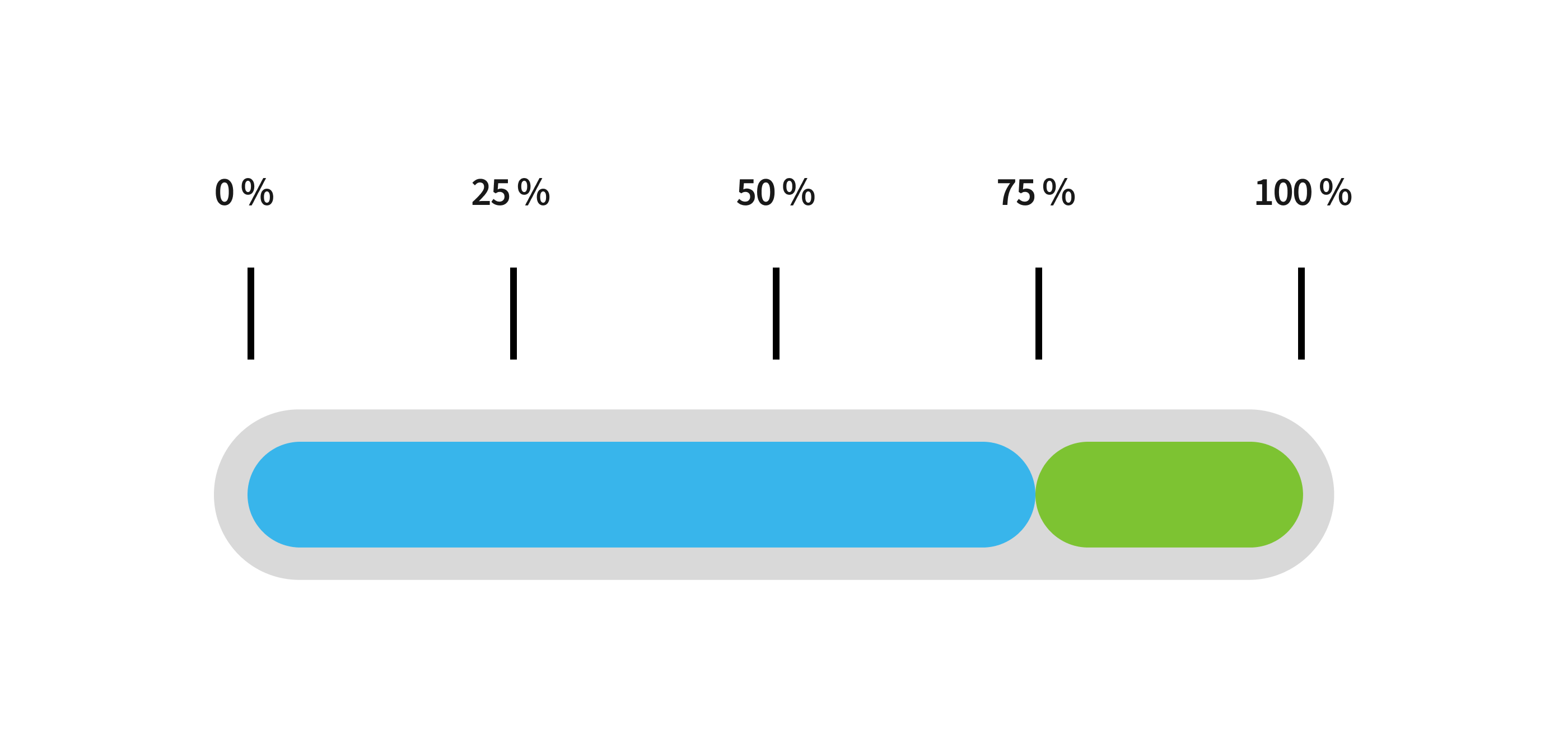
Therefore, the rule of thumb is: Only 70–75% of the daily target should actually be planned. For an 8-hour day, that's a maximum of 5–6 hours.
This buffer ensures that project management runs smoothly despite uncertainties. It also helps to relieve everyday pressure.
 (English image not yet available)
(English image not yet available)For context: A workload of about 60% is considered cost-covering in many service industries. Planning permanently above this value risks overloading projects – with all the negative consequences from sick leave to dissatisfied clients.
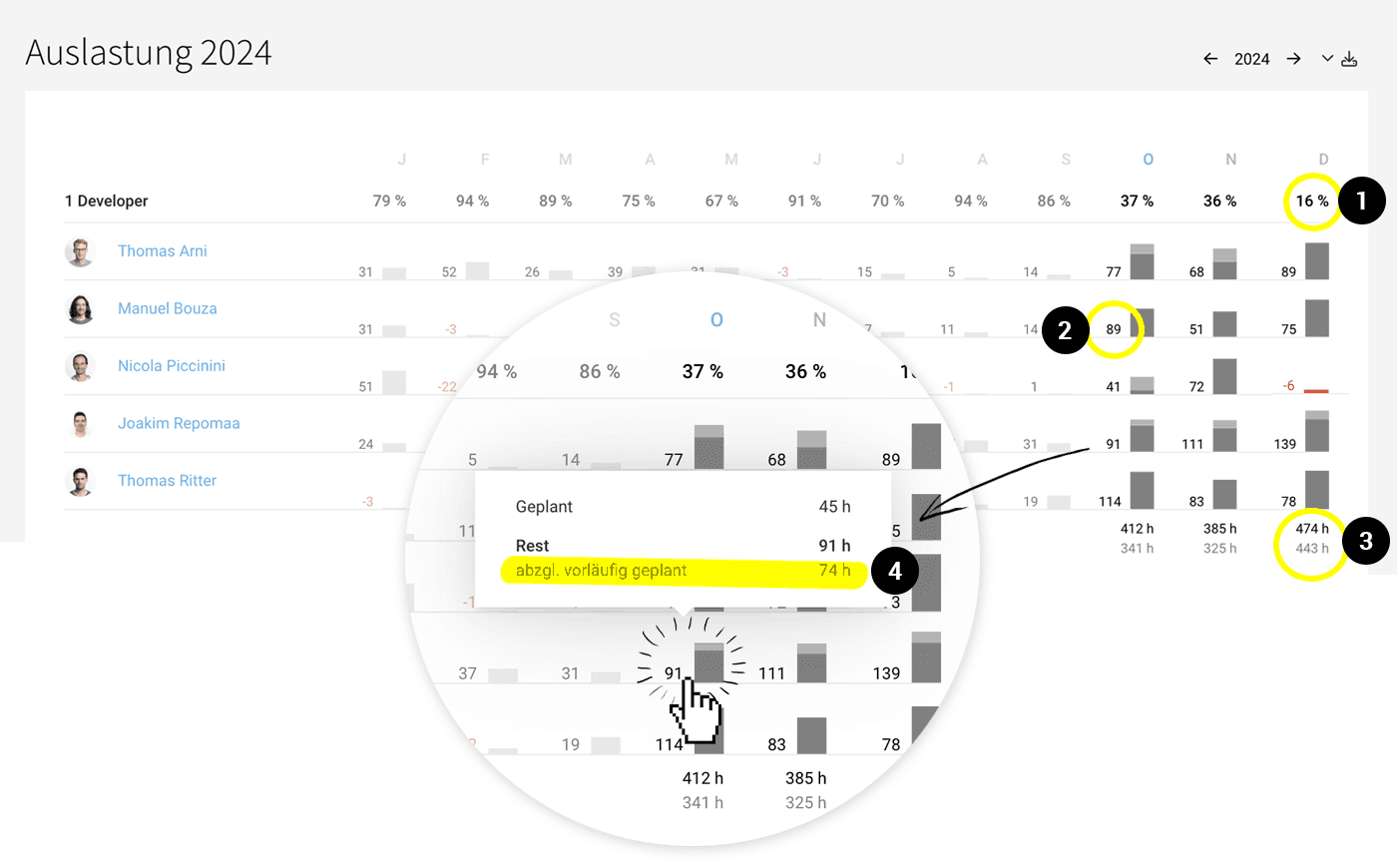
In MOCO, the annual overview of workload & capacity by team and person shows at a glance the monthly percentage team workload (1). Also, the unplanned hours per person (2) and per team (3) are displayed in this report. This overview assists you in planning your capacities.
 (English image not yet available)
3. Plan in Detail Promptly
The rough plan provides the framework. For operational control, a more detailed plan of the next two to four weeks is usually needed.
During this period:
👉 Short-term small projects are scheduled.
👉 Spontaneous client requests are considered.
👉 Internal tasks are added.
This plan should be regularly reviewed. Only then can you identify when projects are going off track or employees haven't been booked on a project as planned.
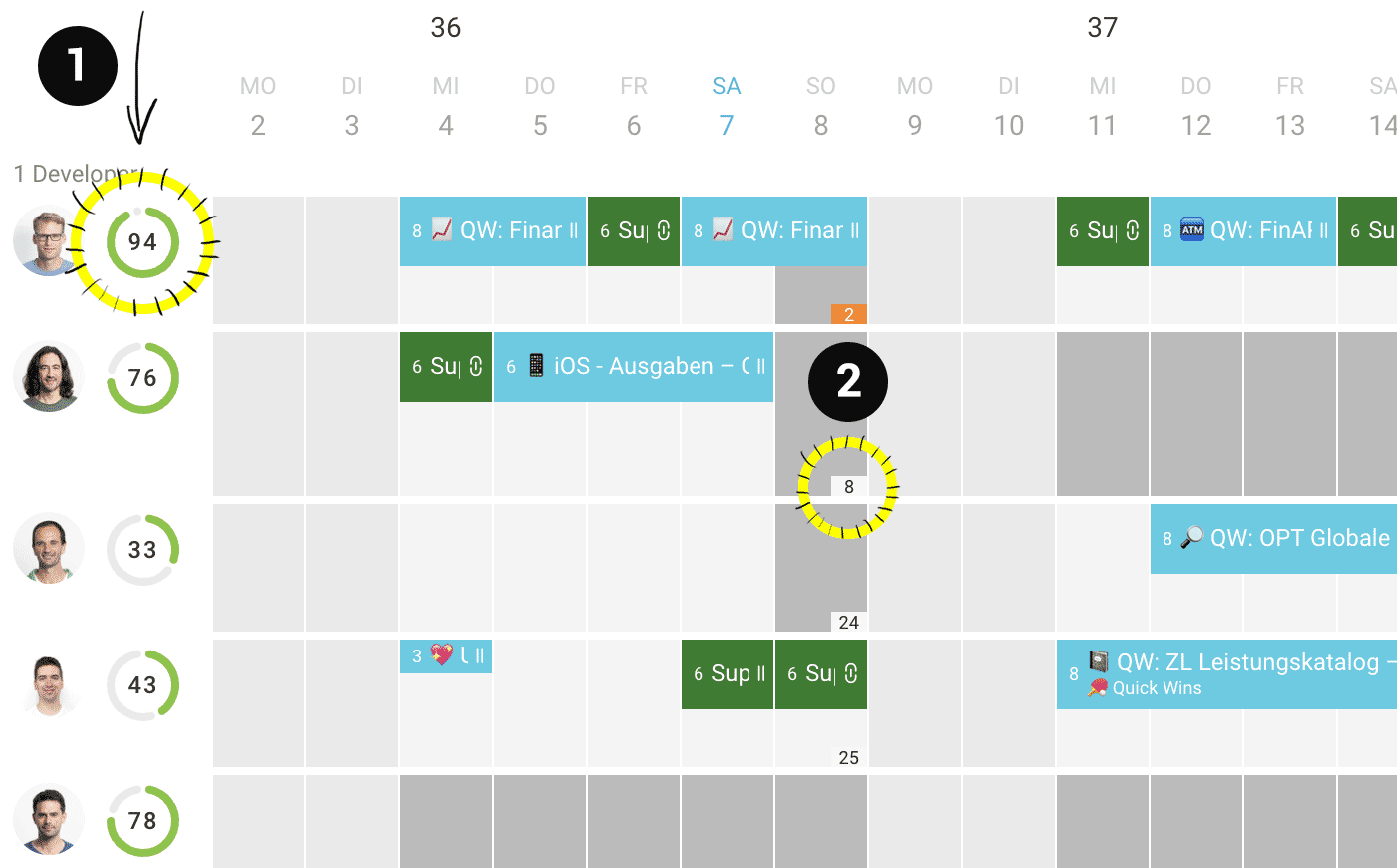
MOCO helps you with a view of the workload per person. Directly in the planning, the overview provides quick information on current workload and remaining capacities.
👉 Live display: Workload for the next 4 weeks (1) or the next week.
👉 Remaining hours: Difference between target and planned hours per week (2) or per day.
 (English image not yet available)
Example: A project was originally planned with 50 hours. After two weeks, you realise that only a fraction of the time has actually been worked. Now it's time to take corrective action – whether through reprioritisation, rebooking, or replanning.
4. Regularly Review and Adjust
Resource planning is not a one-time exercise. Those who take the time every week or every two weeks to align the plan with reality save a lot of effort in the long run.
Important questions during the review:
👉 Which projects are running as planned?
👉 Where are there delays?
👉 Which projects have had little time booked?
👉 Who is over- or underutilised?
With these insights, you can act in time – instead of only reacting when the damage has already occurred.
Proactively Plan Leads
Many companies only plan leads once the contract is signed. It's better to create a placeholder in the resource planning early on.
This brings several advantages:
👉 You can identify potential bottlenecks early.
👉 Your sales team can immediately see which start dates and deadlines are realistic.
👉 Once the contract is awarded, you can directly incorporate the plan.
In practice:
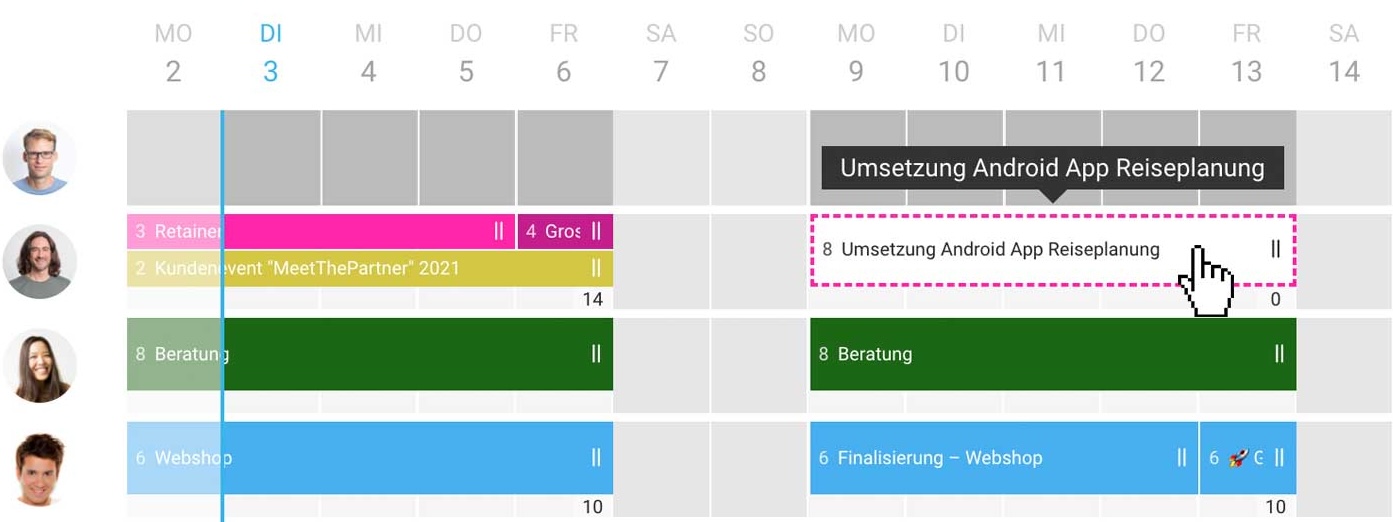
Leads differ from projects in MOCO capacity planning by the reduced, dashed-coloured border.
Leads differ from projects in MOCO capacity planning by the reduced, dashed-coloured border.
Once a lead is won, you create one or more projects from it and can change the planned assignment to the project.
 (English image not yet available)
(English image not yet available)Smart Use of Preliminary Planning
Especially when projects are to be planned without much being clear, you can take advantage of the option of preliminary planning.
Typical scenario:
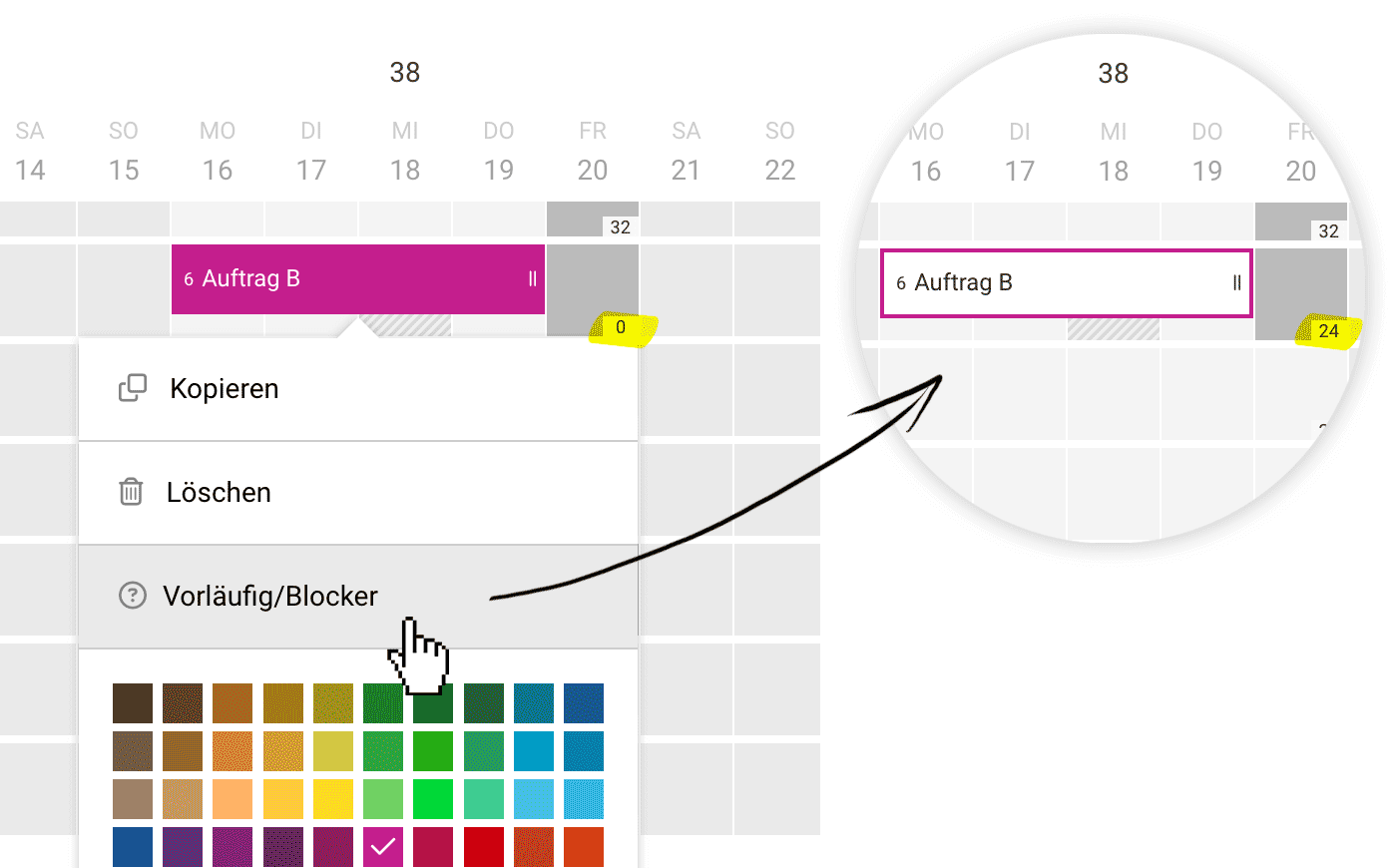
A project is essentially set, but you don't yet know which employees will take it on. In this case, you can mark the entry as "preliminary." The blocker makes the project tangible in the planning – but does not yet reduce the available capacities of the person. This way, the entry can later be easily moved to another person in the team, and the "Preliminary" status can be removed. You can recognise preliminary blockers by the solid border.
 (English image not yet available)
A project is essentially set, but you don't yet know which employees will take it on. In this case, you can mark the entry as "preliminary." The blocker makes the project tangible in the planning – but does not yet reduce the available capacities of the person. This way, the entry can later be easily moved to another person in the team, and the "Preliminary" status can be removed. You can recognise preliminary blockers by the solid border.
(English image not yet available)Efficient Use of the Interface
Your resource planning stands and falls with an interface that makes all important information quickly accessible. MOCO helps you with thoughtful navigation and smart filters.
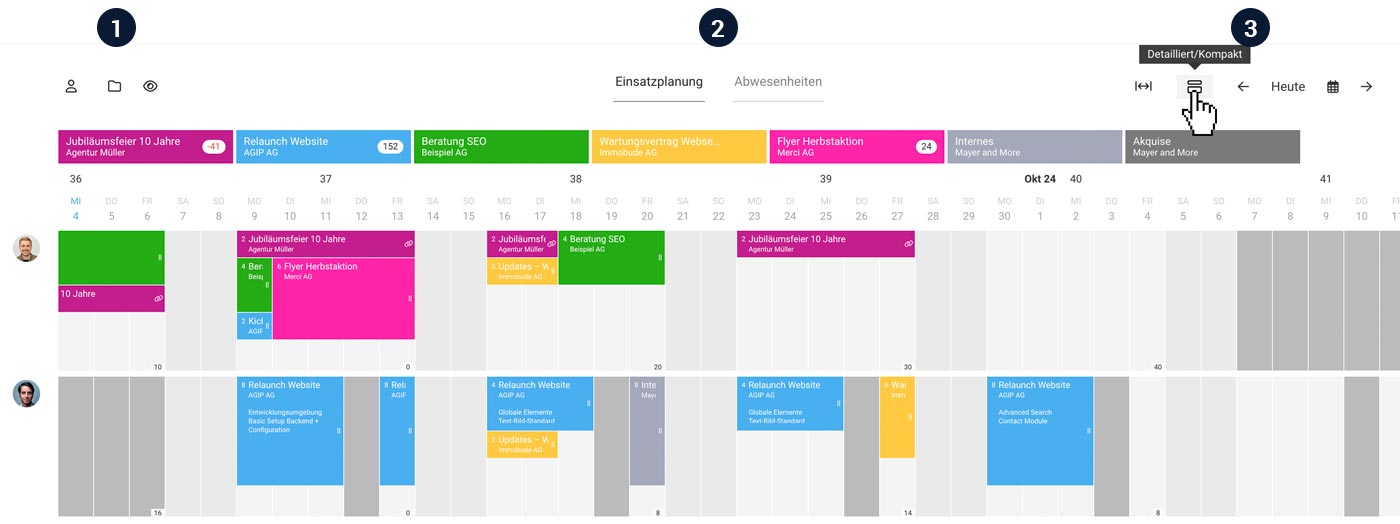
(1) Select Teams and Project Favourites
Use the person and project icon to select which teams, people, and project favourites are displayed in the planning. With project favourites, you can directly see how many unplanned hours per project are still available.
Use the person and project icon to select which teams, people, and project favourites are displayed in the planning. With project favourites, you can directly see how many unplanned hours per project are still available.
Use the eye icon to show or hide your project favourites. This is useful if you want to keep an eye on many project favourites via the bar – but then focus on the lower part when planning.
(2) Switch Between Planning and Absences
With one click, you switch from the planning view directly to absence management. Here you can overview holidays or other absences across the entire company.
With one click, you switch from the planning view directly to absence management. Here you can overview holidays or other absences across the entire company.
(3) Month, Week, and Detail View
Use the month/week and compact/detailed options to set how much detail you want to see. The month view is particularly good for a rough overview, while the zoom options provide more detailed information on remaining hours per day, performance, and descriptions.
Tip: With the keyboard shortcut Q, you can reduce the view to your own planning. Another click shows all projects again.
If you only want to see a specific project, click on the project favourite or directly on an entry while holding down the Alt key.
 (English image not yet available)
If you only want to see a specific project, click on the project favourite or directly on an entry while holding down the Alt key.
(English image not yet available)Planned vs. Actual – Creating Transparency
A good plan only becomes valuable when you compare it with reality. MOCO compares the planning with what was actually done – or recorded via time tracking.
Examples:
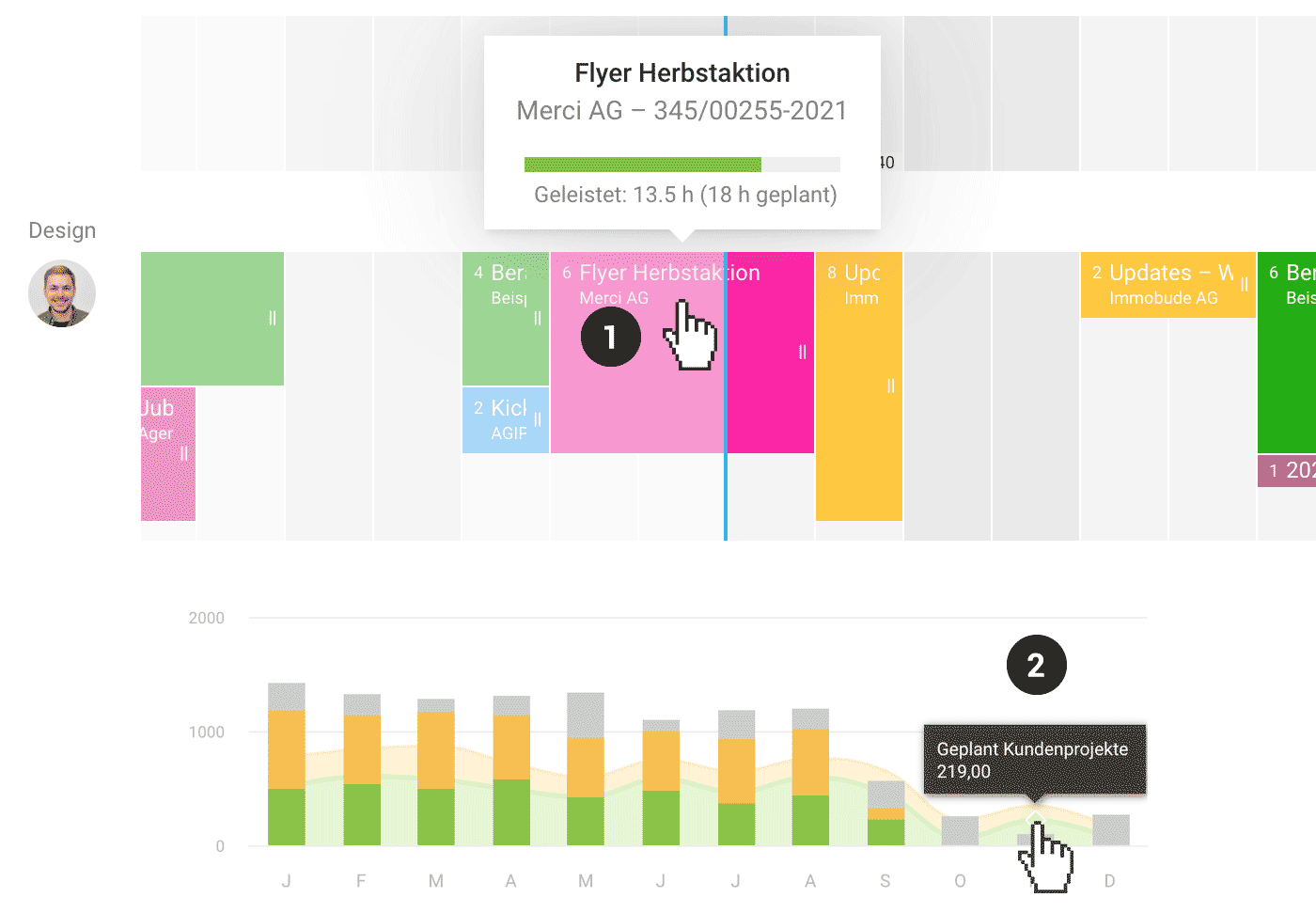
👉 When hovering over a past planning entry (1) MOCO shows you how many hours were recorded via time tracking.
👉 In various reports, such as the personal or project report, you can compare how many hours were planned monthly and how many were actually worked (2).
Especially in growing teams, this comparison is an important lever to learn from experience and plan more realistically.
 (English image not yet available)
(English image not yet available)Conclusion
A well-thought-out resource planning workflow is more than just an administrative task. It is your strategic tool to successfully implement projects, retain your team long-term, and avoid unnecessary costs.
Whether rough long-term planning, detailed short-term planning, or regular adjustments – every step contributes to the reliability of your company.
MOCO supports you in implementing this workflow as intuitively as possible. This leaves more time for what matters: successful projects and satisfied clients.
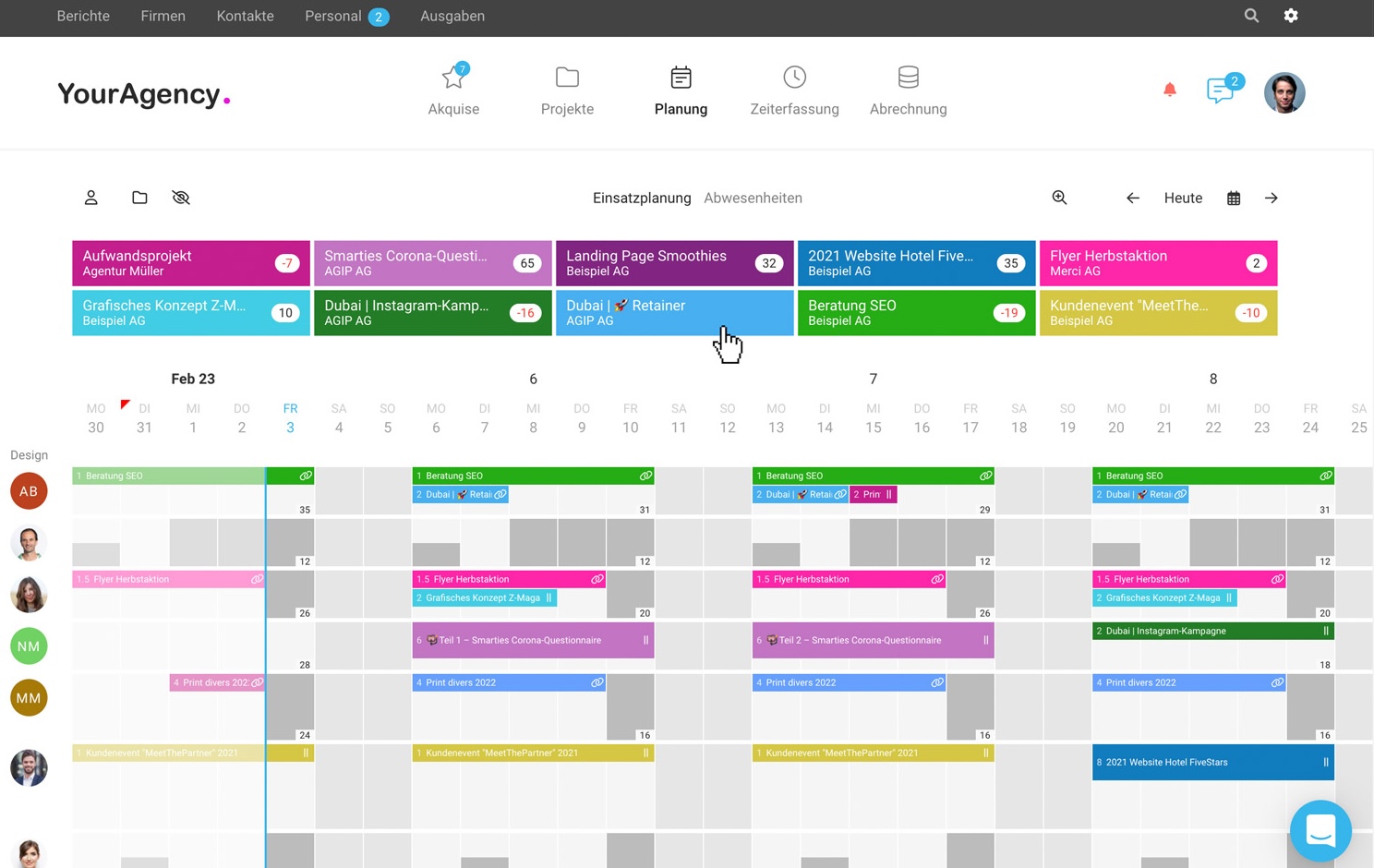
Want a deeper insight into MOCO resource planning? In this video, we present the features and possibilities of capacity planning in more detail.
 (English image not yet available)
Want a deeper insight into MOCO resource planning? In this video, we present the features and possibilities of capacity planning in more detail.
(English image not yet available)







