
-------

MOCO + Banana (CH)
Digital accounting for sole traders and small businesses.
MOCO focuses on project business and offers simple accounting preparation that doesn't burden your everyday work. Easily transfer invoice data directly to Banana.
Benefits and Integration Information
Save time, stay organised, and effortlessly transfer outgoing and incoming invoice data into your accounts
- Simple copy-paste of prepared data
- Fewer errors & save effort/costs
No need to manually enter each invoice for accounting. This reduces errors and saves effort and costs. - Exported invoices are automatically locked
- Easy synchronous management of accounting and MOCO
No duplicate invoices, none forgotten. - Documents remain with the company
CSV Export
With the file interface, invoice data can be exported in the appropriate format for Banana. This means the export has been tailored for Banana (Excel-like).
Cash Basis
Since small businesses typically handle accounting on a cash basis, this integration is optimised for that scenario. Cash basis means: Revenue is accounted for on the payment date, which also affects tax assessment.
Incoming and outgoing invoices in the account currency (CHF) are considered. Foreign currencies are not covered and must be handled manually as before.
Cash Basis
Since small businesses typically handle accounting on a cash basis, this integration is optimised for that scenario. Cash basis means: Revenue is accounted for on the payment date, which also affects tax assessment.
Incoming and outgoing invoices in the account currency (CHF) are considered. Foreign currencies are not covered and must be handled manually as before.
Setup & Workflow
Setup
Since the focus is on cash basis, in the accounting settings (Settings > Accounting > General), instead of debtor and creditor numbers (or accounts), the bank account is recorded. Debtor and creditor numbers are irrelevant.
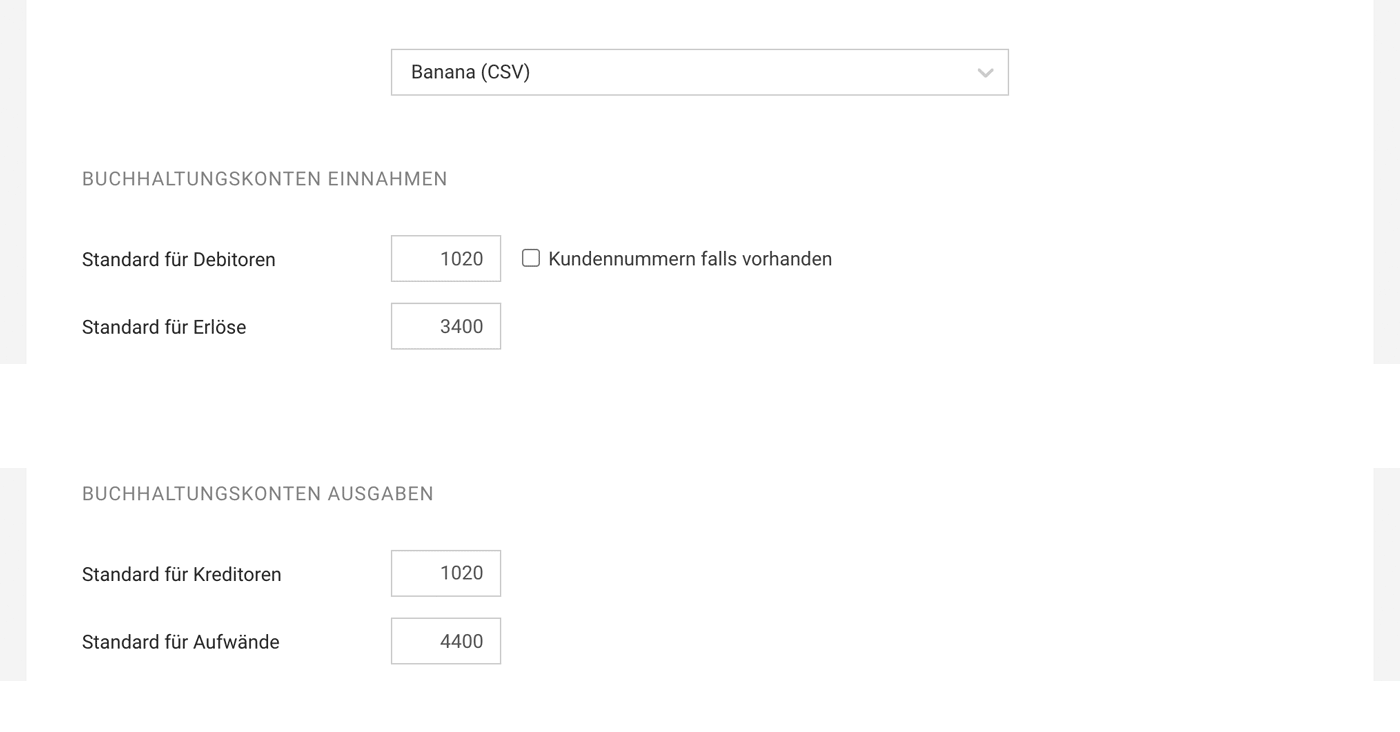 (English image not yet available)
ACCOUNTING ACCOUNTS INCOME
(English image not yet available)ACCOUNTING ACCOUNTS INCOME
Standard Debtors: 1020 (Swiss SME chart of accounts)
Standard Revenue: 3400 (Service revenue)
ACCOUNTING ACCOUNTS EXPENDITURES
Standard for Creditors: 1020 (Swiss SME chart of accounts)
Standard Expenses: 4400 (Expenses for services received)
Select Invoices and Create Export
1. Select Paid Invoices
Go to Invoicing or Expenditures under "Payments". Select the month or desired payments and click on the "Accounting" action at the bottom left. You will then be directed to the filtered accounting view.
2. Create Accounting Export
In the filtered accounting view, create the export via the green button at the bottom right
3. Download Entries
Download CSV (= entries) and documents.
Go to Invoicing or Expenditures under "Payments". Select the month or desired payments and click on the "Accounting" action at the bottom left. You will then be directed to the filtered accounting view.
2. Create Accounting Export
In the filtered accounting view, create the export via the green button at the bottom right
3. Download Entries
Download CSV (= entries) and documents.
Do It Yourself
4. Open in Excel (table format)
5. Copy-paste entries into Banana under “Entries”
6. Store the downloadable documents (files) from the accounting export in parallel.
With an Accountant
If you prefer not to deal with accounting, work with an accountant who can handle this part for you. In this case, provide your accountant with the downloaded CSV and documents for further processing and document storage.
Looking for support? The Zahlenmacher accounting office already assists MOCO clients and would be happy to help you.
Further Information
About Banana
Banana is a Swiss accounting software by Banana.ch SA based in Lugano and has been known in the market since 1990. The Excel-like software is designed for small businesses and individuals. Therefore, Banana strives to make their software as simple and clear as possible.
Links
Youtube Tutorials: Banana Video Channel
More on MOCO Integration To the Banana Integration Page
Website To the Banana Website (banana.ch)
Reviews 4.5 out of 5 (49 reviews) on Galaxus
More on MOCO Integration To the Banana Integration Page
Website To the Banana Website (banana.ch)
Reviews 4.5 out of 5 (49 reviews) on Galaxus








