
-------

MOCO + Fritz!Box
Utilising Business Contacts for Telephone Systems
Business contacts (contacts, companies, employees) from MOCO can be directly used for telephone systems.
Setting Up the Connection
FRITZ!Box allows direct CardDAV server integrations.
 (English image not yet available)
Before you start: Activate the CardDAV access in MOCO under Settings -> Extensions -> CardDAV.
1. Go to Telephony
2. Select Phonebook
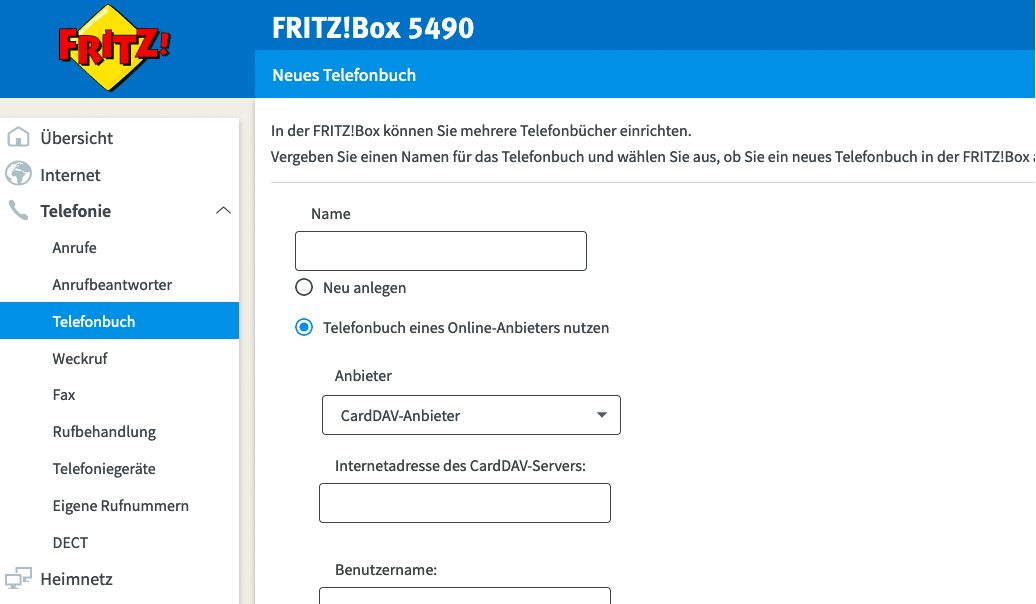
3. Choose New Phonebook (see illustration)
4. Fill in the details. The CardDAV URL in this case is https://*myaddress*.mocoapp.com/carddav.
Important: Use your personal password for contact synchronisation from Profile > Integrations.
You might also need to enter the longer version:
https://*myaddress*.mocoapp.com/carddav/principal or even https://*myaddress*.mocoapp.com/carddav/principal/addressbook
https://github.com/carlos22/carddav2fb
(English image not yet available)Before you start: Activate the CardDAV access in MOCO under Settings -> Extensions -> CardDAV.
1. Go to Telephony
2. Select Phonebook
3. Choose New Phonebook (see illustration)
4. Fill in the details. The CardDAV URL in this case is https://*myaddress*.mocoapp.com/carddav.
Important: Use your personal password for contact synchronisation from Profile > Integrations.
You might also need to enter the longer version:
https://*myaddress*.mocoapp.com/carddav/principal or even https://*myaddress*.mocoapp.com/carddav/principal/addressbook
https://github.com/carlos22/carddav2fb








