
-------

MOCO + Jira
Combine MOCO’s Business Focus with Jira Tasks & Tickets
Jira is a task management tool that’s particularly popular with developers and agile teams. Together with MOCO, it’s a great fit. There are several integration options:
1. Integration via the MOCO Browser Extension
From MOCO
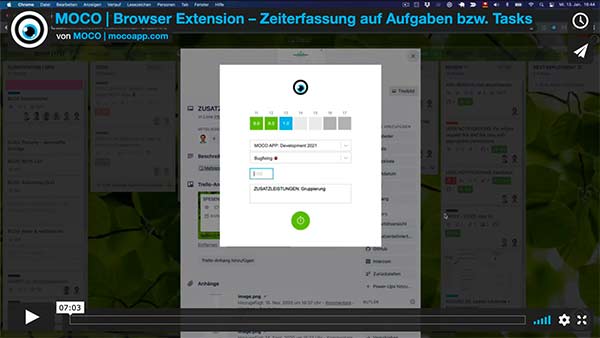
With the MOCO extension, you can log time in MOCO directly while working in Jira—on issues, in the Kanban board, and in the overview—without switching to MOCO. The ticket ID is also included in the timesheet (csv/xlsx).
Set Up the Connection
» In the video, Tobias shows an example setup from 1:00
 (English image not yet available)
Note on Permissions and Data Protection
Because the MOCO browser extension needs to integrate into various pages, certain permissions are required. We only read the times entered in MOCO, and we only send the information to MOCO that’s required to create time entries. We do not collect or use any other data. For transparency, we’ve published the code from the start: https://github.com/hundertzehn/mocoapp-browser-extension
(English image not yet available)Note on Permissions and Data Protection
Because the MOCO browser extension needs to integrate into various pages, certain permissions are required. We only read the times entered in MOCO, and we only send the information to MOCO that’s required to create time entries. We do not collect or use any other data. For transparency, we’ve published the code from the start: https://github.com/hundertzehn/mocoapp-browser-extension
Self-Hosted Jira
For self-hosted Jira, you can adjust the endpoint in the extension settings. The extension itself is open source, so it could also be built yourself as an alternative.
 (English image not yet available)
(English image not yet available)2. Jira → MOCO Worklog Synchronisation
From Mindset.Swiss
This workflow, created for the self-hosted version, automatically synchronises all newly created or updated worklogs from Jira with MOCO’s time tracking system every day. Mindset.Swiss developed the n8n solution and provides you with the workflow JSON.
How It Works at a Glance:
1. A daily trigger (midnight) starts the workflow.
2. Updated worklogs from the last 15 days are retrieved from Jira.
3. For each worklog, additional issue details (type, description, author, etc.) are fetched from Jira.
4. At the same time, existing MOCO activities with remote_id = Jira worklog ID are retrieved.
5. Both data sources (Jira + MOCO) are merged and analysed: Is there already an entry in MOCO? → Update. If there isn’t an entry → Create a new one in MOCO.
6. If there is no MOCO service yet for the worklog author, one is created automatically.
7. Finally, the activity for the Jira issue in MOCO is created or updated with the following details: project assignment, comment, date, time spent, and remote link.
Mindset.Swiss will send you the workflow JSON if you get in touch via the contact form and mention "Jira → MOCO Worklog Synchronisation".
This workflow, created for the self-hosted version, automatically synchronises all newly created or updated worklogs from Jira with MOCO’s time tracking system every day. Mindset.Swiss developed the n8n solution and provides you with the workflow JSON.
How It Works at a Glance:
1. A daily trigger (midnight) starts the workflow.
2. Updated worklogs from the last 15 days are retrieved from Jira.
3. For each worklog, additional issue details (type, description, author, etc.) are fetched from Jira.
4. At the same time, existing MOCO activities with remote_id = Jira worklog ID are retrieved.
5. Both data sources (Jira + MOCO) are merged and analysed: Is there already an entry in MOCO? → Update. If there isn’t an entry → Create a new one in MOCO.
6. If there is no MOCO service yet for the worklog author, one is created automatically.
7. Finally, the activity for the Jira issue in MOCO is created or updated with the following details: project assignment, comment, date, time spent, and remote link.
Mindset.Swiss will send you the workflow JSON if you get in touch via the contact form and mention "Jira → MOCO Worklog Synchronisation".
3. Jira Plugin for MOCO
From move:elevator
With the Jira plugin, you can log time directly in Jira. It is then automatically added to MOCO.
With the Jira plugin, you can log time directly in Jira. It is then automatically added to MOCO.
- You define the MOCO service once at project, epic, or ticket level. All subordinate tickets inherit it.
- Each entry arrives in MOCO with ticket number, ticket title, and comment.
- In the ticket, you can see which times have been transferred. If a service is locked or already billed, you’ll see a note.
- Jira indicates when a ticket is assigned to someone who is marked as on leave in MOCO.
Each person stores their own MOCO API key. Time is logged with the permissions they have in MOCO. Only times created after setup are transferred.
The plugin is paid and is available on request from move:elevator.








