Alter News-Artikel!
» Hier geht's zur aktuellen Online-Hilfe
Article from
Batch Action for Payment Recording.
Just like with outgoing invoices, you can now mark multiple expenditures as paid with a single click.
Select the relevant expenditures and click on "Record Payment" at the bottom (see illustration). After confirming with "OK", the payment will be recorded on the chosen date and the expenditures will be marked as paid.
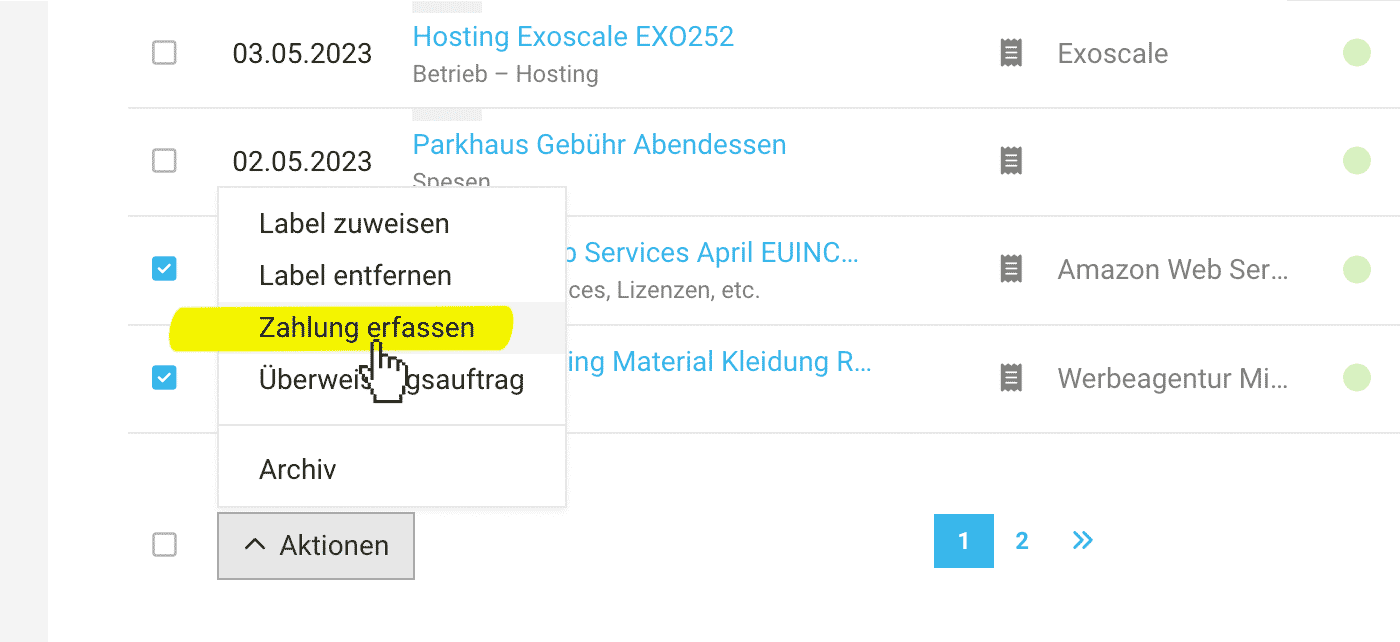 (English image not yet available)
This option can be used, for example, when
- Personal expenses are not settled via the transfer order from MOCO and are manually marked as paid.
- When payment recording is done in another system and you simply want to pragmatically and quickly record payments to reflect cash flow.
Important Note: For expenditures not in the account currency, amounts will be converted to the account currency and the payment will be recorded in the account currency.








