Alter News-Artikel!
» Hier geht's zur aktuellen Online-Hilfe
Article from
Quick Wins: Various Feature and UX Optimisations, Zapier Updates.
 (English image not yet available)
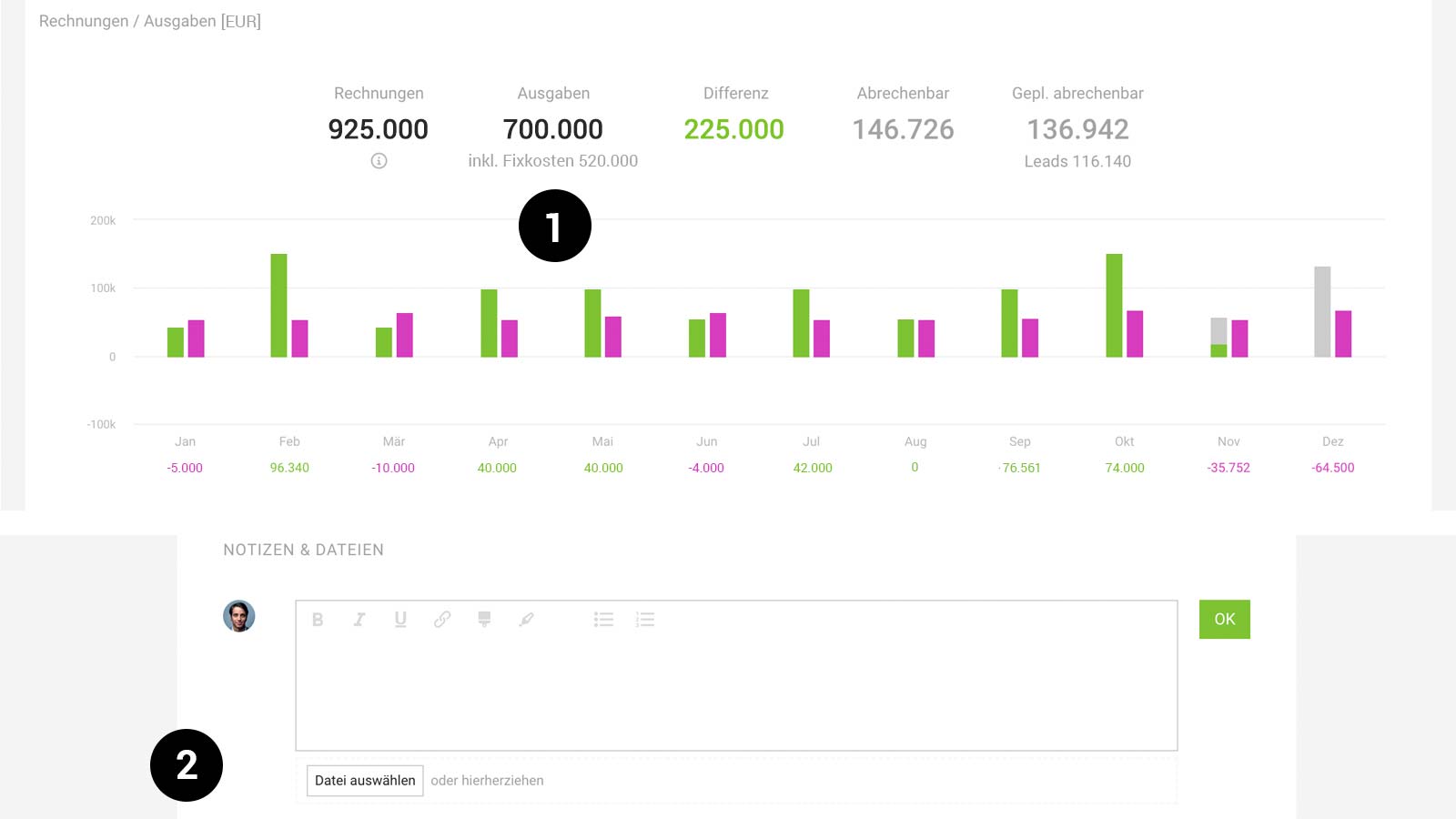
Display of Fixed Costs in Financial Report "Invoices/Expenditures" (1)
The financial report "Invoices/Expenditures" now includes fixed costs (typically rent and salaries) in total and monthly expenditures. As the net amount is considered here, tax can now also be specified for fixed costs if needed.
Smoother Document Creation and Storage
To prevent the view from "jumping unpleasantly," MOCO displays a placeholder (skeleton) when creating and saving a document, such as a proposal or an invoice.
Drag & Drop for "Notes & Files" (2)
Wherever the "Notes & Files" section is available, you can now drag and drop files into the field without adding a comment.
Copy Predefined Additional Services
Predefined additional services under "Services" in settings can now be copied.
Notification of Discrepant Payment Amounts during CAMT Reconciliation
During CAMT reconciliation, MOCO now actively notifies you if the gross invoice amount and payment amount differ significantly in a match. Assuming it is a partial payment, MOCO suggests "Partially Paid" as the status. Users can easily change this to "Paid."
Optimised Contact Display
Former staff (deactivated) are no longer displayed under contacts.
Minor UX Optimisations
Traceability in Leave Account
The leave account now also shows the person who credited the leave balance. For all existing entries, the account owner has been set.
Faster Invoice Dispatch
Previously, MOCO displayed a popup with a small animation for confirmation when sending an invoice. As this could cause delays, it has been changed to a short message (toast) that does not block the process.
Time Tracking Settings Split
As the settings have become more extensive, the settings under "Settings" > "Time Tracking" have been sensibly divided into two tabs. This new division not only supports readability but also helps better categorise the settings.
Quickly Display All Additional Services for Next Month
In the central list of additional services (Projects > Additional Services), you can now quickly display the additional services for the next month. Select the new quick selection for the next month alongside "All + Recurring."
Scrolling Optimised in Expenditure
In the expenditure form, the document view remains at the top during scrolling, making it easier to make/correct entries below.
Colour Change in Time Tracking
The colour in time tracking has changed from blue to black, allowing the blue colour to be used more selectively.
New Filter under Payments
This is the next step for upcoming expansions of payment types or accounts.
Display of Purpose in Automatic Payment Reconciliation
For automatically recorded payments (bank reconciliation or camt), the purpose is displayed via an "i" symbol, aiding traceability.
Lead Sorting by Due Date
Leads within acquisition stages are now sorted by due date instead of alphabetically.
The leave account now also shows the person who credited the leave balance. For all existing entries, the account owner has been set.
Faster Invoice Dispatch
Previously, MOCO displayed a popup with a small animation for confirmation when sending an invoice. As this could cause delays, it has been changed to a short message (toast) that does not block the process.
Time Tracking Settings Split
As the settings have become more extensive, the settings under "Settings" > "Time Tracking" have been sensibly divided into two tabs. This new division not only supports readability but also helps better categorise the settings.
Quickly Display All Additional Services for Next Month
In the central list of additional services (Projects > Additional Services), you can now quickly display the additional services for the next month. Select the new quick selection for the next month alongside "All + Recurring."
Scrolling Optimised in Expenditure
In the expenditure form, the document view remains at the top during scrolling, making it easier to make/correct entries below.
Colour Change in Time Tracking
The colour in time tracking has changed from blue to black, allowing the blue colour to be used more selectively.
New Filter under Payments
This is the next step for upcoming expansions of payment types or accounts.
Display of Purpose in Automatic Payment Reconciliation
For automatically recorded payments (bank reconciliation or camt), the purpose is displayed via an "i" symbol, aiding traceability.
Lead Sorting by Due Date
Leads within acquisition stages are now sorted by due date instead of alphabetically.
Zapier Updates
New Triggers
- Updated Company
- Updated Contact Person
- Holiday request approved
New Fields
- Expenditures (Action Create expense) has been supplemented with, e.g., "within budget."








